
Steps Involved:
- Open SharePoint 2010 Management Shell by going to Start | All Programs | SharePoint | Microsoft SharePoint 2010 Products | SharePoint 2010 Management Shell (Run as Administrator).
- Run the following script.
Powershell Script:
## Get the specified view schema for the specified SharePoint 2010 list using web service in powershell
$uri="http://serverName:10736/sites/ECT/_vti_bin/Views.asmx?wsdl"
[String]$listName="List"

[String]$viewName="D959C5C0-93AF-443B-8446-5011883094E3"
## Web Service Reference - http://Site/_vti_bin/Views.asmx
$viewsWebServiceReference = New-WebServiceProxy -Uri $uri -UseDefaultCredential
[System.Xml.XmlNode]$xmlNode=$viewsWebServiceReference.GetView($listName,$viewName)
$xmlNode
## To get the view schema
Write-Host -ForegroundColor Magenta "Displaying the view schema............"
$xmlNode.OuterXml
Output: $xmlNode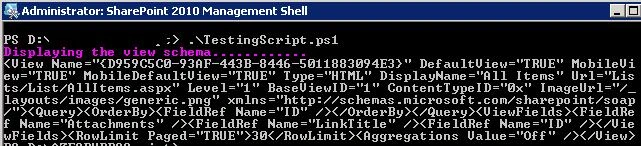
Output: $xmlNode.Outerxml
 <View Name="{D959C5C0-93AF-443B-8446-5011883094E3}" DefaultView="TRUE" MobileView="TRUE" MobileDefaultView="TRUE" Type="HTML" DisplayName="All Items" Url="Lists/List/AllItems.aspx" Level="1" BaseViewID="1" ContentTypeID="0x" ImageUrl="/_layouts/images/generic.png" xmlns="http://schemas.microsoft.com/sharepoint/soap/">- <Query>
- <OrderBy>
  <FieldRef Name="ID" />

  </OrderBy>


  </Query>


- <ViewFields>
  <FieldRef Name="Attachments" />

  <FieldRef Name="LinkTitle" />

  <FieldRef Name="ID" />

  </ViewFields>


  <RowLimit Paged="TRUE">30</RowLimit>

  <Aggregations Value="Off" />

  </View>

Join the conversation! Your thoughts help the community grow.