
Introduction
In this blog, we will discuss how to work with SQL GROUP BY, WHERE, and HAVING clauses in SQL and explain the concept with an example in a simple way. I hope this is very useful for beginners and intermediates to help them understand the basic concept.
The Group by clause is often used to arrange identical duplicate data into groups with a select statement to group the result-set by one or more columns. This clause works with the select specific list of items, and we can use HAVING, and ORDER BY clauses. Group by clause always works with an aggregate function like MAX, MIN, SUM, AVG, COUNT.
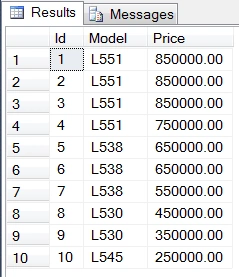
Let us discuss group by clause with an example. We have a VehicleProduction table and there are some models with a price and it has some duplicate data. We want to categorize this data in a different group with a respective total price.
Example
Create table VehicleProduction
(
Id int primary key Identity,
Model varchar(50),
Price money
)

Insert into VehicleProduction values('L551', 850000),('L551', 850000),('L551', 850000),('L551', 750000),
('L538', 650000),('L538', 650000),('L538', 550000),('L530', 450000),('L530',350000), ('L545', 250000)

Select * from VehicleProduction
Output
SQL Aggregate Functions
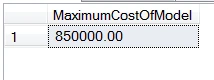
MAX()- function returns the maximum value of the numeric column of specified criteria.
Example
Select max(Price) As 'MaximumCostOfModel' from VehicleProductionOutput
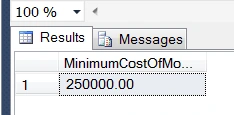
MIN()- function returns the minimum of the numeric column of specified criteria.
Example
Select Min(Price) As 'MinimumCostOfModel' from VehicleProductionOutput
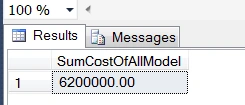
SUM()- function returns the total sum of a numeric column of specified criteria.
Example
Select SUM(Price) As 'SumCostOfAllModel' from VehicleProductionOutput
AVG()- function returns the average value of a numeric column of specified criteria.
Example
Select AVG(Price) As 'AverageCostOfModel' from VehicleProductionOutput
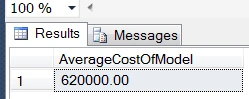
COUNT()- function returns the number of rows that match specified criteria.
Example
Select Count(Price) As 'TotalVehicleModels' from VehicleProductionOutput
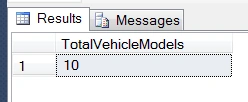
SQL Distinct clause
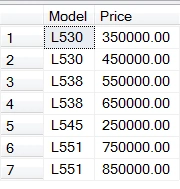
The distinct clause is used to filter unique records out of the duplicate records that satisfy the query criteria.
Example
Select Distinct(Model), Price from VehicleProductionOutput
SQL Group by clause
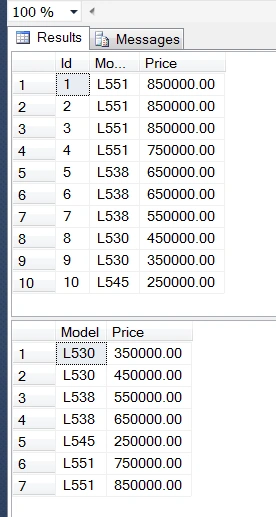
The Group by clause is often used to arrange the identical duplicate data into groups with the select statement. This clause works with the select specific list of items, for that we can use HAVING, and ORDER BY clauses.
Syntax
SELECT Column1, Column2
FROM TableName
GROUP BY Column1, Column2
Example
Select * from VehicleProduction

Select Model, Price from VehicleProduction
group by Model, Price
Output
Let’s look at an example of a GROUP BY with aggregate functions.
SQL GROUP BY with aggregate functions
Example
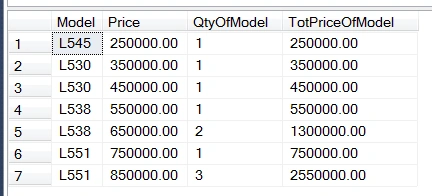
Select Model, Price, Count(*) As QtyOfModel, Sum(Price) As TotPriceOfModel from VehicleProduction
group by Model, Price
Output
SQL Where clause
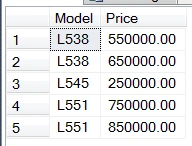
Where clause works with select clause but won’t work on the group by or aggregate function condition.
Example 1
Select Model, Price from VehicleProduction
where Model != 'L530'
group by Model, Price
Output
Example 2
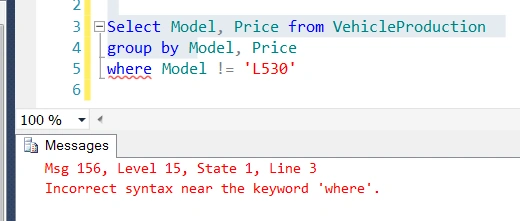
We can’t use where clause after group by clause
Select Model, Price from VehicleProduction
group by Model, Price
where Model != 'L530'
Output
SQL Having clause
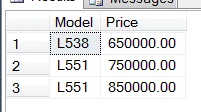
Having clause works with a group by clause but specifically works on aggregate function condition.
Example
Select Model, Price from VehicleProduction
Group by Model, Price
Having SUM(Price)  > 600000.00
Output
SQL ORDER BY clause
Order By clause shows the records in ascending or descending order of the specific condition.
Example
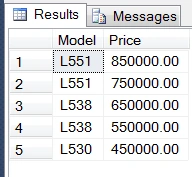
Select Model, Price from VehicleProduction
Group by Model, Price
Having SUM(Price)  > 400000.00
order by Price desc
Output
Summary
I hope you understand the concept, please post your feedback, questions, or comments about this blog and feel free to tell me the required changes in this write-up to improve the content quality.


Raj KumarPosted Aug 19, 2018, 10:27 PM EDT
Most Useful Query To Fetch Data.
Jignesh KumarTOP 100Posted Aug 18, 2018, 5:37 PM EDT
Nice atrticle short and sweet.
Muhammad Aqib ShehzadPosted Aug 18, 2018, 9:23 AM EDT
Simple and nice
Raj KumarPosted Aug 18, 2018, 4:26 AM EDT
This is simplest way to define all query.This query is very helpful.
Manikandan VengadasalamPosted Aug 18, 2018, 1:13 AM EDT
Nice Article Thanks for sharing
Shrimant TelgavePosted Aug 17, 2018, 11:32 PM EDT
Nice sharing..............keep it up.
Sushil SinghPosted Aug 17, 2018, 8:42 AM EDT
Is ever 'having' clause works as where clause? is yes then why 'where' clause is created if having clause also works as where clause.