
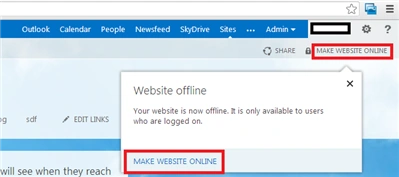
Steps for activating on public site from here:
- Navigate to the Office 365 admin center.
- Click Sites on the top link bar.
- Click Public site.
- Click MAKE WEBSITE ONLINE at the top right corner of the page.
Thanks for learning my blogs!!
In this blog i would like to share how to activate the anonymous access for public site in SharePoint 2013.
Steps for activating on public site from here:
Join the conversation! Your thoughts help the community grow.

Join to leave a comment
Members earn 10 SHARP for a comment, 10 SHARP for a reaction, and 250 SHARP for every blog they publish.
 DevSocialUpcoming · 3rd editionAI Agents ConferenceDec 1–3, 2026Live onlineFree to attend4days leftRegisterMembers onlyeBook · SharePointSharePoint Online And Office 365 AdministrationDownload now
Write a blog post and earn +250 SHARP when it is approved.
Write a blog
Vijay SPosted Jun 17, 2015, 5:06 AM EDT
Good one