
Introduction
A Document Set is a group of related documents that can be created in one step and then managed as a single entity.
Source Code
- $(document).ready(function() {
- getDocSet('Documents','Orders',success,logError);
- });
- function getDocSet(listTitle,docSetName, success,error) {
- var context = SP.ClientContext.get_current();
- var list = context.get_web().get_lists().getByTitle(listTitle);
- var items = list.getItems(createGetDocSetQuery(docSetName));
- context.load(items);
- context.executeQueryAsync(
- function() {
- var docSetItem = (items.get_count() > 0 ? items.getItemAtIndex(0) : null);
- success(docSetItem);
- },
- error
- );
- function createGetDocSetQuery(docSetName)
- {
- var query = new SP.CamlQuery();
- var viewXml =
- "<View>" +
- "<Query>" +
- "<Where>" +
- "<And>" +
- "<Eq>" +
- "<FieldRef Name=\"FSObjType\"/>" +
- "<Value Type=\"Integer\">1</Value>" +
- "</Eq>" +
- "<Eq>" +
- "<FieldRef Name=\"FileLeafRef\" />" +
- "<Value Type=\"Text\">" + docSetName + "</Value>" +
- "</Eq>" +
- "</And>" +
- "</Where>" +
- "</Query>" +
- "<RowLimit>1</RowLimit>" +
- "</View>";
- query.set_viewXml(viewXml);
- return query;
- }
- }
We need to activate it before we can create or configure new Document Set content types.
- Go to the top-level site in the site collection for which you want to enable Document Sets.
- Go to Site Actions menu-->click Site Settings.
- Now, go to Site Collection Administration - Site collection features.
- Find Document Sets in the list, and then click Activate.
Add Document Set as a Content Type to your Document Library
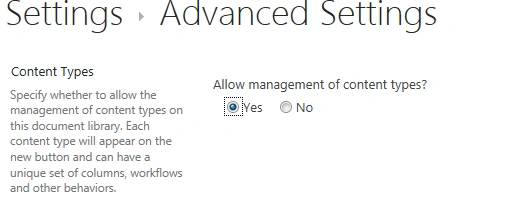
- Go to Document Settings and change the Advanced Settings to: Allow management of content types
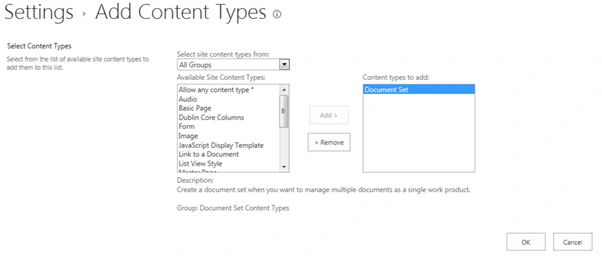
- Then, go to the Settings, add from existing site content types, and find the Document Set content type. Select Document Set and click Add:
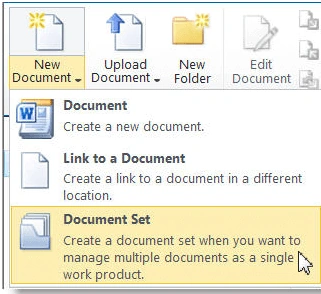
- Go to your Document library and select New Document -> Document Set from the drop-down list.
That's it. I hope you liked this blog.

Join the conversation! Your thoughts help the community grow.