
See how to enable Power Pivot in Microsoft Excel 2013 add - in. By default it's not enabled. Power Pivot is used to make data analysis in Microsoft Excel.
Follow these steps -
1. Start Microsoft Excel 2013
2. Go to File > Options > Add-Ins.
3. In the Manage box, click COM Add-ins> Go.
4. Check the Microsoft Office Power Pivot in Microsoft Excel 2013 box, and then click OK.
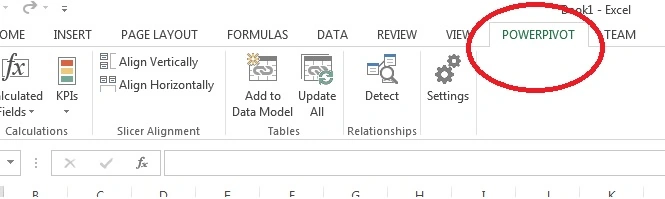
Figure 1


Hashim ShafiqPosted Aug 30, 2015, 5:39 PM EDT
nice
Yashwanth MuthineniPosted Aug 29, 2015, 1:46 AM EDT
Nice Share
Santhakumar MunuswamyPosted Aug 29, 2015, 1:24 AM EDT
Nice. Thanks for sharing
Gowtham KTOP 100Posted Aug 28, 2015, 9:32 AM EDT
Thanks for sharing
Mohammed IbrahimPosted Aug 28, 2015, 4:30 AM EDT
nice information
Karthikeyan KPosted Aug 28, 2015, 4:29 AM EDT
Informative sir..Thanks for share