
In this post, we will learn how to get all table record counts from the selected database. Here, we are using sys.objects and sys.partitions for getting the record count. Here, we are using join sys.objects with sys.partitions from sys.partitions, we can get row count of table and sys.objects will return the name of a schema (table name).
Here, we are setting the short name A for getting table name and short name B for getting row count. See the below query for getting record count. For this example, set the top 10 rows to get only 10 table names and record counts. See the below example query. Let's start coding.
- SELECT TOP 10 (SCHEMA_NAME(A.schema_id) + '.' + A.Name) AS TableName
- , SUM(B.rows) AS RecordCount
- FROM sys.objects A
- INNER JOIN sys.partitions B ON A.object_id = B.object_id
- WHERE A.type = 'U'
- GROUP BY A.schema_id, A.Name
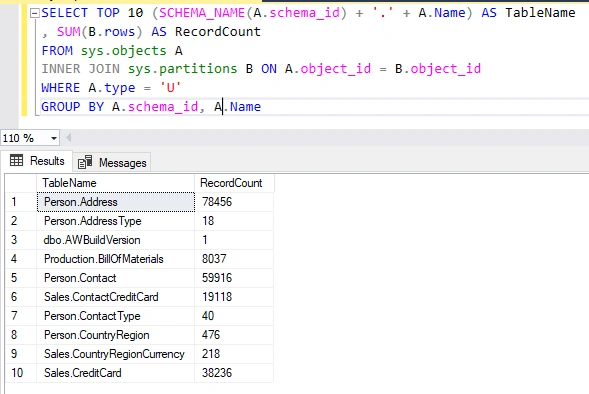
See the below result screenshot that returns the above query.
All tables' row count screenshot.


saiful islamPosted May 2, 2023, 2:45 AM EDT
Wrong answer
Jason OwensPosted Oct 13, 2022, 12:16 PM EDT
AND A.Name not like 'sys%'
Jason OwensPosted Oct 13, 2022, 12:15 PM EDT
And maybe include this in the WHERE clause :
Jason OwensPosted Oct 13, 2022, 12:15 PM EDT
Aliases A and B. Tut tut.
Debashish SarkarPosted May 28, 2021, 9:18 AM EDT
Thank you Hardik for the help.
Baparoutu VarmaPosted Dec 8, 2020, 9:44 PM EST
Nice blog. Thanks for sharing.I came across another blog which talk one more way doing same i.e SQL mangement studio. Sharing link: http://sforsuresh.in/getting-rows-count-for-each-table-in-database
Jignesh KumarTOP 100Posted Aug 15, 2018, 7:26 AM EDT
Nice article ..
Hadshana KamalanathanTOP 100Posted Jul 15, 2018, 9:26 AM EDT
Thank you for sharing