
I have a document library named “Shared Documents” which has the following folder structure.
- /Shared Documents
- /Shared Documents/Articles
- /Shared Documents/Articles/Screenshots
- /Shared Documents/Scripts
You can download setup files from the releases section of the PnP PowerShell repository.
Copy the below script and paste it in a notepad. Save the file as GetFolders.ps1. This script will loop through all the folders inside “Shared Documents” and folders inside the folder (subfolders).
- # Input Parameters
- $siteURL="https://c986.sharepoint.com/sites/dev"
- $folder="/Shared Documents"
- # Loop through to get all the folders and subfolders
- Function GetFolders($folderUrl)
- {
- $folderColl=Get-PnPFolderItem -FolderSiteRelativeUrl $folderUrl -ItemType Folder
- # Loop through the folders
- foreach($folder in $folderColl)
- {
- $newFolderURL= $folderUrl+"/"+$folder.Name
- write-host -ForegroundColor Green $folder.Name " - " $newFolderURL
- # Call the function to get the folders inside folder
- GetFolders($newFolderURL)
- }
- }
- # Connect to SharePoint Online site
- Connect-PnPOnline –Url $siteURL –Credentials (Get-Credential)
- # Call the functions
- GetFolders($folder)
Note: Updated the script as per the comments. bug fix - removed the break command.
Open PowerShell window and run the following command.
- >cd "<folderlocation>"
folderlocation – GetFolders.ps1 file location
Run the following command,
- >.\GetFolders.ps1
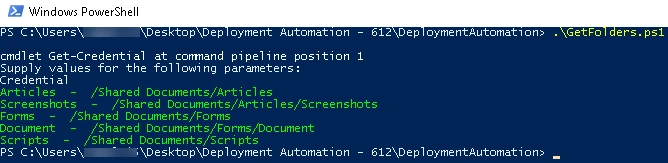
Reference - Get-PnPFolderItem
Thus in this blog, you saw how to get all the folders and subfolders from SharePoint Online Document Library using PnP PowerShell.


Just TecPosted Sep 30, 2021, 7:59 AM EDT
Thank You. Works well. I just wanted to get a script to list first level folders.
Hal SclaterPosted Jan 28, 2021, 6:27 AM EST
This will quickly hit the throttling limit in sharepoint online, if you try this for a large site. Also Get-PnPFolderItem -has a built in -recursive switch which is easier.
Russell SandersPosted Jan 6, 2021, 3:31 AM EST
This is great although you have mixed $folder and $folderUrl parameters I think? When I test it ignores the parameter and searches from the top of the site URL. I fixed this by replacing GetFolders($folderUrl) with Function GetFolders($folder) and PnPFolderItem -FolderSiteRelativeUrl $folderUrl -ItemType Folder with PnPFolderItem -FolderSiteRelativeUrl $folder -ItemType Folder
Naveen KumarPosted Aug 23, 2019, 8:46 AM EDT
$username = "3233232"$password = "2332XXX" $CSVpath=".\Input.csv" $cred = New-Object -TypeName System.Management.Automation.PSCredential -argumentlist $userName, $(convertto-securestring $Password -asplaintext -force) # Input Parameters $siteURL="https://aXXXXXom/sites/gecome" $folder="Documents/IT Department/IT" $outputReport="C:\Output.csv" # Loop through to get all the folders and subfolders $logdetails=@() Function GetFolders($folderUrl) { $folderColl=Get-PnPFolderItem -FolderSiteRelativeUrl $folderUrl -ItemType Folder if($folderColl.Count -eq 0) { # break; } else { # Loop through the folders foreach($folder in $folderColl) { $newFolderURL= $folderUrl+"/"+$folder.Name write-Host $newFolderURL $folderCollCount=Get-PnPFolderItem -FolderSiteRelativeUrl $newFolderURL -ItemType Folder $logData = New-Object PSObject $logData | Add-Member -MemberType NoteProperty -name "Name" -value $folder.Name $logData | Add-Member -MemberType NoteProperty -name "ItemCount" -value ($folder.ItemCount - $folderCollCount.Count) $logData | Add-Member -MemberType NoteProperty -name "Path" -value $newFolderURL # $folder.Name+","+($folder.ItemCount - $folderCollCount.Count)+","+$newFolderURL| Export-Csv $ExportFile -append $logdetails+=$logData $logData | Export-Csv $outputReport -append # Call the function to get the folders inside folder GetFolders($newFolderURL) } } } # Connect to SharePoint Online site Connect-PnPOnline –Url $siteURL –Credentials $cred # Call the functions GetFolders($folder) #$logdetails | Export-Csv $outputReport -NoType Pause
mauPosted Jan 23, 2019, 8:33 AM EST
Doesn't work below the first level. The recursivity fails.
sailendra kumarPosted Jan 14, 2019, 12:27 AM EST
How to get all the files inside these folders please help if you have ? Thanks for getting the folders
Linda SimPosted Nov 19, 2018, 10:31 PM EST
How to also include folders ownership and also export all the result to csv?
Luis DuranPosted Oct 25, 2018, 5:52 AM EDT
I've been pulling my hair out with a variant of this script as it is not getting all the folders. It is missing quite a few. When I run this script exactly, I get the same results. I can go to the sharepoint list and see all the folders and I am using the same credentials. I have looked over the code and it looks right but it is just not getting everything. Don't know why. EDIT: I just figured it out. It's in your code to break. When a folder is empty, it breaks out and doesn't go through the rest of the folders after it. Remove that break condition and it works properly!
Viknaraj ManogararajahTOP 100Posted Jul 19, 2018, 2:32 AM EDT
Nice Article...........