
Introduction
In this post we will discuss how to retrieve data from SQL server using Ajax and web service in asp.net.
Step 1
Create a database in the SQL server of your choice:
- CREATE TABLE [dbo].[Employee](
- [ID] [int] IDENTITY(1,1) NOT NULL,
- [Name] [nvarchar](50) NULL,
- [Position] [nvarchar](50) NULL,
- [Office] [nvarchar](50) NULL,
- [Age] [int] NULL,
- [Salary] [int] NULL,
- CONSTRAINT [PK_Employee] PRIMARY KEY CLUSTERED
- (
- [ID] ASC
- )WITH (PAD_INDEX = OFF, STATISTICS_NORECOMPUTE = OFF, IGNORE_DUP_KEY = OFF, ALLOW_ROW_LOCKS = ON, ALLOW_PAGE_LOCKS = ON) ON [PRIMARY]
- ) ON [PRIMARY]
- CREATE procedure [dbo].[spGetAllEmployee]
- as
- begin
- select ID,Name,Position,Office,Age,Salary from employee
- end
Step 2
Create an empty project in visual studio, give it a meaningful name and add connection webconfig file. Change data source and database name.
- <connectionStrings>
- <add name="DBCS" connectionString="data source=FARHAN\SQLEXPRESS; database=Demo; integrated security=true;"/>
- </connectionStrings>
Step 3
Create class in project -- right click, add new item, choose class, and give it a meaningful name.
- public class EmployeesRecord
- {
- public int ID { get; set; }
- public string Name { get; set; }
- public string Position { get; set; }
- public string Office { get; set; }
- public int Age { get; set; }
- public int Salary { get; set; }
- }
Step 4
Create web service in project; right click, add new item, choose web service.asmx, and give it a meaningful name.
Add namespace
using System.Data.SqlClient;
using System.Configuration;
using System.Web.Script.Serialization;
- [WebMethod]
- public void GetAllEmployee()
- {
- List<EmployeesRecord> employeelist = new List<EmployeesRecord>();
- string CS = ConfigurationManager.ConnectionStrings["DBCS"].ConnectionString;
- using (SqlConnection con=new SqlConnection(CS))
- {
- SqlCommand cmd = new SqlCommand("spGetAllEmployee", con);
- cmd.CommandType = CommandType.StoredProcedure;
- con.Open();
- SqlDataReader rdr = cmd.ExecuteReader();
- while (rdr.Read())
- {
- EmployeesRecord employee = new EmployeesRecord();
- employee.ID = Convert.ToInt32(rdr["ID"]);
- employee.Name = rdr["Name"].ToString();
- employee.Position = rdr["Position"].ToString();
- employee.Office = rdr["Office"].ToString();
- employee.Age = Convert.ToInt32(rdr["Age"]);
- employee.Salary= Convert.ToInt32(rdr["Salary"]);
- employeelist.Add(employee);
- }
- }
- JavaScriptSerializer js = new JavaScriptSerializer();
- Context.Response.Write(js.Serialize(employeelist));
- }
Step 5
Create web form in project; right click, add new item, choose web form, and give it a meaningful name.
Add script cdn link in head section:
- <link rel="stylesheet" href="https://maxcdn.bootstrapcdn.com/bootstrap/4.0.0/css/bootstrap.min.css">
- <script src="https://ajax.googleapis.com/ajax/libs/jquery/3.3.1/jquery.min.js"></script>
- <script src="https://maxcdn.bootstrapcdn.com/bootstrap/4.0.0/js/bootstrap.min.js"></script>
Write script to call web service to retrieve data from the SQL server:
- <script type="text/javascript">
- $(document).ready(function () {
- $.ajax({
- url: 'EmployeeService.asmx/GetAllEmployee',
- dataType: "json",
- method: 'post',
- success: function (data) {
- var employeeTable = $('#tblEmployee tbody');
- employeeTable.empty();
- $(data).each(function (index, emp) {
- employeeTable.append('<tr><td>' + emp.ID + '</td><td>'
- + emp.Name + '</td><td>' + emp.Position + '</td><td>' + emp.Office
- + '</td><td>' + emp.Age + '</td><td>' + emp.Salary + '</td></tr>');
- });
- },
- error: function (err) {
- alert(err);
- }
- });
- });
- </script>
Step 6
Design an html table to display data:
- <body>
- <form id="form1" runat="server">
- <div class="container">
- <h3 class="text-uppercase text-center">How to retrive data using ajax in asp.net</h3>
- <table id="tblEmployee" class="table table-bordered">
- <thead class="bg-primary text-white">
- <tr>
- <th>ID</th>
- <th>Name</th>
- <th>Position</th>
- <th>Office</th>
- <th>Age</th>
- <th>Salary</th>
- </tr>
- </thead>
- <tbody></tbody>
- </table>
- </div>
- </form>
- </body>
Run project ctr+F5
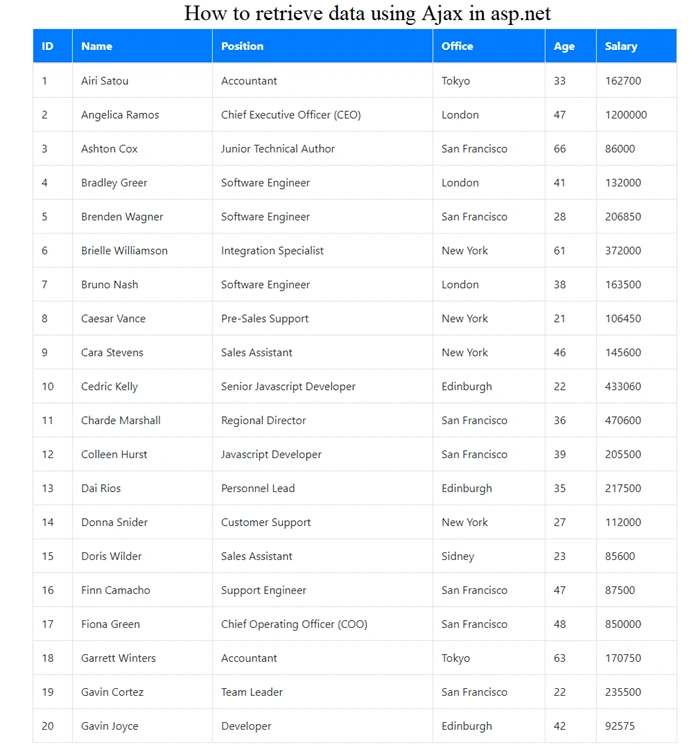
Final output


wasim hasanPosted Sep 18, 2020, 5:54 PM EDT
If I need to use parameter then how can I pass that from Jquery?
Subhasis TripathyPosted Aug 3, 2020, 7:38 AM EDT
I am using this logic inside the modal but it is not working, please help.
Afek PeretzPosted Jul 17, 2019, 12:14 AM EDT
Hey, Getting server Error (500), any idia why?
athulya shajiPosted Apr 25, 2019, 7:21 PM EDT
Hai !here the output is in a table format can we get results in textboxes ? Like if we select a name from the dropdown we get all details like contact details and adress of the selected person in two different text boxes .......Is there any solution please share.
Tushant RajpalPosted Apr 15, 2019, 1:56 AM EDT
Great work!. Working perfectly.
abhishek amanPosted Sep 13, 2018, 9:22 PM EDT
I want to make any of the tr to make link & popup modal , and get tr value into the modal .
Gajendra JangidPosted Mar 28, 2018, 1:30 AM EDT
Nice blog..................