
Today, while working on an application for ClickOnce deployment, I faced a small issue, which took almost a half an hour. My task was to associate a default icon to my Application. Thus, in order to do this, I went to my project properties and simply set the icon, as shown below: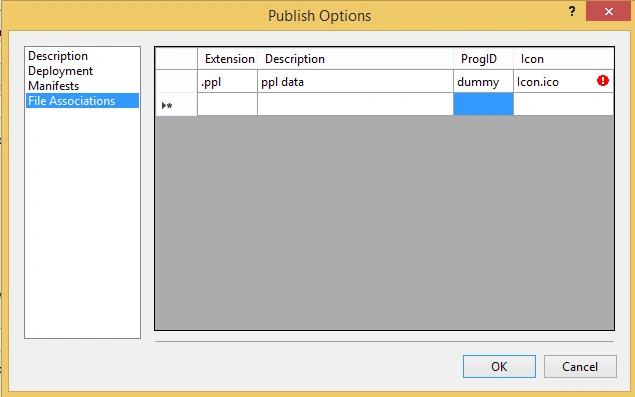
As you can see in the screenshot, shown above, it is showing an error icon which states: 'Icon file is not set to be published with the Application or is not a part of the required download group'.
Now, I built my Application and landended up with the error message, shown below, which is more clear: 
After hitting my head for many minutes, I thought, let's check out what is this 'download group'.
On surfing the net, I got the clue that download group is nothing but a collection of files, which are going to be a part of our publishing activity.
Thus, I quickly opened Application files dialog, using Project properties >> Publish. The Application files dialog looks like: 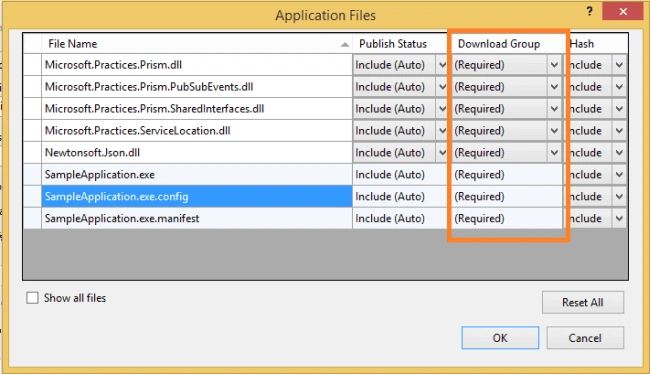
I noticed that my icon file is not listed above. Thus, I got an idea on what went wrong :)
I immediately changed "to build action" to 'Content' and forced it to 'Copy Always'. Guess what?
My error has gone :)
After fixing this issue, I realized, that it was very silly. As it wasted many minutes, I thought to add it to my repository, so that it can be useful for all others, who got stuck like me :(
Happy troubleshooting !!!
How To Troubleshoot The Icon File Association Issue In ClickOnce Deployment
In this article, you will learn how to troubleshoot the icon file association issue in clickonce deployment.


dega sureshPosted Nov 18, 2016, 2:23 AM EST
NiceBlog and Helpfull Shweta
Suthahar JegatheesanPosted Aug 23, 2016, 7:28 PM EDT
Nice blog
Vivek KumarPosted Aug 21, 2016, 12:48 PM EDT
Good one
Anu VPosted Aug 16, 2016, 8:52 PM EDT
Nice