
Step 1: For the Basic of RDLS report follow this link:
Step 2: Download the bar code font 3 of 9 from this site:
Step 3: Then go to your rdlc report page:
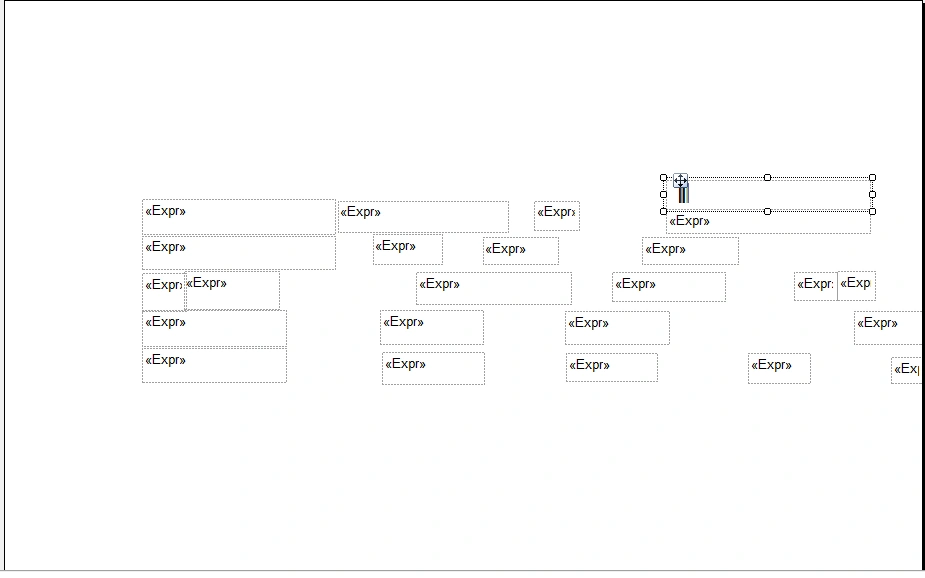
Step 4: Right click on the Expression(TextBox) which you want to make barcode->select->"TextBox Properties"

Step 5: Text Box Properties->Font->Select font type->ok
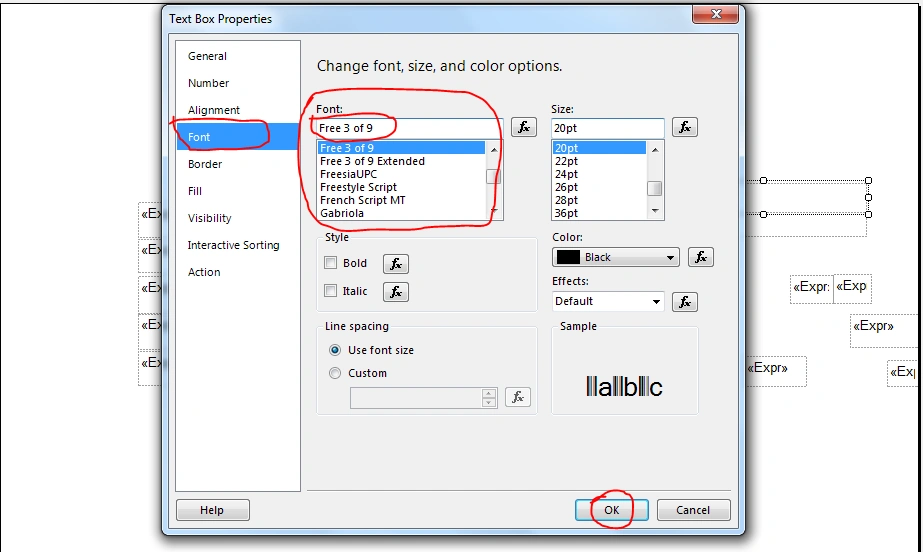
Step 6: Then right click on the Expression(TextBox) which you want to make barcode->select->'Expression'

Step 7: Append '*' to the expression value and click OK.

Step 8: Run your application and you can see your barcode in your report like this.



RamachandranPosted Feb 1, 2024, 6:57 AM EST
Not Support symbol (?)
Javier GomezPosted Dec 28, 2022, 8:50 AM EST
I would like to emphasize that RDLC has a sort of bug, so you cannot use less than 2 chars in the expression value (it actually creates a barcode but it cannot be read by any of the barcode scanners I've tried so...)
izzath aqsaPosted Feb 13, 2021, 3:30 AM EST
Thanks for the documentation
Email NotificationPosted Feb 10, 2020, 2:46 AM EST
Able to print barcode but barcode not scanned...
Neela KantaPosted Jul 9, 2018, 3:17 AM EDT
Barcode Is working fine but not showing Characters below barcode
Mahesh RoyalPosted Nov 13, 2017, 10:30 PM EST
Can u please help me how to install font 3of 9
Marco GuarimPosted May 15, 2017, 4:52 PM EDT
The generated bar code, with the parameters passed in this publication, is very small, and can not be read, environment: windows 10 + vs2015 + c #
Karthikeyan ShanmugamPosted May 3, 2017, 5:21 AM EDT
It displays input Values directly....barcode not generating....
sathish ramPosted Feb 10, 2016, 11:02 PM EST
barcode scanner inside textbox can able to scan in my mobile but inside table can't using RDLC
BishnuPosted Dec 17, 2015, 8:36 PM EST
scanner is not scann
Fahad MohammedPosted Sep 4, 2015, 11:57 PM EDT
not work in rdlc in windows 10 :(
Venkatesh LakshmananPosted Sep 1, 2015, 11:47 PM EDT
Miss Priti help me what i update
Venkatesh LakshmananPosted Sep 1, 2015, 11:45 PM EDT
After font 3 of 9 installation barcode is visible in Visual Studio RDLC designer, but when executing the report it shows just text in browser like ' *123123123* '
Asad KhanPosted Aug 11, 2015, 2:44 AM EDT
For me it appears like *TEXT* in browser, but in V.Studio designer it shows barcode.
Abhishek ChadhaPosted Jul 25, 2015, 2:11 AM EDT
not working for me
Jalpa patelPosted May 6, 2015, 11:52 PM EDT
Not working
Milton JeasiahPosted Apr 16, 2014, 3:45 AM EDT
Not WORKING