## Link the meeting workspace to the Calendar event$siteURL="http://serverName:26413/sites/Vijai"$site=Get-SPSite$siteURL$web=$site.OpenWeb()
$list=$web.Lists.TryGetList("Calendar")
if($list-ne$null)
{
## Add an event to the Calendar list$item = $list.Items.Add()
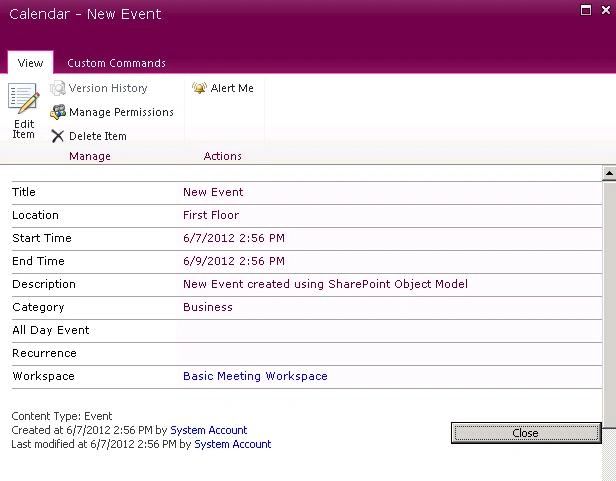
$item["Title"] = "New Event"$item["Description"] = "New Event created using SharePoint Object Model"$item["Location"] = "First Floor"$item["Start Time"] = [System.DateTime]::Now
$item["End Time"] = [System.DateTime]::Now.AddDays(4);
$item["Category"] = "Business";
$item["fAllDayEvent"] = $false;
## Update the $item$item.Update();
write-host-ForegroundColor Green $item["Title"] " event is added successfully to the Calendar"## Get the existing meeting workspace$mwsWeb=$site.OpenWeb("Basic Meeting Workspace")
## Get the Calendar list Id$listId = $list.ID.ToString()
## Get the event Id to which the meeting workspace has to be linked$itemId = $item.ID;
## Gets an SPMeeting object that has meeting information for the specified Web site$meetingInfo = [Microsoft.SharePoint.Meetings.SPMeeting]::GetMeetingInformation($mwsWeb);
## Link the meeting workspace website with the newly created event$meetingURL=$meetingInfo.LinkWithEvent($web, $listId, $itemId, "WorkspaceLink", "Workspace")
## Dispose the SPWeb object$mwsWeb.Dispose();
write-host-ForegroundColor Green $item["Title"]" event is linked to the workspace "$meetingURL.ToString()
}
else
{
write-host-ForegroundColor Yellow "List does not exists"
}
$web.Dispose()
$site.Dispose()
Output:
0 comments
Comments
Join the conversation! Your thoughts help the community grow.
Join to leave a comment
Members earn 10 SHARP for a comment, 10 SHARP for a reaction, and 250 SHARP for every blog they publish.

 DevSocialUpcoming · 3rd editionAI Agents ConferenceDec 1–3, 2026Live onlineFree to attend4days leftRegisterMembers onlyeBook · SharePointSharePoint Online And Office 365 AdministrationDownload now
Join the conversation! Your thoughts help the community grow.