Introduction

There are tons of articles around in the web dealing with the implementation of the model view controller (MVC) pattern. Nevertheless, I had a hard time to find one which was usable as a kind of blueprint for a little software project of mine - a windows forms application with database access and data table display by using the .NET datagridview. Finally I found Matthew Cochran's article "
Introduction to Model View Control (MVC) Pattern using C#" which helped me a lot in getting an MVC up and running.
Still, I always thought that it would have been useful for me to have something closer to real life - and involving a .NET datagridview. This is what I want to provide in this blog, even if it shows work in progress.

Technical Framework

System: WinXP SP3
.NET version: 4.0
IDE: Visual Studio C# 2010 Express
DB: SQL Server Express 2008 Express

The UI

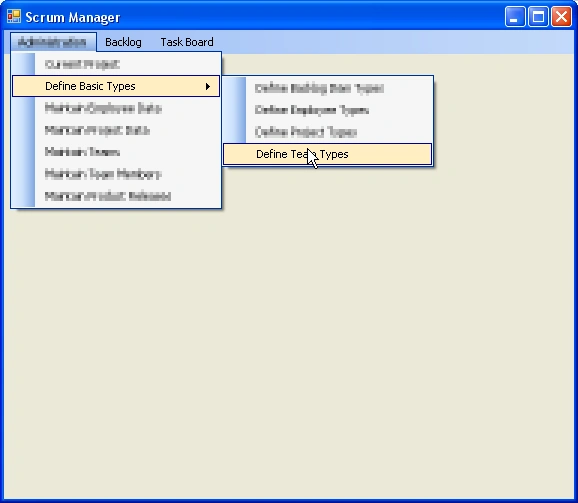
Here is what I wanted: a simple UI which enables the user to edit data stored in a database table. The user should be able to view the current data available in the DB, edit values of existing DB table entries, add lines to the data, delete lines and save the data. In the end I want to have an user interface to maintain a couple of database tables. The individual tables are accessible via a dropdown menu in a main window. Each user request from the main window invokes a form for editing data stored in one DB table:

ScrumMngr_1.png

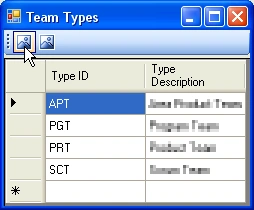
The window called by the user command looks like this:

ScrumMngr_2.png

...the mouse point to what will become the save button.

So far I implemented only data retreval from the DB, change data in the UI and save this data to DB again. The "delete line" and "add line" features are still missing, but I think the existing functionality is enough to show the principles.

The Model

The model is responsible for any DB interaction and data manipluation. Following Matthew's article I created an interface for the model:

Code
public interface IDBTableEditorModel
Code
{
Code
	#region Methods
Code
            void addLineToTable();
Code
            void addObserverView(IDBTableEditorView inTeamTypesView);
Code
            void deleteLineFromTable();
Code
            void notifyObserverView();
Code
            DataTable readDataFromDB();
Code
            void writeDataToDB(DataTable in_DataTable);
Code
        #endregion
Code
}

Note: Don't get irritated by the order of the methods - I just like sorting them alphabetically...

As one might guess by the interface name, I want to use this model in the future to handle DB table data independent of the concrete DB table. This is similar to Matthew's IVehicleModel together with the implementation in class Automobile.

The interface is then implemented in an abstract class which serves as blueprint for the table dependent implementation and which implements the MVC-relevant logic:

Code
public abstract class classDBTableEditorModel : IDBTableEditorModel
Code
{
Code
        #region Attributes
Code
        IDBTableEditorView theTeamTypeView;
Code
        string viewType;
Code
        #endregion
Code
        public classDBTableEditorModel(string inViewType)
Code
        {
Code
            this.viewType = inViewType;
Code
        }
Code
Code
        public void addObserverView(IDBTableEditorView inTeamTypeView)
Code
        {
Code
            theTeamTypeView = inTeamTypeView;
Code
        }
Code
Code
        public void notifyObserverView()
Code
        {
Code
            theTeamTypeView.updateUserInterface(this);
Code
        }
Code
Code
        public void deleteLineFromTable()
Code
        {
Code
        }
Code
Code
        public virtual void writeDataToDB(DataTable inDataTable)
Code
        {
Code
        }
Code
Code
        public virtual DataTable readDataFromDB()
Code
        {
Code
            DataTable lt_DataTable = new DataTable();
Code
            //Add code for concrete data retreval here in concrete class
Code
            return lt_DataTable;
Code
        }
Code
    }

Note: those methods which require table specific logic have the attribute "virtual".

In this specific example I'm dealing with a DB table called "TeamTypes" and which has 3 columns (TeamTypeID (char(3)), TeamTypeDesc (varchar(100)), TeamTypeNumber (bigint)). Thus I have to create a specific table-dependent implementation of my virtual base class called "classTeamTypesModel", in this class I have to override the two "virtual" methods:

Code
class classTeamTypesModel : classDBTableEditorModel
Code
{
Code
        public classTeamTypesModel(string teamTypeName):base(teamTypeName)
Code
        {
Code
        }
Code
Code
        public override DataTable readDataFromDB()
Code
        {
Code
            DataTable lt_TeamTypes = new DataTable();
Code
            //Read data from DB via connector
Code
            try
Code
            {
Code
                lt_TeamTypes = classSqlServerConnector.Instance.TeamTypeReadAll;
Code
            }
Code
            catch { }
Code

            return lt_TeamTypes;
Code
        }
Code

        public override void writeDataToDB(DataTable inDataTable)
Code
        {
Code
            classSqlServerConnector.Instance.TeamTypeUpdateRecords(inDataTable);
Code
        }
Code
}

Note: the classSqlServerConnector is not part of the MVC, but hosts all the functionality to read/write data from/to the DB and will not be discussed here.

The Controller

Following Matthew's article I created an interface for the controller as well:

Code
    public interface IDBTableEditorController
Code
    {
Code
        DataTable onView_Load();
Code
        void onButtonSave_Click(DataTable inDataTable);
Code
        void onButtonDeleteLine_Click();
Code
        void onButtonAddLine_Click();
Code
        void onCellData_Changed();
Code
        void setView(IDBTableEditorView inTeamTypesView);
Code
        void setModel(IDBTableEditorModel inTeamTypesModel);
Code
    }

The corresponding implementation of this interface looks like this:

Code
    public class classDBTableEditorController : IDBTableEditorController
Code
    {
Code
        #region Attributes
Code
        IDBTableEditorModel theTeamTypesModel;
Code
        IDBTableEditorView theTeamTypesView;
Code
        #endregion
Code

        public classDBTableEditorController(IDBTableEditorModel inTeamTypesModel, IDBTableEditorView inTeamTypesView)
Code
        {
Code
            this.theTeamTypesModel = inTeamTypesModel;
Code
            this.theTeamTypesView = inTeamTypesView;
Code
        }
Code

        public classDBTableEditorController()
Code
        {
Code
        }
Code
Code
        public void setModel(IDBTableEditorModel inTeamTypesModel)
Code
        {
Code
            this.theTeamTypesModel = inTeamTypesModel;
Code
        }
Code
Code
        public void setView(IDBTableEditorView inTeamTypesView)
Code
        {
Code
            this.theTeamTypesView = inTeamTypesView;
Code
        }
Code

        public DataTable onView_Load()
Code
        {
Code
            return theTeamTypesModel.readDataFromDB();
Code
        }
Code

        public void onButtonSave_Click(DataTable inDataTable)
Code
        {
Code
            if (theTeamTypesModel != null)
Code
            {
Code
                theTeamTypesModel.writeDataToDB(inDataTable);
Code
            }
Code
            else
Code
            {
Code
                throw new Exception("Error in initializing model to controller: TeamTypes");
Code
            }
Code
        }
Code
Code
        public void onButtonAddLine_Click()
Code
        {
Code
        }
Code
Code
        public void onButtonDeleteLine_Click()
Code
        {
Code
        }
Code
Code
        public void onCellData_Changed()
Code
        {
Code
        }
Code
    }

The View

For the view on ehas to implement the logic in the class code coming with the UI elements. Still, I implemented additionally a view interface:

Code
    public interface IDBTableEditorView
Code
    {
Code
        void addObserver(IDBTableEditorController theController);
Code
        void updateUserInterface(IDBTableEditorModel inTeamTypeModel);
Code
    }

The corresponding view implementation looks like this:

Code
public partial class formTeamTypes : Form, IDBTableEditorView
Code
{
Code
        private IDBTableEditorController theTeamTypesController = new classDBTableEditorController();
Code
        private IDBTableEditorModel theTeamTypeModel = new classTeamTypesModel("Test");
Code
Code
        public formTeamTypes()
Code
        {
Code
            InitializeComponent();
Code
            this.initialize(theTeamTypesController, theTeamTypeModel);
Code
        }
Code
Code
        public void initialize(IDBTableEditorController inTeamTypesController, IDBTableEditorModel inTeamTypesModel)
Code
        {
Code
            if (theTeamTypeModel != null)
Code
            {
Code
            }
Code
            theTeamTypeModel = inTeamTypesModel;
Code
            theTeamTypesController = inTeamTypesController;
Code
            theTeamTypesController.setModel(theTeamTypeModel);
Code
            theTeamTypesController.setView(this);
Code
            theTeamTypeModel.addObserverView(this);
Code
        }
Code
        public void addObserver(IDBTableEditorController inTeamTypesController)
Code
        {
Code
            this.theTeamTypesController = inTeamTypesController;
Code
        }
Code
Code
        public void updateUserInterface(IDBTableEditorModel inTeamTypeModel)
Code
        {
Code
            this.dataGridTeamTypes.Update();
Code
        }
Code
Code
        private void formTeamTypes_Load(object sender, EventArgs e)
Code
        {
Code
	    //When Form is called, the data for Team Types are read from DB
Code
            dataGridTeamTypes.DataSource = theTeamTypesController.onView_Load();
Code
            dataGridTeamTypes.Columns[0].HeaderText = "Type ID";
Code
            dataGridTeamTypes.Columns[1].HeaderText = "Type Description";
Code
            dataGridTeamTypes.Columns[2].Visible = false;
Code
	    //Add a fourth virtual column for a marker flag to mark changed rows
Code
            dataGridTeamTypes.Columns.Add("ChangedFlag", "Changed Flag");
Code
            dataGridTeamTypes.Columns[3].Visible = false;
Code
        }
Code
Code
        private void buttonSave_Click(object sender, EventArgs e)
Code
        {
Code
            DataTable lt_RowsForUpdate = new DataTable();
Code
            DataRow ls_DataRow;
Code
            //Build internal table with rows for update
Code
            lt_RowsForUpdate.Columns.Add("TeamTypeID");
Code
            lt_RowsForUpdate.Columns.Add("TeamTypeDesc");
Code
            lt_RowsForUpdate.Columns.Add("TeamTypeNumber");
Code
            lt_RowsForUpdate.Columns.Add("Changed");
Code
            //Check for Changes and write to DB
Code
            for (int i = 0; i < dataGridTeamTypes.Rows.Count; i++)
Code
            {
Code
                if (dataGridTeamTypes.Rows[i].Cells[3].Value != null &&
Code
                    dataGridTeamTypes.Rows[i].Cells[3].Value.ToString() == "C")
Code
                {
Code
                    ls_DataRow = lt_RowsForUpdate.NewRow();
Code
                    ls_DataRow[0] = dataGridTeamTypes.Rows[i].Cells[0].Value;
Code
                    ls_DataRow[1] = dataGridTeamTypes.Rows[i].Cells[1].Value;
Code
                    ls_DataRow[2] = dataGridTeamTypes.Rows[i].Cells[2].Value;
Code
                    lt_RowsForUpdate.Rows.Add(ls_DataRow);
Code
                }
Code
            }
Code
            theTeamTypesController.onButtonSave_Click(lt_RowsForUpdate);
Code
        }
Code
Code
        private void dataGridTeamTypes_CellValueChanged(object sender, DataGridViewCellEventArgs e)
Code
        {
Code
	    //Mark rows which have been changed
Code
            if (e.RowIndex >= 0)
Code
            {
Code
                dataGridTeamTypes.Rows[e.RowIndex].Cells[3].Value = "C";
Code
            }
Code
        }
Code
}

Note: marking the changed rows with a "C" might be a bit clumsy, but I didn't find a better way. Maybe you have a better one - I'd be glad to get to know about it.

Calling the MVC from the Application

The whole MVC cluster is called by the standard invocation of the form from wherever (here from the event menu item XYZ_clicked:
Code
        private void defineTeamTypes_Click(object sender, EventArgs e)
Code
        {
Code
            formTeamTypes theTeamTypesForm = new formTeamTypes();
Code
            theTeamTypesForm.Show();
Code
        }

Conclusion

I hope this real-life example adds a bit to Matthew's article and shows how things can be realized when working with a database.

Enjoy!
