
In my previous blog, I have explained select and deselect item from listbox and remove selected item from ListBox using JavaScript. Now I am going to explain how to move items across the ListBox such as:
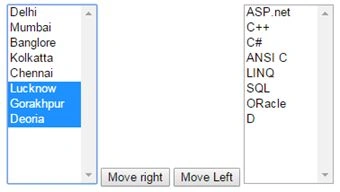
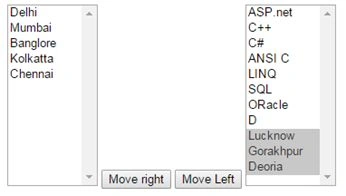
After selecting the item from listbox 1 like { Licknow,Goralhpur,Deoria}, click on Move right. After this you can see that the then selected data should be shown in listbox2 like.
Now select some item from listbox2 like {C++,C#,ANSI C}
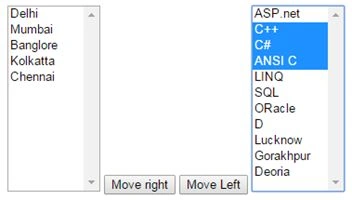
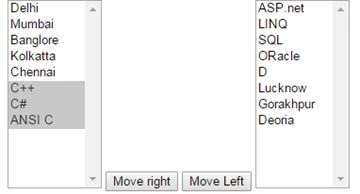
And now click on Move Left button, data will move to listbox1
For this write following code inside body tag.
- <form id="form1" runat="server">
- <div>
- <asp:ListBox ID="lstbox1" runat="server" SelectionMode="Multiple" style="height:200px;width:100px;">
- <asp:ListItem Value="1" Text="Delhi" ></asp:ListItem>
- <asp:ListItem Value="2" Text="Mumbai" ></asp:ListItem>
- <asp:ListItem Value="3" Text="Banglore" ></asp:ListItem>
- <asp:ListItem Value="4" Text="Kolkatta" ></asp:ListItem>
- <asp:ListItem Value="5" Text="Chennai" ></asp:ListItem>
- <asp:ListItem Value="6" Text="Lucknow" ></asp:ListItem>
- <asp:ListItem Value="7" Text="Gorakhpur" ></asp:ListItem>
- <asp:ListItem Value="8" Text="Deoria" ></asp:ListItem>
- </asp:ListBox>
- <asp:Button ID="btn1" runat="server" Text="Move right" OnClientClick="moverightleft('lstbox1','lstbox2');return false;" />
- <asp:Button ID="btn2" runat="server" Text="Move Left" OnClientClick="moverightleft('lstbox2','lstbox1');return false;" />
- <asp:ListBox ID="lstbox2" runat="server" SelectionMode="Multiple" style="height:200px;width:100px;">
- <asp:ListItem Value="1" Text="ASP.net" ></asp:ListItem>
- <asp:ListItem Value="2" Text="C++" ></asp:ListItem>
- <asp:ListItem Value="3" Text="C#" ></asp:ListItem>
- <asp:ListItem Value="4" Text="ANSI C" ></asp:ListItem>
- <asp:ListItem Value="5" Text="LINQ" ></asp:ListItem>
- <asp:ListItem Value="6" Text="SQL" ></asp:ListItem>
- <asp:ListItem Value="7" Text="ORacle" ></asp:ListItem>
- <asp:ListItem Value="8" Text="D" ></asp:ListItem>
- </asp:ListBox>
- </div>
- </form>
Here a have declared two listbox lstbox1 and lstbox2 and two buttons one for Move Right and one for Move Left.
And write following code for Javascript inside Head tag:
- <script >
- function moverightleft(list1, list2) {
- var lst1 = document.getElementById(list1);
- var lst2 = document.getElementById(list2);
- for (var i = 0; i < lst1.options.length; i++) {
- if (lst1.options[i].selected == true) {
- var option = lst1.options[i];
- var newOption = document.createElement("option");
- newOption.value = option.value;
- newOption.text = option.text;
- newOption.selected = true;
- try
- {
- lst2.add(newOption, null);
- lst1.remove(i, null);
- }
- catch(error)
- {
- lst2.add(newOption);
- lst1.remove(i);
- }
- i--;
- }
- }
- }
- </script>
Here a function called move right left is used for both purposes like move left and move right.

Join the conversation! Your thoughts help the community grow.