
Nested GridView and Crud Operation
Working on single GridView with all CRUD operations is a tedious task to implement but not difficult.
If we need to implement in nested form then it makes it more complex compared to single GridView. In the below case, I have implemented a nested GridView where the following provision is made available.
- Enter new row/ record using footer of a template in outer as well as inner GridView.
- Edit, Update, Delete record/rows of particular GridView.
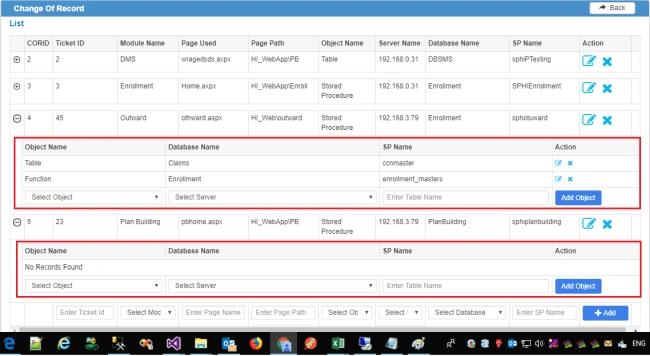
- Collapsible inner GridView for every row of an outer GridView i.e subset of every record.
Design Outer GridView
- <asp:GridView ID="grdParent" AutoGenerateColumns="false" ShowFooter="true" EmptyDataText="No Records Found" CssClass="table table-bordered" runat="server" OnRowDataBound="grdParent_RowDataBound" OnRowCancelingEdit="grdParent_RowCancelingEdit" OnRowCommand="grdParent_RowCommand" OnRowEditing="grdParent_RowEditing" OnRowUpdating="grdParent_RowUpdating">
- <Columns>
- <asp:TemplateField HeaderText="Name">
- <ItemTemplate>
- <asp:Label ID="lblName" runat="server" Text='<%# Eval("Name")%>' /> </ItemTemplate>
- <EditItemTemplate>
- <asp:TextBox ID="txtEditName" runat="server" placeholder="Enter Name Please" Text='<%# Eval("Name")%>' /> </EditItemTemplate>
- <FooterTemplate>
- <asp:TextBox ID="txtName" runat="server" placeholder="Enter Name Please" /> </FooterTemplate>
- </asp:TemplateField>
- <asp:TemplateField HeaderText="Action">
- <ItemTemplate>
- <asp:LinkButton runat="server" ID="btnEdit" CommandName="Edit" ToolTip="Edit" Text="Edit" CssClass=""><i class="fa fa-x fa-edit"></i></asp:LinkButton>
- <asp:LinkButton runat="server" ID="btndelete" ToolTip="Remove" CommandName="DeleteParentRow" Text="Delete" CssClass=""><span class="fa fa-x fa-close"></span></asp:LinkButton>
- </ItemTemplate>
- <EditItemTemplate>
- <asp:LinkButton runat="server" ID="btnSubUpdate" CommandName="Update" ToolTip="Update" Text="Update" CssClass=""><i class="fa fa-x fa-thumbs-up"></i></asp:LinkButton>
- <asp:LinkButton runat="server" ID="btnCancel" ToolTip="Cancel" CommandName="Cancel" Text="Cancel" CssClass=""><i class="fa fa-x fa-thumbs-down"></i></asp:LinkButton>
- </EditItemTemplate>
- <FooterTemplate>
- <asp:Button ID="btnSubAdd" CommandName="AddNew" runat="server" Text="Add New Record" CssClass="btn btn-sm btn-primary" /> </FooterTemplate>
- </asp:TemplateField>
- </Columns>
- </asp:GridView>
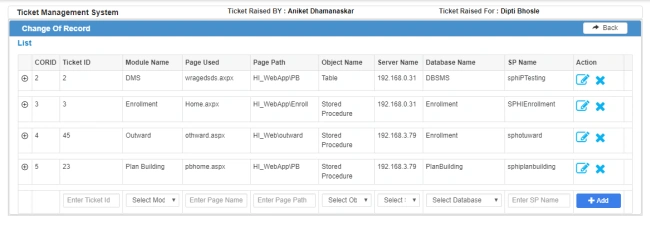
Simple Design for outer GridView where fields are bound within column tag using item template.
Edit template is used for editing and updating rows.
FooterTemplate is used as a provision to enter a new record to grid at the bottom of the GridView.
We need to mention footer template to every field of a row where there is a need to enter a new value.
Design Inner GridView
Add one more item template at the end of parent GridView which will replicate or generate a child GridView for every bound row of parent grid.
- <asp:TemplateField>
- <ItemTemplate>
- <tr>
- <td>
- <asp:GridView ID="gvChildGrid" CssClass="table table-bordered" ShowFooter="true" runat="server" AutoGenerateColumns="false" OnRowDataBound="gvChildGrid_RowDataBound" OnRowEditing="gvChildGrid_RowEditing" OnRowCancelingEdit="gvChildGrid_RowCancelingEdit" OnRowCommand="gvChildGrid_RowCommand" OnRowUpdating="gvChildGrid_RowUpdating">
- <Columns>
- <asp:TemplateField HeaderText="Name">
- <ItemTemplate>
- <asp:Label ID="lblSubName" runat="server" Text='<%# Eval("SubName")%>' /> </ItemTemplate>
- <EditItemTemplate>
- <asp:TextBox ID="txtSubEditName" runat="server" placeholder="Enter child Name Please" Text='<%# Eval("SubName")%>' /> </EditItemTemplate>
- <FooterTemplate>
- <asp:TextBox ID="txtSubName" runat="server" placeholder="Enter child Name Please" /> </FooterTemplate>
- </asp:TemplateField>
- <asp:TemplateField HeaderText="Action">
- <ItemTemplate>
- <asp:LinkButton runat="server" ID="btnChildEdit" CommandName="Edit" ToolTip="Edit" Text="Edit" CssClass=""><i class="fa fa-x fa-edit"></i></asp:LinkButton>
- <asp:LinkButton runat="server" ID="btnChilddelete" ToolTip="Remove" CommandName="DeleteParentRow" Text="Delete" CssClass=""><span class="fa fa-x fa-close"></span></asp:LinkButton>
- </ItemTemplate>
- <EditItemTemplate>
- <asp:LinkButton runat="server" ID="btnChildUpdate" CommandName="Update" ToolTip="Update" Text="Update" CssClass=""><i class="fa fa-x fa-thumbs-up"></i></asp:LinkButton>
- <asp:LinkButton runat="server" ID="btnChildCancel" ToolTip="Cancel" CommandName="Cancel" Text="Cancel" CssClass=""><i class="fa fa-x fa-thumbs-down"></i></asp:LinkButton>
- </EditItemTemplate>
- <FooterTemplate>
- <asp:Button ID="btnChildAdd" CommandName="AddNew" runat="server" Text="Add New Record" CssClass="btn btn-sm btn-primary" /> </FooterTemplate>
- </asp:TemplateField>
- </Columns>
- <td>
- </tr>
- </ItemTemplate>
- </asp:TemplateField>
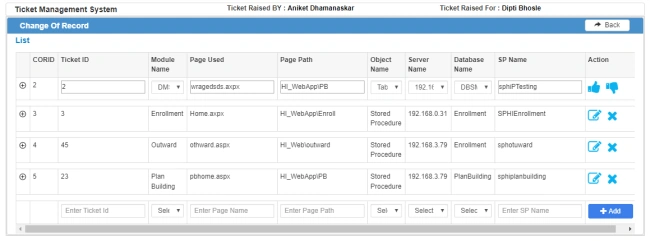
This inner GridView will function with CRUD operations the same as outer GridView but it has the challenge to identify which inner GridView has been called for functionality.
Functionality for Parent Gridview
Functionality for Parent Gridview
- Protected void grdParent_RowDataBound: Columns get bind as per data source.
- Protected void grdParent_RowCommand: Based on CommandName, a respective set of operation execute like AddNew Row, Delete Row.
- Protected void grdParent_RowEditing: Edit particular rowindex of a GridView.
- Protected void grdParent_RowUpdating: Execute Edit functionality for selected editing row.
- Protected void grdParent_RowCancelingEdit: Cancel Edit functionality for any row.
Bind internal Grid in Parent RowdataBound event.
Code Snippet
Code Snippet
- if (e.Row.RowType == DataControlRowType.DataRow) // Fill or load child gridviews for every parent grid row
- {
- GridView gv = (GridView) e.Row.FindControl("gvChildGrid");
- Find gridview
- for every Row
- DataTable dtAction = new DataTable();
- dtAction = LoadSubCORList(Convert.ToString(id));
- if (dtAction.Row.Count > 0) {
- gv.DataSource = dtAction
- gv.DataBind();
- } else {
- // If there is no sub set for row then return empty grid to add new row
- dtAction.Rows.Add(dtAction.NewRow()); // Add new row to empty datatable
- gv.DataSource = dtAction;
- gv.DataBind();
- int columncount = gv.Rows[0].Cells.Count;
- gv.Rows[0].Cells.Clear();
- gv.Rows[0].Cells.Add(new TableCell());
- gv.Rows[0].Cells[0].ColumnSpan = columncount;
- gv.Rows[0].Cells[0].Text = "No Records Found";
- }
- }
Functionality for Child Gridview
- protected void gvChildGrid_RowCommand : Based on CommandName, respective Set of operation execute like AddNew Row, Delete Row on particular inner grid.
- protected void gvChildGrid_RowDataBound :Columns get bind as per datasource
- protected void gvChildGrid_RowEditing: Edit particular rowindex of inner gridview
- protected void gvChildGrid_RowCancelingEdit: Cancel Edit functionality for any row.
- protected void gvChildGrid_RowUpdating : Execute Edit functionality for selected editing row.
In the above case, it's difficult to figure out which inner GridView is functioning at a time.
The following code was used in Child GridView events to identify the functioning GridView.
The following code was used in Child GridView events to identify the functioning GridView.
Code Snippets
- GridView GV = (GridView)sender; // Select either of inner gridview who request for Edit / cancel edit out of all innner gridview
- GridViewRow grdParent = (GridViewRow)GridView2.Parent.Parent; // Find controls from parent grid view
Use the above line to identify the inner grid view to perform selective operations on respective inner grid.
Script For Collapsible Events
Script For Collapsible Events
- <script language="javascript" type="text/javascript">
- function divexpandcollapse(divname) {
- var div = document.getElementById(divname);
- var img = document.getElementById('img' + divname);
- if (div.style.display == "none") {
- div.style.display = "inline";
- img.src = "../images/minus.png";
- } else {
- div.style.display = "none";
- img.src = "../images/plus.png";
- }
- }
- </script>
Add the following itemtemplate for parent gridview
Add the below template to add collapsible option to parent GridView and child GridView will be hidden/shown for every row.
Add the below template to add collapsible option to parent GridView and child GridView will be hidden/shown for every row.
- <asp:TemplateField ItemStyle-Width="20px">
- <ItemTemplate> <a href="JavaScript:divexpandcollapse('div<%# Eval(" ID ") %>');">
- <img id="imgdiv<%# Eval("ID") %>" width="14px" border="0" src="../images/plus.png" />
- </a> </ItemTemplate>
- </asp:TemplateField>


Cesar NegretePosted Aug 2, 2024, 5:32 PM EDT
Dear Sagar please You share your code at [email protected]
Niravkumar VaghelaPosted Jul 1, 2024, 6:44 AM EDT
Dear, Sagar Can You Please Share code. It will helpful for me.
News EagerPosted Jul 15, 2023, 3:54 AM EDT
LoadsubCoRlist
Bryan DuemlerPosted Mar 14, 2023, 9:17 PM EDT
Dear Sagar Can You Please Share code to my mail - [email protected] Thank You
Woodley WestbrookPosted Oct 18, 2021, 3:54 PM EDT
Dear Sagar Can You Please Share code on my mail - [email protected]
supriya patilPosted Sep 28, 2021, 3:04 AM EDT
Please mail code to [email protected]
Ripon GogiPosted Sep 8, 2021, 11:48 AM EDT
Can you please send me the source code like which would be great for me. My email is [email protected]. Thanks
Agusta PradnyanaPosted Sep 8, 2021, 3:24 AM EDT
Hai, Can you send to me your complate code please? [email protected].. thanks
Social UsePosted Aug 30, 2021, 12:24 AM EDT
Can I have the code pls? [email protected], thankyou
supriya gadePosted Aug 23, 2021, 12:13 PM EDT
Hi can you plz send all code to [email protected]
jay singhPosted Mar 22, 2021, 12:37 AM EDT
It is looking very Good but not working for me plz help
jay singhPosted Mar 22, 2021, 12:36 AM EDT
Dear Sagar Can You Please Share code on my mail Id [email protected].
Shahul HameedPosted Mar 16, 2021, 4:19 AM EDT
Hello Author, Could you please share your code to my mail Id: [email protected]. It is very helpful for me.
kumari reemaPosted Nov 10, 2020, 8:48 PM EST
Would you please share the full code. to [email protected], Thanks
Dale CallowPosted Aug 7, 2020, 7:57 AM EDT
Could you please share your code for this, thank you!
Mamta MestryPosted Jul 22, 2020, 6:17 AM EDT
Can u please help us for freezing columns in nested grid.
Hoang LePosted May 25, 2020, 11:02 PM EDT
Would you please share the full code to [email protected]. thank
Ashok KPosted May 20, 2020, 8:22 PM EDT
Kindly share your code to [email protected]? Thanks in Advance!
Dinkar HirePosted May 7, 2020, 1:16 AM EDT
Would you please share the full code. to [email protected], Thanks
William BittenbenderPosted Apr 2, 2020, 4:57 AM EDT
Are you not sharing your code?
William BittenbenderPosted Mar 26, 2020, 7:47 AM EDT
I am having issues keeping the inner grid row open to perform operations....I was really hoping to see your code.
William BittenbenderPosted Mar 25, 2020, 5:14 AM EDT
Would you be so kind as to share the full code... [email protected]? Thank you very much
Nguyen LanPosted Mar 22, 2020, 11:17 PM EDT
I saw your code Design Outer GridView/ Design Inner GridView that conflict your picture (your picture has multiple columns but your code one column). Why???
Nguyen LanPosted Mar 16, 2020, 9:17 AM EDT
Can you please share your code to [email protected]? Thanks!
Anand NavalePosted Jan 5, 2020, 6:46 PM EST
Nice Explanation ,Great job
David ManorajPosted Dec 18, 2019, 9:21 PM EST
Dear, Please Share code [email protected]
sam kothariPosted Oct 18, 2019, 2:03 AM EDT
Dear Sagar, Please share working code with me on [email protected]
asad ullahPosted Oct 1, 2019, 8:03 AM EDT
Please share working code with me on [email protected]
sidra InamPosted Sep 30, 2019, 8:55 PM EDT
Please share your code at [email protected]
sagayam nithyaPosted Aug 16, 2019, 12:29 AM EDT
Hi Sagar, Excellent work. Please can u email me complete code. [email protected]
Anthony EarlyPosted Jul 17, 2019, 6:02 AM EDT
Can you please share your code to [email protected]? Thanks
Ever GuzmánPosted Jun 27, 2019, 7:51 AM EDT
Can you please share your code to [email protected]?
Amornkan ElfPosted Jun 9, 2019, 7:34 PM EDT
Please shear your code [email protected]
Manish GanatraPosted Jun 3, 2019, 12:49 AM EDT
Hi Sagar, this meets my requirement, can u Please email me complete code. [email protected]
Sheikh FareethPosted May 13, 2019, 8:51 PM EDT
Hello sagar please send the nested gridview in mvc.5 using with three tables with edit and delete option to [email protected]
Mohammed AfrozPosted Apr 25, 2019, 2:18 AM EDT
Hi Sagar, Nice work, this meets my requirement, Can you please share your code to my email. [email protected]
manjunath matolliPosted Apr 8, 2019, 8:18 PM EDT
Please shear your code [email protected]
Warren CoxPosted Feb 1, 2019, 5:40 AM EST
Hello Sagar please send me code for Nested GridView In ASP.NET Using C# (Parent And Child Gridview) to [email protected] thank you
IsaiSelvan SPosted Jan 8, 2019, 8:37 PM EST
In case there is no record in datatable or SQL , how grid will be binded on page load with header and first empty row?
IsaiSelvan SPosted Jan 8, 2019, 8:36 PM EST
Hi Sagar, Excellent work. Thank you very much. Please can u email me complete code. [email protected]
Sheikh FareethPosted Nov 20, 2018, 10:32 PM EST
Hi Sagar Can you please send the full project code
Rajani BijapurPosted Nov 16, 2018, 12:53 AM EST
Hi... can you share me the complete source code to [email protected]
ruel luengoPosted Oct 27, 2018, 11:27 PM EDT
Please can you send the complete to my eamil please [email protected]
Daniel AlvarezPosted Oct 11, 2018, 2:42 AM EDT
Hello Sagar! Great work! Can you share the code for something similar?
Carlos SantoyoPosted Sep 28, 2018, 7:38 AM EDT
Can I get your code please?
pradeep dasariPosted Aug 8, 2018, 2:57 AM EDT
Hi sagar, all program is fine but i need database for above program
Bansi HPosted Jun 10, 2018, 10:35 PM EDT
Hi Sagar , can you share source code for same