
Introduction
Today, in this blog let's play around with one of the interesting and most useful concept in C#.
Question: What is nullable type?
In simple terms "It provides flexibility for us to define null values to non-accepting datatypes".
Step
1: Create
a new webform project
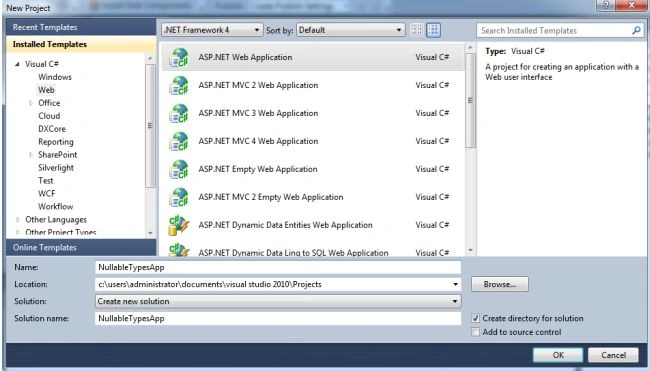
Step 2: The complete code of webform1.aspx looks like this:
<%@ Page Language="C#" AutoEventWireup="true" CodeBehind="WebForm1.aspx.cs" Inherits="NullableTypesApp.WebForm1" %>
<!DOCTYPE html PUBLIC "-//W3C//DTD XHTML 1.0 Transitional//EN" "http://www.w3.org/TR/xhtml1/DTD/xhtml1-transitional.dtd">
<html xmlns="http://www.w3.org/1999/xhtml">
<head id="Head1" runat="server">
<title></title>
</head>
<body>
<form id="form1" runat="server">
<center>
<div>
<table>
<tr>
<td colspan="2">
<asp:Label ID="Label1" runat="server" Text="Nullable Types in .NET" Font-Bold="true"
Font-Size="Large" Font-Names="Verdana" ForeColor="Maroon"></asp:Label>
</td>
</tr>
<tr>
<td colspan="2" align="center">
<asp:Button ID="Button1" runat="server" Text="Addition" Font-Names="Verdana" Width="213px"
BackColor="Orange" Font-Bold="True" OnClick="Button1_Click" />
</td>
</tr>
<tr>
<td colspan="2" align="center">
<asp:Button ID="Button2" runat="server" Text="Substraction" Font-Names="Verdana"
Width="213px" BackColor="Orange" Font-Bold="True" OnClick="Button2_Click" />
</td>
</tr>
<tr>
<td colspan="2" align="center">
<asp:Button ID="Button3" runat="server" Text="Multiplication" Font-Names="Verdana"
Width="213px" BackColor="Orange" Font-Bold="True" OnClick="Button3_Click" />
</td>
</tr>
<tr>
<td colspan="2" align="center">
<asp:Button ID="Button4" runat="server" Text="Division" Font-Names="Verdana" Width="213px"
BackColor="Orange" Font-Bold="True" OnClick="Button4_Click" />
</td>
</tr>
<tr>
<td colspan="2" align="center">
<asp:Label ID="Label5" runat="server" Font-Bold="true" Font-Names="Verdana" ForeColor="Maroon"></asp:Label>
</td>
</tr>
</table>
</div>
</center>
</form>
</body>
</html>
Step 3: The complete code of webform1.aspx.cs looks like this:
using System;
using System.Collections.Generic;
using System.Linq;
using System.Web;
using System.Web.UI;
using System.Web.UI.WebControls;
namespace NullableTypesApp
{
public partial class WebForm1 : System.Web.UI.Page
{
protected void Page_Load(object sender, EventArgs e)
{
}
double? a = null;double? b = null;
protected void Button1_Click(object sender, EventArgs e)
{
//a = 10;
//b = 20;
if(a.HasValue == true && b.HasValue == true)
{
Label5.Text = "Addition Result is: " + (a + b);
Label5.ForeColor = System.Drawing.Color.Green;
}
else
{
Label5.Text = "Values are null";
Label5.ForeColor = System.Drawing.Color.Red;
}
}
protected void Button2_Click(object sender, EventArgs e)
{
//a = 20;
//b = 10;
if (a.HasValue && b.HasValue)
{
Label5.Text = "Substraction Result is: " + (a - b);Label5.ForeColor = System.Drawing.Color.Green;
}
else
{
Label5.Text = "Values are null";
Label5.ForeColor = System.Drawing.Color.Red;
}
}
protected void Button3_Click(object sender, EventArgs e)
{
//a = 10;//b = 20;
if (a.HasValue && b.HasValue)
{
Label5.Text = "Multiplication Result is: " + (a * b);
Label5.ForeColor = System.Drawing.Color.Green;
}
else
{
Label5.Text = "Values are null";
Label5.ForeColor = System.Drawing.Color.Red;
}
}
protected void Button4_Click(object sender, EventArgs e)
{
//a = 10;//b = 20;
if (a.HasValue && b.HasValue)
{
Label5.Text = "Division Result is: " + (a / b);
Label5.ForeColor = System.Drawing.Color.Green;
}
else
{
Label5.Text = "Values are null";
Label5.ForeColor = System.Drawing.Color.Red;
}
}
}
}
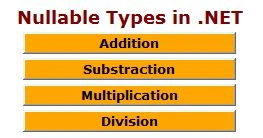
Step 4: The output of the application looks like this

Join the conversation! Your thoughts help the community grow.