
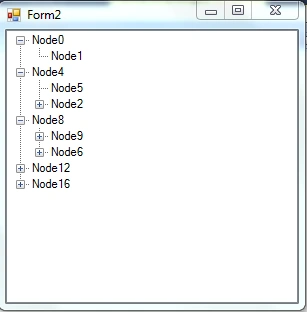
This blog will show you how you can perform drag and drop operations on treeview control node using C#.Net in Windows application. So for this article first we will create a new windows application and add the below code on form load.
- private void Form2_Load(object sender, EventArgs e)
- {
- treeView1 = new TreeView();
- this.SuspendLayout();
- // Initialize treeView1.
- treeView1.AllowDrop = true;
- treeView1.Dock = DockStyle.Fill;
- // Add nodes to treeView1.
- TreeNode node;
- for (int x = 0; x < 5; ++x)
- {
- // Add a root node to treeView1.
- node = treeView1.Nodes.Add(String.Format("Node{0}", x * 4));
- for (int y = 1; y < 6; ++y)
- {
- // Add a child node to the previously added node.
- node = node.Nodes.Add(String.Format("Node{0}", x * 4 + y));
- }
- }
- // Add event handlers for the required drag events.
- treeView1.ItemDrag += new ItemDragEventHandler(treeView1_ItemDrag);
- treeView1.DragEnter += new DragEventHandler(treeView1_DragEnter);
- treeView1.DragOver += new DragEventHandler(treeView1_DragOver);
- treeView1.DragDrop += new DragEventHandler(treeView1_DragDrop);
- // Initialize the form.
- this.ClientSize = new Size(292, 273);
- this.Controls.Add(treeView1);
- this.ResumeLayout(false);
- }
In the above code I have created nodes of tree view. Now we will perform the operation for the drag and drop feature. First create the tree view control treeView1_ItemDrag event and add the below code.
- private void treeView1_ItemDrag(object sender, ItemDragEventArgs e)
- {
- // Move the dragged node when the left mouse button is used.
- if (e.Button == MouseButtons.Left)
- {
- DoDragDrop(e.Item, DragDropEffects.Move);
- }
- // Copy the dragged node when the right mouse button is used.
- else if (e.Button == MouseButtons.Right)
- {
- DoDragDrop(e.Item, DragDropEffects.Copy);
- }
- }
- private void treeView1_DragEnter(object sender, DragEventArgs e)
- {
- e.Effect = e.AllowedEffect;
- }
- private void treeView1_DragOver(object sender, DragEventArgs e)
- {
- // Retrieve the client coordinates of the mouse position.
- Point targetPoint = treeView1.PointToClient(new Point(e.X, e.Y));
- // Select the node at the mouse position.
- treeView1.SelectedNode = treeView1.GetNodeAt(targetPoint);
- }
- private void treeView1_DragDrop(object sender, DragEventArgs e)
- {
- // Retrieve the client coordinates of the drop location.
- Point targetPoint = treeView1.PointToClient(new Point(e.X, e.Y));
- // Retrieve the node at the drop location.
- TreeNode targetNode = treeView1.GetNodeAt(targetPoint);
- // Retrieve the node that was dragged.
- TreeNode draggedNode = (TreeNode)e.Data.GetData(typeof(TreeNode));
- // Confirm that the node at the drop location is not
- // the dragged node or a descendant of the dragged node.
- if (!draggedNode.Equals(targetNode) && !ContainsNode(draggedNode, targetNode))
- {
- // If it is a move operation, remove the node from its current
- // location and add it to the node at the drop location.
- if (e.Effect == DragDropEffects.Move)
- {
- draggedNode.Remove();
- targetNode.Nodes.Add(draggedNode);
- }
- // If it is a copy operation, clone the dragged node
- // and add it to the node at the drop location.
- else if (e.Effect == DragDropEffects.Copy)
- {
- targetNode.Nodes.Add((TreeNode)draggedNode.Clone());
- }
- // Expand the node at the location
- // to show the dropped node.
- targetNode.Expand();
- }
- }
- private bool ContainsNode(TreeNode node1, TreeNode node2)
- {
- // Check the parent node of the second node.
- if (node2.Parent == null) return false;
- if (node2.Parent.Equals(node1)) return true;
- // If the parent node is not null or equal to the first node,
- // call the ContainsNode method recursively using the parent of
- // the second node.
- return ContainsNode(node1, node2.Parent);
- }


Mister TPosted Jul 25, 2025, 2:59 PM EDT
A project download would be good
Lance CruzPosted Sep 19, 2022, 7:38 PM EDT
For future readers. In the dragdrop event, after line 07. Add code that checks if the targetnode is null to prevent an error if the drop zone is empty or without any nodes present. //Check if dropzone is an empty space. if(targetNode == null) { MessageBox.Show("Drop zone is null!"); return; }
Pratiksha BhorPosted Apr 29, 2020, 1:27 PM EDT
Code to write event handlers for above code
ANIYAN CPosted Aug 19, 2018, 8:34 PM EDT
Is there any way to do this in MVC web application?