
SharePoint 2013 has introduced a new feature called Popularity Trends
for the documents in the ribbon interface. Popularity Trends feature will
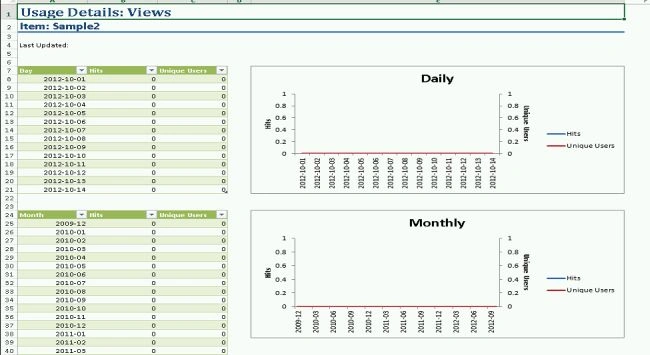
generate an excel file which shows the usage statistics of a particular document
on daily and monthly basis (both numeric and chart). I have created a team site
in which Documents library will be present by default. I have added few
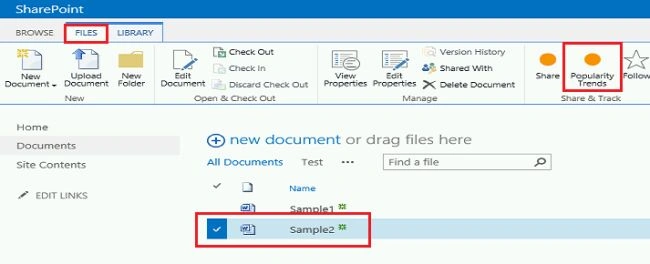
documents to that library. Select a particular document, click on Files
tab in the ribbon interface. Click on Popularity Trends button which is
available in the Share & Track group.
It will generate an excel file and which shows the usage details of that
particular document as shown in Figure.
Popularity Trends feature in SharePoint 2013
In this blog you will see about a new feature “Popularity Trends” in SharePoint 2013.


Prabhu NehruPosted Nov 9, 2017, 6:46 PM EST
Vinay, for a site collection am not getting any any data in the Usage Report. But for other site collection in the same web application, i am getting the data in the report. What am i missing ?
Sumit DeshmukhPosted Aug 31, 2015, 3:05 AM EDT
Thanks a lot Vijay, really helpful. :-)
surendra babuPosted Mar 26, 2015, 11:33 PM EDT
How to Access rdl file in Popularity Trends on sharePoint can you please help me
Venkatesh KumarPosted Oct 16, 2012, 9:41 PM EDT
Thanks a lot Vijay, i just now read your post.
Vijai Anand RamalingamTOP 10Posted Oct 16, 2012, 1:41 PM EDT
Hi Venkat, You need to activate the Reporting feature in the site collection level. Please refer my next blog http://www.c-sharpcorner.com/Blogs/10220/popularity-trends-option-missing-in-sharepoint-2013-document.aspx
Venkatesh KumarPosted Oct 16, 2012, 4:57 AM EDT
Hi Vijay, i have created a team site in SP2013, but i am not able to find this feature, is this default one or we need to enable any feature...