
If you want to print document such as the
doc, docx, pdf, jpeg etc. with C# code. Follow this Post.
Here I have to use the filedialog control of dot net framework for the file
browsing purpose and add this namespace using System.Diagnostics and
using ProcessStartInfo class i have to call the particular document file and
print this file.
Using ProcessStartinfo Class we can call the external resources which is
outside of dot net technology. Window based Application:=>Add opendialog control
on Designer Form.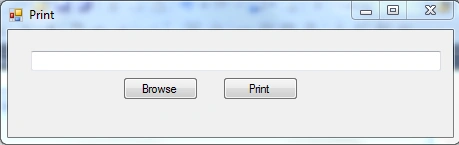
Add this code in Form.cs in : Add this code on the Browse Button Click
For browsing file.
private void btnBrowse_Click(object sender, EventArgs e)
{
DialogResult dr = openFileDialog1.ShowDialog();
string[] s = openFileDialog1.FileName.Split('.');
if (dr.ToString() == "OK")
{
if (s.Length > 1)
if (s[1] == "doc" || s[1] == "docx" || s[1] == "jpg")
txtFileName.Text = openFileDialog1.FileName;
else
MessageBox.Show("Please select doc,docx,jpeg file !!");
}
}
Add This code on print Button Click:=>Here i have to use processStartInfo dot
net inbuilt class for accessing external resourcess like do,docx etc file.
private void btnPrint_Click(object sender, EventArgs e)
{
if
(string.IsNullOrEmpty(txtFileName.Text.Trim()))
{
txtFileName.BackColor = Color.Yellow;
MessageBox.Show("Please Select file.");
return;
}
//Using below code we can print any document
ProcessStartInfo info = new ProcessStartInfo(txtFileName.Text.Trim());
info.Verb = "Print";
info.CreateNoWindow = true;
info.WindowStyle = ProcessWindowStyle.Hidden;
Process.Start(info);
}


hnin htwePosted Jan 3, 2020, 6:13 AM EST
I tried this code. It work in local and when I upload to hosting, no printed. May I know is there any reason? Thanks
Rupesh NamdevPosted Feb 28, 2019, 10:20 PM EST
When i print Pdf , Doc file it show file . can you please how to print directly.
sulabh saxenaPosted May 25, 2018, 4:35 AM EDT
When i print a pdf using this code, why adobe reader shown in my task bar.. plz suggest ..
Muhammad UsmanPosted Oct 16, 2017, 4:35 AM EDT
I have tried using the code for docx files and it works fine for few files. But I need to print about 100 or may be more docx file each having multiple pages. All the documents neeed to remain in the printer queue. when I loop through all the files (about 100) then application gets stuck. printer queue shows only 30+ files and it does not receive any file until I cancel the existing jobs and kill word instances. Please suggest if any better way of doing this. Thanks a lot
Dhivya pPosted Oct 11, 2017, 5:16 AM EDT
Kindly give your ideas
Dhivya pPosted Oct 11, 2017, 5:15 AM EDT
I need to print pnr file
PURNIMA SHARMAPosted Oct 8, 2017, 1:40 AM EDT
How to crop and print a particular section of pdf file?
Prasad VarmaPosted Dec 23, 2016, 4:36 AM EST
Can i Set specific printer name to print document?
Praful SoniPosted May 26, 2016, 11:20 PM EDT
Hii,, Awesome post. your code helped me lot.. Thanks.
mohammad kaabPosted Apr 10, 2016, 7:56 AM EDT
hi, im using your code , ty for sharing it , but id does not work with pdf . i mean it wi'll not print any pdf file , what should i do ?
Marcin CPosted Jan 6, 2016, 7:30 AM EST
how to print 2 copies
Morteza AshouriPosted Jan 1, 2016, 5:41 AM EST
ProcessStartInfo info = new ProcessStartInfo(MyDocFiles[i]); Process process; info.Verb = "Print"; info.CreateNoWindow = true; info.WindowStyle = ProcessWindowStyle.Hidden; process=Process.Start(info); //Process.Start(info); process.WaitForExit();
Morteza AshouriPosted Jan 1, 2016, 5:41 AM EST
I found solution:
Morteza AshouriPosted Dec 31, 2015, 10:51 AM EST
Thank you. Useful code. I need to delete printed file after printing progress. The problem is: I wrote delete procedure to remove printed file but as deleting is too fast the file isn't longer available to printing. Waiting for some sec isn't good solution. Is way to check that printing <<Process.Start(info);>> has finished?????
Bharath PeggemPosted Sep 22, 2015, 12:20 AM EDT
Thanks for your replay
Bharath PeggemPosted Sep 19, 2015, 7:41 AM EDT
Hi Priti, how can we print .doc file from our project folder, through using jquery. is it any posible to print that file