
I have a team site in which I have created a custom list named “Test”. In the custom list I have created a choice field which allows multiple selections.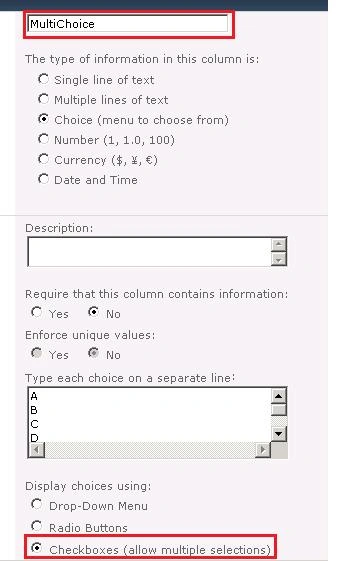
I have added a new item with multi choice values as shown in Figure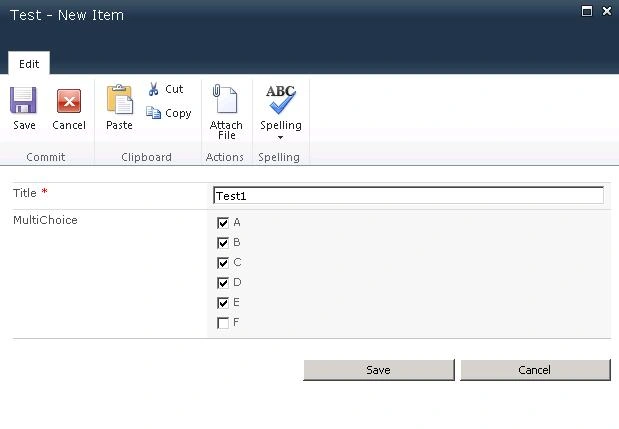
Here you will see how to get all the choice values for particular column using SharePoint object model.
Code Snippet:
using System;using System.Collections.Generic;using System.Linq;using System.Text;using System.Data;using Microsoft.SharePoint; namespace MultiChoice{ class Program { static void Main(string[] args) { using (SPSite site = new SPSite("http://serverName/sites/Vijai/")) { using (SPWeb web = site.OpenWeb()) { SPList list = web.Lists.TryGetList("Test"); if (list != null) { SPListItem item = list.Items[0]; SPFieldMultiChoiceValue choices = new SPFieldMultiChoiceValue(item["MultiChoice"].ToString()); for (int i = 0; i < choices.Count; i++) { Console.WriteLine(choices[i]); } Console.ReadLine(); } } } } }}
Programmatically get multi choice values from SharePoint 2010 list item
In this blog you will see how to get the multi choice values from SharePoint 2010 list item using SharePoint Object Model.
C#

Join the conversation! Your thoughts help the community grow.