Skip to content
<devsocial/>
NewsLearnBooksForumsCommunitiesConferences
  • Videos
  • Articles
  • Blogs
  • Chapters
  • Careers
  • Fuel
  • Hire AI talent
  • Events
  • Interviews
  • Stories
  • Companies
  • Newsletter
  • Get the app
LiveVideosArticlesBlogsChaptersCareersFuelHire AI talentEventsInterviewsStoriesCompaniesNewsletterGet the app
Sign inJoin free
  1. Blogs
  2. SharePoint

Seven Easy Steps to Install Napa Development Tool for Office 365

This blog will explain you the seven easy steps that are needed to install the Napa Development tool for Office 365

Raja Shekher KammaraRaja Shekher KammaraJan 7, 2015Published Jan 6, 2015, 8:14 PM ESTUpdated Jan 7, 2015, 5:55 AM EST · 1 min read
+ Follow
3,1090
Reactions
0
Share
LinkedInX
History

1. Go to your office 365 site online

2. Then click on the “SharePoint” link under “Admin” tab


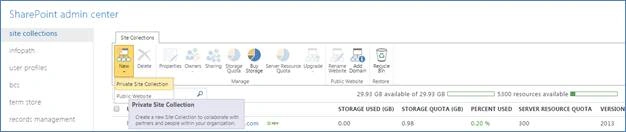
3. Click on the New à Private Site Collections.

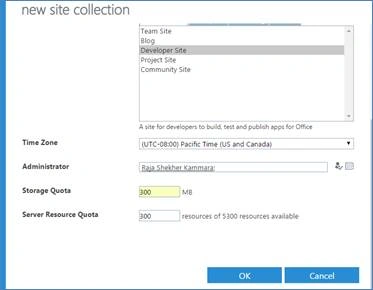
4. A pop up will be displayed where you need to enter the respective details like shown below.

Most importantly you need to select the “Developer site Template”
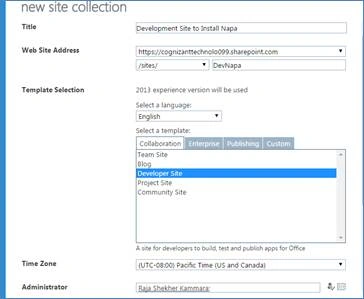

5. After entering all the details click on “OK”.

Once our site is created, click on Settings icon and then “Add an app”.
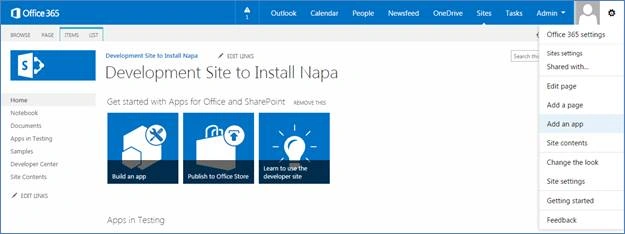


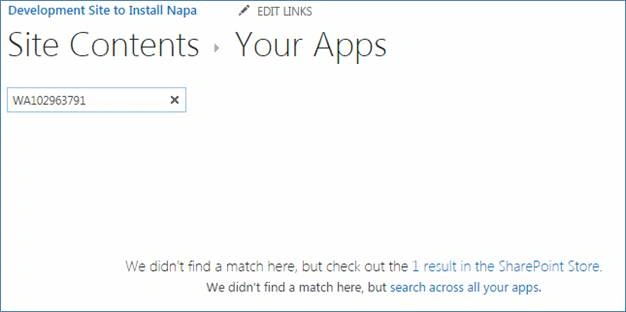
6. Search for “WA102963791” or “Napa App” and click ok.


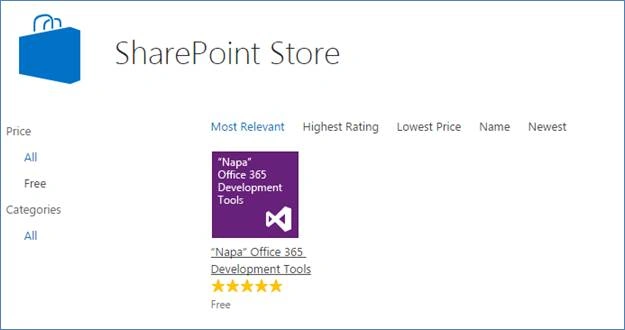
Click on the “1 Result in the SharePoint Store” link shown above.

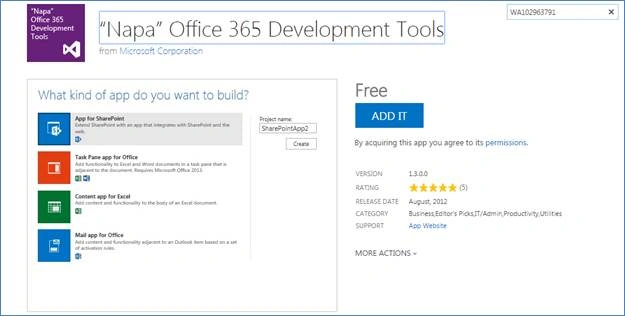
Then, you will be able to see the below page.


7.
Click on “ADD IT” link

YOU ARE READY TO USE IT NOW…..

Note:

You will be able to find Napa tool in your site content.

Launch the "Napa Tool" and you can see that it is a web application with url “https://www.napacloudapp.com/" and which consumes all the details of your Office 365 login, which site collection you are connected from Napa.

The default screen will display all the Apps you have created.

If you are using for first time, there will be a "Add New Project" button.

Join the SharePoint community1 member follows it. Its news, questions and posts in your feed.
Follow
<devsocial/>

Formerly C# Corner. A community of 3.1M developers learning, building and earning together.

Company

About UsPartnersBrand GuidelinesContact UsHackIndia (opens in a new tab)

Community

DevSocial LiveChaptersCommunitiesConferencesMembersMVPsMember Stories

Resources

LearnCareersHire DevelopersRewardsNewsletterIdeasHelp center

Legal

Privacy PolicyTermsReport a BugSitemap
© 2026 DevSocial. All contents are copyright of their authors.DevSocial is a community of AI-native builders.

MC 0.619 · 27 Nov 2026, 12:49 EST

Raja Shekher Kammara

Raja Shekher Kammara

Raja has more than 6 years of professional work experience in the field of application…

1 contribution3.1K reads

More from Raja →
+ Follow

0 comments

Comments

Join the conversation! Your thoughts help the community grow.

Join to leave a comment

Members earn 10 SHARP for a comment, 10 SHARP for a reaction, and 250 SHARP for every blog they publish.

Create free accountSign in
More on SharePoint

More blogs

  1. 01SharePoint Site Provisioning: A Guide to Site Scripts & Site Designs with PowerShellParth Chavda · 1,531 reads
  2. 02Step-by-Step Guide: Convert a SharePoint Site Page to PDF using Power AutomateDivyank Soni · 1,710 reads
  3. 03Create a Document Library in SharePoint OnlineSuraj Dhage · 1,362 reads
  4. 04SPFx Web Part Icon Requirements When Publishing to TeamsShivam Vaghela · 1,179 reads
  5. 05Debugging PnPjs Caching in SharePoint ApplicationsShivam Vaghela · 2,645 reads
All SharePoint blogs →
2026DevSocialUpcoming · 3rd editionAI Agents ConferenceDec 1–3, 2026Live onlineFree to attend4days leftRegisterMembers onlySPDevSocial PressSharePointSharePoint Online And Office 365 AdministrationThis book is targeted for everyone from beginners to advanced SharePoint administrators, architects, Office…Habibur Rahaman238 pageseBook · SharePointSharePoint Online And Office 365 Administration238 pages · Members download free.Download now
Publish yours

Write a blog post and earn +250 SHARP when it is approved.

Write a blog