
Scenario
If you are a user at a manufacturing company, then you might have come across a requirement to send documents to users outside your organization. Yes, you can send the document as an attachment in email easily. But, there could be plenty of reasons where you want to share a link of the document.
Let us see how to do that.
Solution
Yes, it’s possible in SharePoint Online. You can even generate such a URL using FLOW and send it to a user outside the organization.
Note
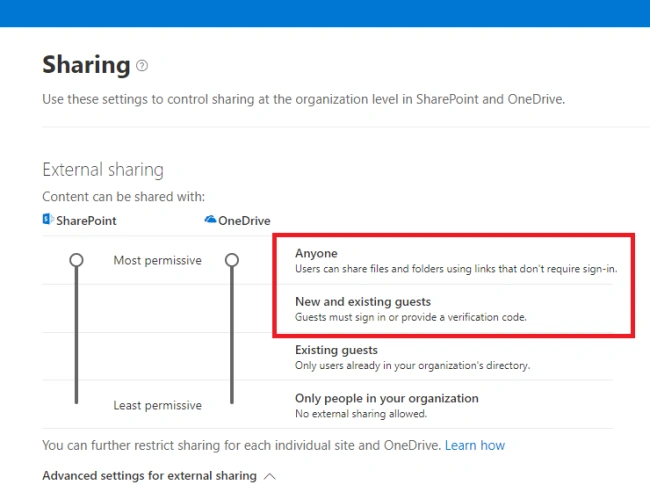
Before moving to FLOW, you need to make sure that external sharing is enabled in your tenant configuration. To check it, please follow the steps mentioned in this Microsoft documentation. The external sharing configuration must be as shown below – with Anyone.
Before moving to FLOW, you need to make sure that external sharing is enabled in your tenant configuration. To check it, please follow the steps mentioned in this Microsoft documentation. The external sharing configuration must be as shown below – with Anyone.
Let’s see how we can generate the URL to be shared with an external user from FLOW.
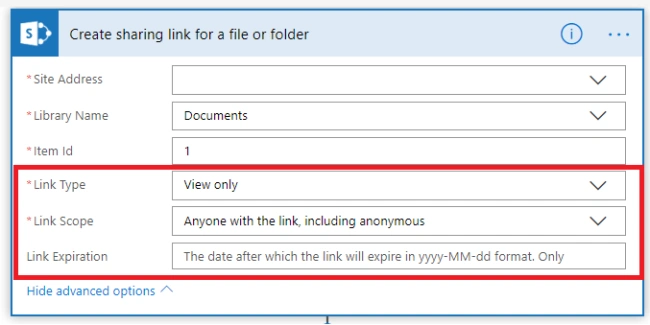
Edit your FLOW >> Add action “Create sharing link for a file or folder” under SharePoint category. >> Provide necessary details of the document whose link you want to share.
You can configure the below properties in this action.
- Link type – make it View.
- Link Scope – make it “Anyone with the link, including anonymous”.
- Link expiration – specify number days, after these number of days link won’t work.
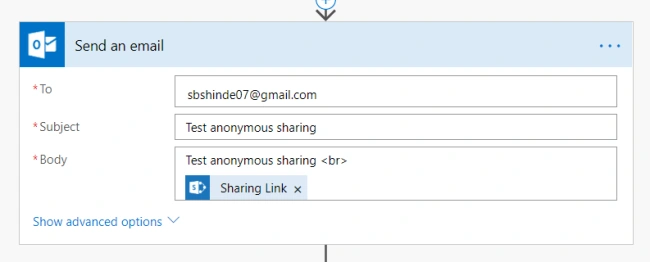
Use the output of the above action in "Send Email" action. Send an email to external users with this link. The user should be able to access the document without any login/authentication.
I hope this helps.

Join the conversation! Your thoughts help the community grow.