
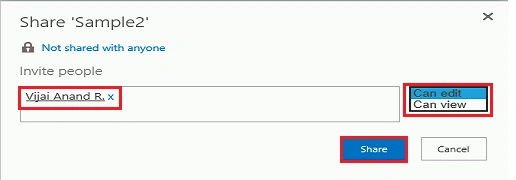
Enter the user to whom you want to share the document and select whether the user can only view or edit the document. Click on Ok.
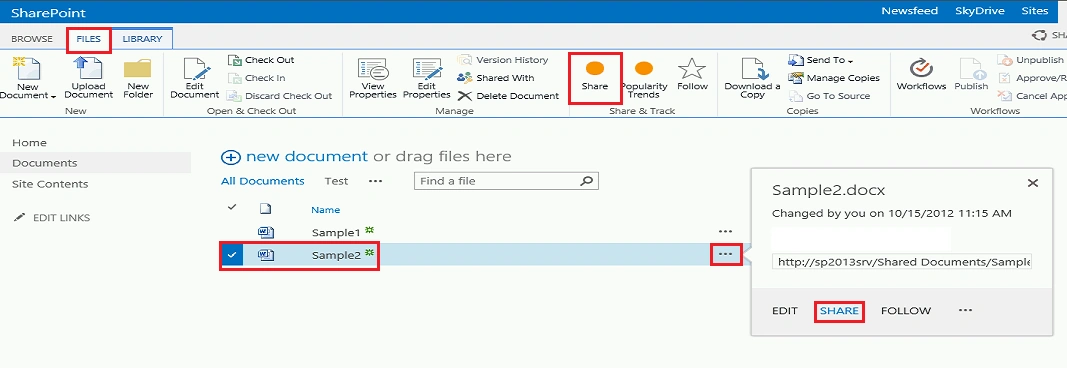
In this blog you will see how to share the documents with other users in SharePoint 2013 document library.
Join the conversation! Your thoughts help the community grow.

Join to leave a comment
Members earn 10 SHARP for a comment, 10 SHARP for a reaction, and 250 SHARP for every blog they publish.
 DevSocialUpcoming · 3rd editionAI Agents ConferenceDec 1–3, 2026Live onlineFree to attend4days leftRegisterMembers onlyeBook · SharePointSharePoint Online And Office 365 AdministrationDownload now
Write a blog post and earn +250 SHARP when it is approved.
Write a blog
Koen VandeghinstePosted Feb 19, 2016, 12:32 AM EST
Can I ask 2 questions concerning this feature ? 1. is it correct that doing this (in edit mode) checks out the document (locking it for other users)? and 2. Is there a way to change the message that is sent out ?
Kiran JoshyaPosted Apr 3, 2015, 8:26 PM EDT
Thanks so much! Your instructions are very clear and helpful. I've been wondering how to do this for months and thrilled to find out how finally!<a href="http://staygreenacademy.com/sharepoint-developer-online-training-videos-certification-courses/">SharePoint Developer Certification Training Online</a>
Amir ShalomPosted Nov 29, 2012, 2:35 AM EST
What will happen if users do it on 1,000 different docs in a doclib ? after passing 1,000 ACLs (ie sharing ...) per doclib microsoft says performance will suffer ... tried it on sp2010 , after 30,000 FGPs performance is slow!! There's a big article of best practices using Fine Grained Permissions. how do they live together ?