
I've seen this many times, developers do not change the default alignment in an ASP.NET Multiline TextBox control.
For example, in our Editor section, we have a TextBox that accepts text and it looks like the following.
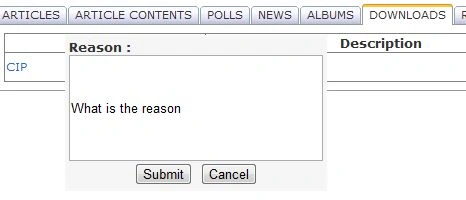
So what is wrong this picture?
The text in the TextBox starts with the center alignments vertically. The text alignment should be top-left unless specified otherwise in the requirements.


Mahesh ChandTOP 10Posted Sep 19, 2012, 8:11 PM EDT
Honey, search this website for Themes. You create multiple themes files and when click on a thumbnail, it will load a different theme. You are on right path. Post questions on the forums if you don't find the article.
Mahesh ChandTOP 10Posted Sep 19, 2012, 8:11 PM EDT
Honey, search this website for Themes. You create multiple themes files and when click on a thumbnail, it will load a different theme. You are on right path. Post questions on the forums if you don't find the article.
Honey ChawlaPosted Sep 11, 2012, 2:01 AM EDT
With Due Respect. Mahesh Sir: Sir i have a query that i want to solve but none of my teacher helped my with it. i asked my teacher that i want to make theme in asp.net which can be applied to whole website and it remain intact througout the website and if a user want to change the theme then the themes should be listed with their thumbnail preview. Sir i hope you can help me with this. Waiting for reply.