
Introduction
Today we understand the basic but important uses of some DBCC commands in SQL Server.
So what is DBCC?
Database Consistency Checker will help us to check the consistency of the database, this is also known as database console commands.
These commands are divided into the below categories.
- Maintenance
- Miscellaneous
- Informational
- Validation
Maintenance
This category includes commands for the tasks related to database, index, and filegroup, as shown below.
- CLEANTABLE
- DBREINDEX
- DROPCLEANBUFFERS
- FREEPROCCACHE
- INDEXDEFRAG,
- SHRINKDATABASE
- SHRINKFILE
- UPDATEUSAGE
Miscellaneous
This category includes commands for the tasks related to trace flag or DDL memory management, as shown below.
- HELP
- FLUSHAUTHCACHE
- TRACEOFF
- FREESESSIONCACHE
- TRACEON
- FREESYSTEMCACHE
- CLONEDATABASE
Informational
This category includes commands for tasks to collect or display different types of information, like below.
- INPUTBUFFER
- SHOWCONTIG
- OPENTRAN
- OUTPUTBUFFER
- PROCCACHE
- SHOW_STATISTICS
- SQLPERF
- TRACESTATUS
- USEROPTIONS
Validation
This category includes commands for the tasks to perform some kind of validation actions on the database, index, tables, etc., which I would say are more useful in certain ways, like below.
- CHECKALLOC
- CHECKCATALOG
- CHECKCONSTRAINTS
- CHECKDB
- CHECKFILEGROUP
- CHECKIDENT
- CHECKTABLE
So let's understand the basic but useful DBCC commands that we might not be familiar with but could help in many ways to solve our problem(s).
DBCC HELP
This command falls under the Miscellaneous category.
Syntax
- DBCC HELP ('?');
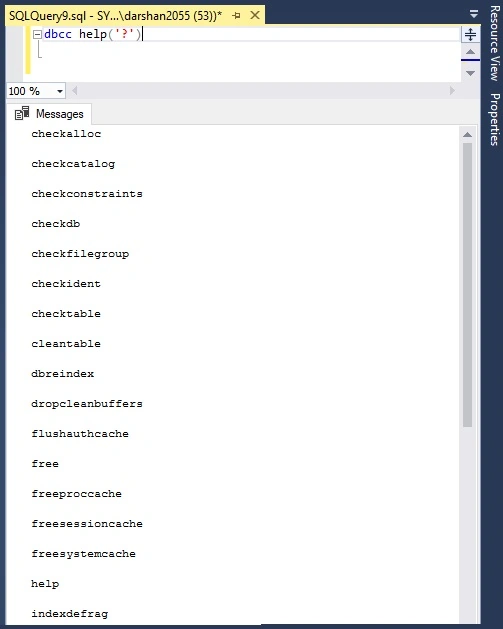
The above statement/command will return all the supported/available DBCC commands to the specific SQL Server version like on the below screen.

Note
Need sysadmin role to execute the above command.
Now we may be thinking of how to use the above commands. It's very simple, we will use the same HELP command, but with the parameter shown below.
Syntax
- DBCC HELP (checkident);
- GO
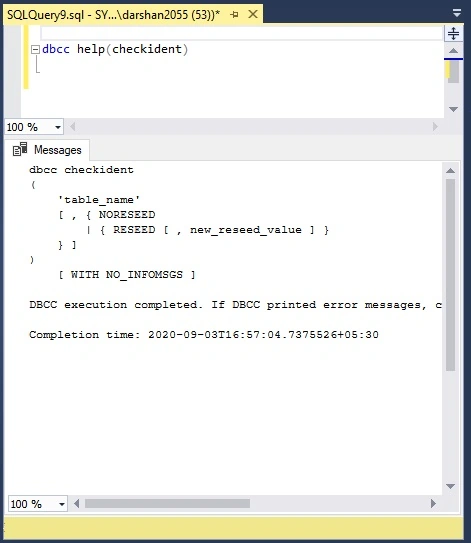
The above statement/command will return the complete syntax of "how to use the checkident command" like in the below screen.
DBCC CHECKIDENT
This command falls under the Validation category.
This command helps us to find the current identity value or to reset new identity values for the specific table.
Let's see how to get the current identity of a specific table.
SQL Script
- DBCC CHECKIDENT ('[table_name]', NORESEED);
Screen
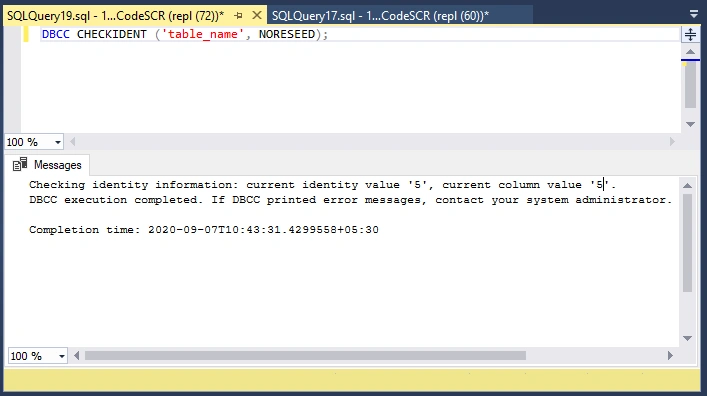
So we can see the current identity value is 5 for this table. When we insert a new value, it will start from 6.
Now let's see how to reset the identity value for a specific table.
SQL Script
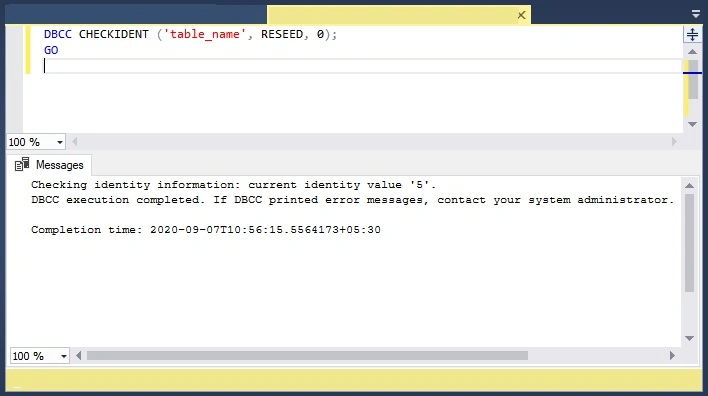
- DBCC CHECKIDENT ('table_name', RESEED, 10);
Screen
Some points to remember:
- The db_owner role can perform this command.
- If you try to set the value in reseed which already exists in the database, it could lead to a unique constraint exception or violation.
- It always starts one number after you reseed it. If you reseed 50, then it will start at 51, and so on.
DBCC SQLPERF
This command falls under the Informational category.
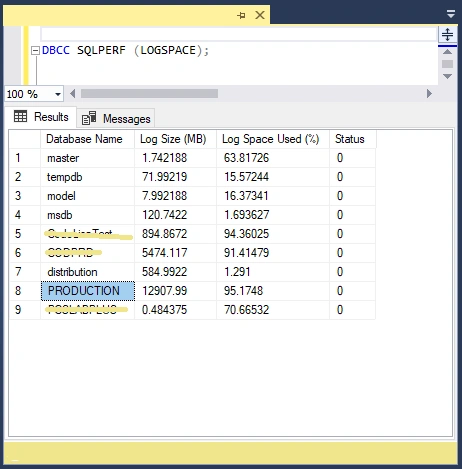
This command provides information about the usage of Transaction Log for all log files for a specific instance.
SQL Script
- DBCC SQLPERF (LOGSPACE);
Screen
Some points to remember.
- To run this Informational command, the user would need VIEW SERVER STATE and ALTER SERVER STATE permission on to the server.
- This command also helps to reset wait and latch statisticsssss but to make it run you must have ALTER SERVER STATE permission on to the server.
Scripts (Reset wait and latch statistics):
- -- Below script to clear spinlock statistics:
- DBCC SQLPERF ("sys.dm_os_spinlock_stats", CLEAR);
- --Below script to clear latch statistics:
- DBCC SQLPERF ("sys.dm_os_latch_stats", CLEAR);
- -- Below script to clear wait statistics
- DBCC SQLPERF ("sys.dm_os_wait_stats", CLEAR);
I hope this blog can help you.
Thanks for reading!


Ashish RathodPosted Sep 23, 2020, 7:16 PM EDT
Easy way to understand contents. Thanks for sharing!
Pankajkumar PatelPosted Sep 18, 2020, 8:22 PM EDT
Contents are good.