
Today, while I am installing hadoop on my local system I found an issue that I am not able to install ubuntu 64bit OS while my host is 64bit windows 10 operating system.
After installing successful Oracle VM virtual box I am trying to install ubuntu 64bit, I can’t find that option.
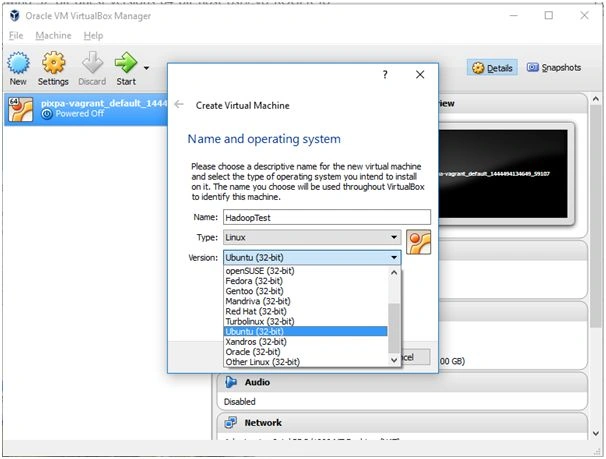
This was annoying because I do have 64 bit OS and I could not use.
Let’s make some change in BIOS. Restart the system and press F10 for BIOS.
Go to system configuration tab. You will find visualization technology as disabled.

Turn it Enabled. Select virtualization technology row and press enter.
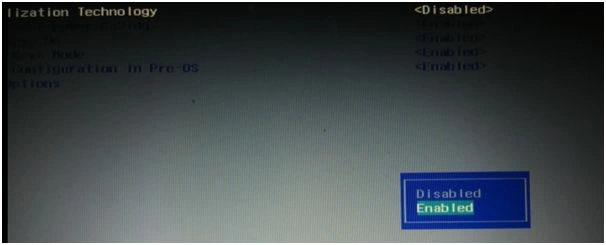
Press enter.
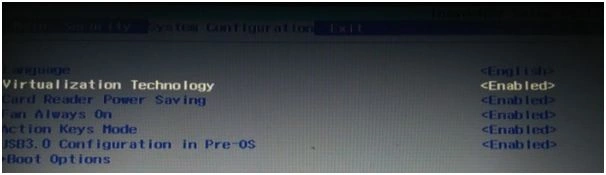
Press F10 for save the changes and exit.

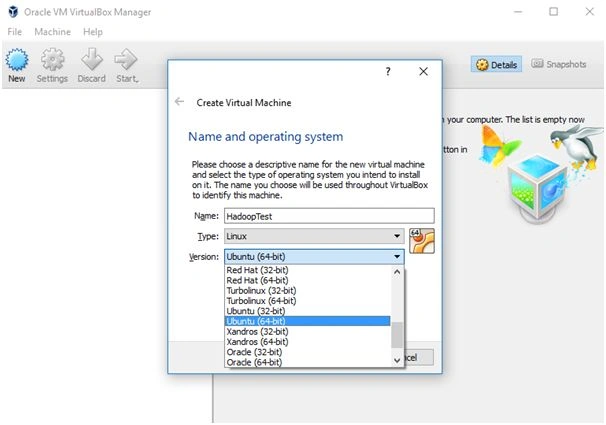
Now I am able to select ubuntu 64 bit when I create virtualbox.
Hope enjoy this article.
Enable Virtualization Technology To Install 64-bit OS In VirtualBox
In this blog you will learn solution of Virtualbox Only have 32-Bit Option, No 64-Bit Option on Windows 10.


Kinex MediaPosted Apr 25, 2016, 2:47 AM EDT
Thanks
Kiran ThakurPosted Jan 16, 2016, 12:32 AM EST
nice share..
Santhakumar MunuswamyPosted Jan 8, 2016, 10:05 PM EST
Thanks for nice share