I work on asp.net mvc Project .I face issue action ApprovalIndex Not redirect to action PendingManagersRequests although no error happen .
I debug and trace breakpoint until reach action PendingManagersRequests and trace until I reach to view return View(vmr); without any issues .
so why it not redirect to view PendingManagersRequests Although no issues happen
steps to my code
1- when click button approve submit it update table column SpeakStuffComment based on Request No
TypeScript
 using (Html.BeginForm("ApprovalIndex", "Resignation", new { id = Model.RequestNo }, FormMethod.Post, htmlAttributes: new { @style = "display:inline;" }))
        {
            @Html.AntiForgeryToken()

                                     Approve
        }
2- when click approve button it call ApprovalIndex on controller ResignationController
C#
public class ResignationController : Controller
    {

        public async Task ApprovalIndex(ResignationRequester REQ)
        {
            string errorMsg = string.Empty;
            string requestStatus;


                 Workforce.ResignationUpdateLineManangerApproval(id, true,Convert.ToInt32(Session[SessionKeys.UserCode]));
                    return RedirectToAction("PendingManagersRequests", new { msg = $"Request NO {REQ.RequestNo} has been accepted " +
                        $"successfully." });

        }
   }
3-jquery call action approvalIndex on resignation controller
JavaScript
    function submit() {
        var ResignationRequester = new Object();
        ResignationRequester.RequestNo = document.getElementById("RequestNo").innerHTML.trim();
        ResignationRequester.EmpID = document.getElementById("EmpID").innerHTML.trim();
        ResignationRequester.SpeakStuffComment = document.getElementById("SpeakStuffComment").value;


        if (ResignationRequester != null) {
            $.ajax({
                type: "POST",
                url: '@Url.Action("ApprovalIndex", "Resignation")',
                data: JSON.stringify(ResignationRequester),
                contentType: "application/json; charset=utf-8",
                dataType: "json",
                success: function (response) {
                    console.log(response);
                },
                failure: function (response) {
                    alert(response.responseText);
                },
                error: function (response) {
                    alert(response.responseText);
                }
            });
        }
    }
C#
public async Task PendingManagersRequests(string msg, string errorMsg)
    {

        ViewModelRequests vmr = new ViewModelRequests();

        vmr.MyRequests = Workforce.GetPendingToDisplayMyRequests(Session[SessionKeys.UserCode].ToString());


        ViewBag.msg = msg;
        ViewBag.errorMsg = errorMsg;
        return View(vmr);
    }
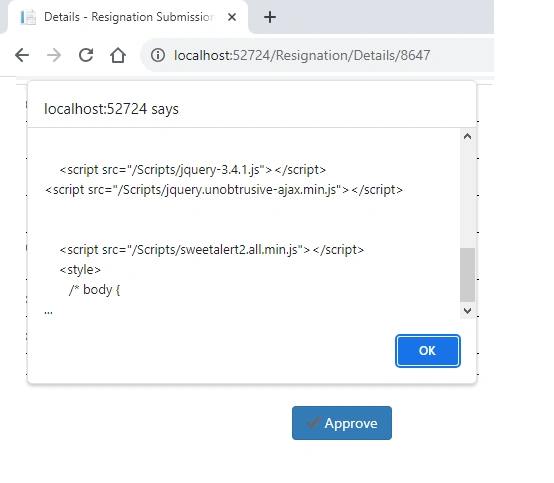
finally I get only this popup localhost say although from action approvalindex no error







Naimish MakwanaRank #324 · 7.7K reputationPosted Oct 18, 2023, 1:17 AM EDT
Hi Ahmed,
the issue you are facing could be related to the use of an AJAX call in your scenario. When you make an AJAX call, it doesn't perform a full page refresh, which means that any redirections that occur on the server side won't automatically navigate to a new page as they would with a standard form submission.
If you want to redirect to a different action/method after a successful AJAX call, you need to handle the redirection in your JavaScript code, not on the server side.
After a successful AJAX call, you can use
window.locationto navigate to the desired URL. For example:success: function (response) { window.location.href = '@Url.Action("PendingManagersRequests")'; }Thanks
Naimish Makwana
ahmed salahRank #2,240 · 628 reputationPosted Oct 18, 2023, 2:39 AM EDT
but why it go to failure section after ajax request
can you tell me why
ahmed salahRank #2,240 · 628 reputationPosted Oct 18, 2023, 3:02 AM EDT
it go to failure although it not have any error when debug code
Naimish MakwanaRank #324 · 7.7K reputationPosted Oct 18, 2023, 3:13 AM EDT
Try below code:
Change controler code to
public async Task ApprovalIndex(ResignationRequester REQ)
{
    string errorMsg = string.Empty;
    string requestStatus;

    // Your business logic here

    return Json(new { success = true, message = $"Request NO {REQ.RequestNo} has been accepted successfully." });
}
your JavaScript code
$.ajax({
    type: "POST",
    url: '@Url.Action("ApprovalIndex", "Resignation")',
    data: JSON.stringify(ResignationRequester),
    contentType: "application/json; charset=utf-8",
    dataType: "json",
    success: function (response) {
        if (response.success) {
            // Handle success here, for example, navigate to a new page.
            window.location.href = '@Url.Action("PendingManagersRequests")';
        } else {
            alert(response.message);
        }
    },
    error: function (xhr, status, error) {
        console.log(xhr.responseText);
        alert("An error occurred: " + xhr.responseText);
    }
});
Thanks