I work on asp.net razor page i face issue when convert html table to datatable jquery
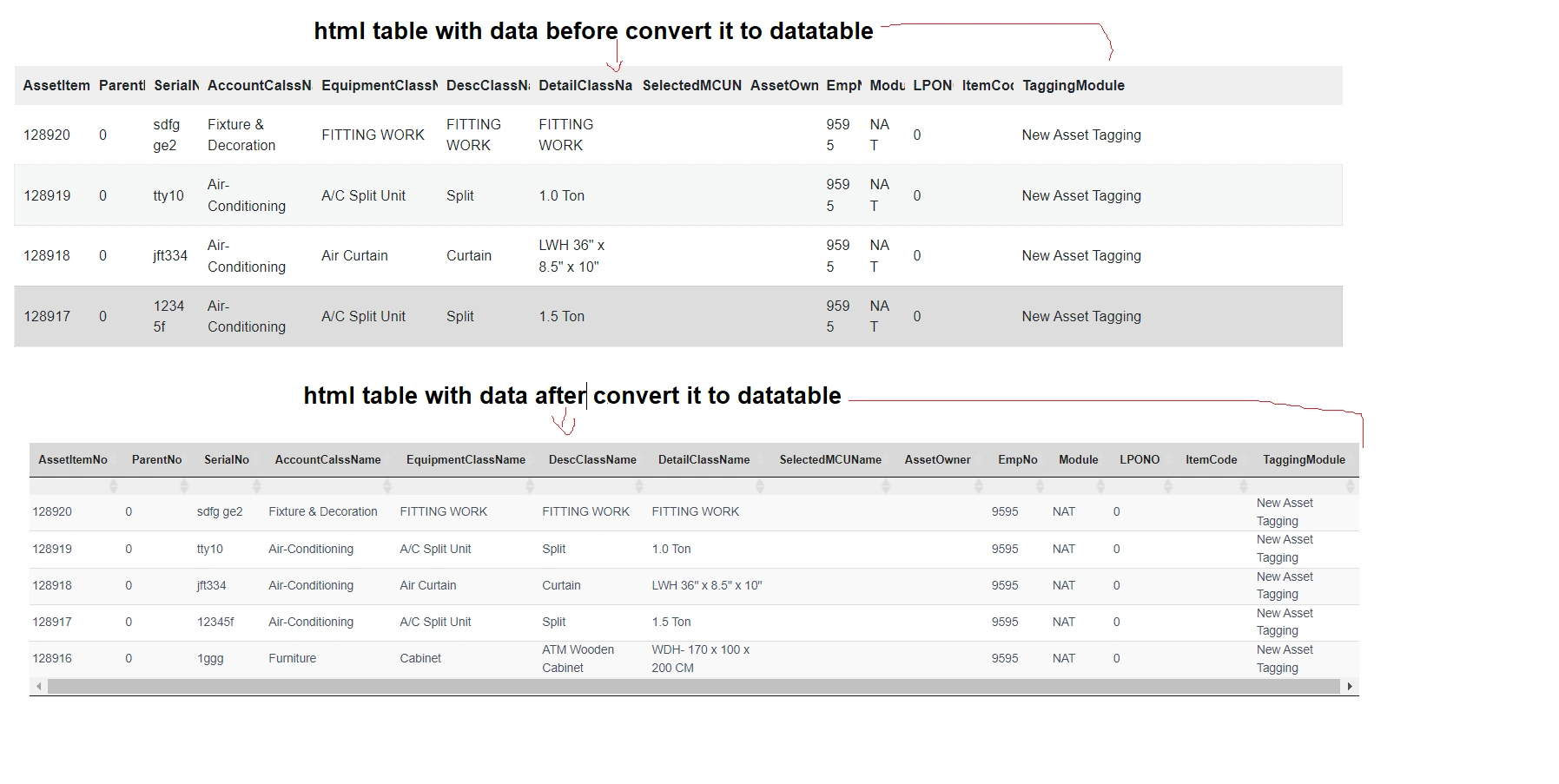
design of table width and cell heigh and size of table changed after convert it to datatable using jquery
Desired result to be datatable after converted and original html table be same on every thing width and size and heigh
so what is issue i don't know
i convert table to datatable for pagination and search and filter and sort etc .
what i tr as below
1- html table before convert it to datatable using jquery
TypeScript
                        AssetItemNo
                        ParentNo
                        SerialNo
                        AccountCalssName
                        EquipmentClassName
                        DescClassName
                        DetailClassName
                        SelectedMCUName
                        AssetOwner
                        EmpNo
                        Module
                        LPONO
                        ItemCode
                        TaggingModule


                    @if (Model.DisplayAssetTaggingDetails.AssetWithTaggingListData != null)
                    {
                        @foreach (var AssetData in Model.DisplayAssetTaggingDetails.AssetWithTaggingListData)
                        {


                                @AssetData.AssetItemNo
                                @AssetData.ParentNo
                                @AssetData.SerialNo
                                @AssetData.AccountCalssName
                                @AssetData.EquipmentClassName
                                @AssetData.DescClassName
                                @AssetData.DetailClassName
                                @AssetData.SelectedMCUName
                                @AssetData.AssetOwner
                                @AssetData.EmpNo
                                @AssetData.Module
                                @AssetData.LPONO
                                @AssetData.ItemCode
                                @AssetData.TaggingModule


                        }
                    }
2- convert html table aboe to datatable with jquery for pagination
JavaScript
     $(document).ready(function () {


         var table = $('#example').DataTable({
             "bFilter": false,

             "paging": true, // Enable pagination
             "pageLength": 5, // Default number of rows per page
             "lengthMenu": [5, 10, 15, 20, 25, -1], // Dropdown options for number of rows per page
             "order": [], // Disable initial sorting
             "scrollX": true, // Enable horizontal scrolling,
                     "columnDefs": [
                 { "targets": 'th', "className": 'dt-wrap' } // Add a custom class to the header cells
             ]
         });

         // Handle dropdown selection change event
         $('#page-length').on('change', function () {
             var selectedValue = parseInt($(this).val()); // Get the selected value from the dropdown
             table.page.len(selectedValue).draw(); // Set the number of rows per page and redraw the DataTable
         });

         });
so what i do to fix this issue please
so why design change after convert html table to datatable using jquery







Amit MohantyRank #112 · 20K reputationPosted Feb 20, 2024, 1:16 AM EST
You can disable DataTable's default styling by setting bAutoWidth to false to disable automatic column width in your DataTable initialization:
var table = $('#example').DataTable({
    "bFilter": false,
    "paging": true,
    "pageLength": 5,
    "lengthMenu": [5, 10, 15, 20, 25, -1],
    "order": [],
    "scrollX": true,
    "bAutoWidth": false, // Disable automatic column width calculation
    "columnDefs": [
        { "targets": 'th', "className": 'dt-wrap' }
    ]
});
After initializing the DataTable, you can adjust the CSS to match your desired design. You may need to override DataTable's default styles or adjust your own styles to accommodate DataTable's structure.