Hi
I have below TypeScript & Html but material UI effects are not shown. Simple dialog box is shown
TypeScript
import { Component, Inject } from '@angular/core';
import { MatDialog, MAT_DIALOG_DATA, MatDialogRef, MatDialogActions, MatDialogClose, MatDialogTitle, MatDialogContent, MatDialogModule} from '@angular/material/dialog';
@Component({
  selector: 'app-confirmation-dialog',
  standalone: true,
  imports: [MatDialogModule,MatDialogActions, MatDialogClose,MatDialogTitle,MatDialogContent],
  templateUrl: './confirmation-dialog.component.html',
  styleUrl: './confirmation-dialog.component.css'
})
Code
Are You Sure?

    {{message}}


    {{confirmButtonText}}
    {{cancelButtonText}}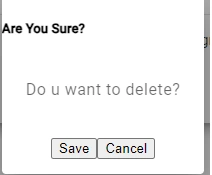
Thanks







Naimish MakwanaRank #324 · 7.7K reputationPosted Jun 6, 2024, 5:00 AM EDT
It seems like you’re trying to use Angular Material Dialog in your Angular application, but the Material UI effects are not being applied. Here are a few things you could check:
Angular Material Module Import: Make sure you have imported the
MatDialogModulein your module where this component is declared, not in the component itself. Theimportsarray should be in yourNgModule, not in@Component.Styles: Ensure that you have included the Angular Material theme in your styles. You can include it in your
styles.cssorstyles.scssfile at the root of your project like this:@import "~@angular/material/prebuilt-themes/indigo-pink.css";You can choose a theme that fits your application from the prebuilt themes.
Animations: Angular Material uses Angular’s animation library to provide smooth animations. Make sure you have added the
BrowserAnimationsModulein your app module. If you don’t want to add animations, you can useNoopAnimationsModuleinstead.Check for Errors: Check your browser’s console for any errors. Sometimes, the Material UI might not work as expected due to some errors or failed dependencies.
Remember, the
MatDialogis a service, so it should be included in theprovidersarray of yourNgModuleor component, and then injected into the constructor of your component, like this:constructor(public dialog: MatDialog) {}Thanks
Jayraj ChhayaRank #304 · 8.2K reputationPosted Jun 6, 2024, 2:57 AM EDT
To ensure that Angular Material UI effects are displayed properly, make sure to include the necessary Angular Material modules in your Angular application. Check if the Angular Material theme is correctly imported in your styles.scss file. Additionally, confirm that the Angular Material dialog module is imported in your app module.
import { MatDialogModule } from '@angular/material/dialog'; import { MatButtonModule } from '@angular/material/button'; import { MatIconModule } from '@angular/material/icon'; // Import other necessary Angular Material modules @NgModule({ imports: [ MatDialogModule, MatButtonModule, MatIconModule // Add other Angular Material modules here ] }) export class AppModule { }Vishal JoshiRank #377 · 6.7K reputationPosted Jun 6, 2024, 4:37 AM EDT
Hello Ramco,
Please make sure you have exported MatDialogModule in app.module.ts file.
Check the below code in app.module.cs file
import { MatDialogModule } from '@angular/material';

NgModule({
  exports: [
    // Material
    MatDialogModule
  ]
})
Also, Check component file imports the below:
import { VERSION, MatDialogRef, MatDialog, MatSnackBar, MAT_DIALOG_DATA } from '@angular/material';Thanks
Vishal