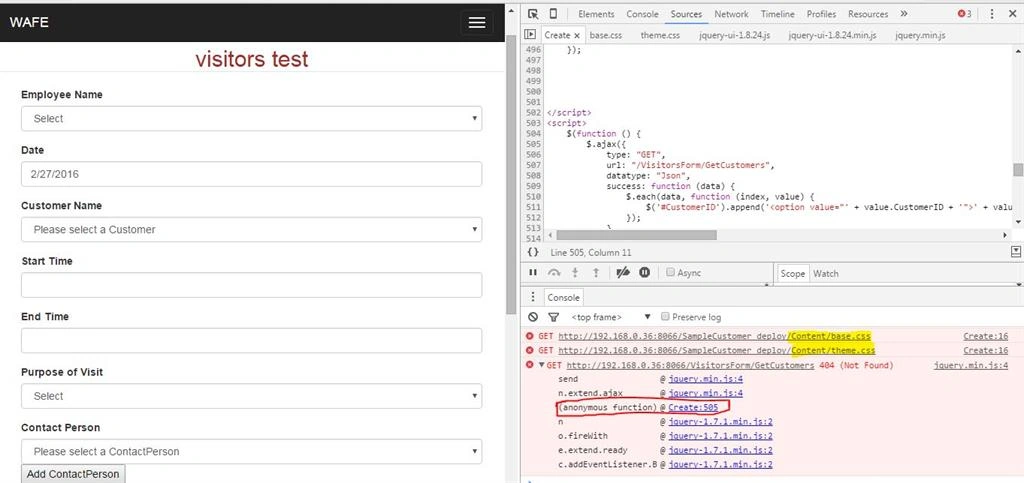
Hi i have one view called visitors view in my project. In that view it contain two drop downsCustomerName and ContactPerson if i select the CustomerName the CustomerName related ContactPerson name will be automatically load in contact person drop down.its like Cascading DropDown. This process is working fine in normal mode that is when i run my application this cascading dropdown is working fine. But when i publish my project in LocalHost and run the application both the dropdown are not loading the values from db. These cascading is not working. so i inspect the issue in browser at that time i got these issue. The issue are below. please any one tell me what are the issue is this? Give me solution for this problem
My ViewModel
C#
   public NullableSystem.Guid> CustomerID { get; set; }
   public string CustomerName { get; set; }
   public NullableSystem.Guid> CustomerContactID { get; set; }
   public string ContactPerson { get; set; }
My Controller
public ActionResult Create()
{
public JsonResult GetCustomers()
{
return Json(db.Customers.ToList(), JsonRequestBehavior.AllowGet);
}
public JsonResult GetContactPersobByCustomerId(string customerId)
{
Guid Id = Guid.Parse(customerId);
var customercontacts = from a in db.CustomerContacts where a.CustomerID == Id select a;
return Json(customercontacts);
}
return View();
}
My View
@Html.Label("Customer Name", new { @class = "control-label" })
@Html.DropDownListFor(model => model.CustomerID, new SelectList(string.Empty, "Value", "Text"), "Please select a Customer", new { @class = "form-control required", type = "text" })
@Html.Label("Contact Person", new { @class = "control-label" })
@Html.DropDownListFor(model => model.CustomerContactID, new SelectList(string.Empty, "Value", "Text"), "Please select a ContactPerson", new { @class = "form-control", type = "text", id = "CustomerContactID" })
My Jquery
6 Answers
Know the answer? Post it. Somebody with the same question will find it here.

Answer a question in the forums and earn +20 SHARP for every answer.
See unanswered questionsForums
Top experts
 Arun PottiAnswers in the forums20answers02
 Tahir AnsariAnswers in the forums5answers03
 Kamlesh KumarAnswers in the forums5answers04
 Sam HobbsAnswers in the forums4answers05
 Željko PerićAnswers in the forums3answersFull leaderboard →
 DevSocialUpcoming · 3rd editionAI Agents ConferenceDec 1–3, 2026Live onlineFree to attend4days leftRegister
Manas MohapatraRank #182 · 13.2K reputationPosted Feb 26, 2016, 11:56 PM EST
Sneha KRank #2,496 · 563 reputationPosted Feb 27, 2016, 12:41 AM EST
Manas MohapatraRank #182 · 13.2K reputationPosted Feb 27, 2016, 8:18 PM EST
Sneha KRank #2,496 · 563 reputationPosted Feb 28, 2016, 5:57 PM EST
@Html.Label("Contact Person", new { @class = "control-label" })
@Html.DropDownListFor(model => model.CustomerContactID, new SelectList(string.Empty, "Value", "Text"), "Please select a ContactPerson", new { @class = "form-control", type = "text", id = "CustomerContactID" })
$("#AddNewContactPerson").dialog({
autoOpen: true,
position: { my: "center", at: "top+350", of: window },
width: 1000,
resizable: false,
title: 'Add New Area',
modal: true,
open: function () {
$(this).load('@Url.Action("ContactPersonPartialView", "VisitorsForm")');
},
buttons: {
Cancel: function () {
$(this).dialog("close");
}
}
});
return false;
});
@Html.LabelFor(model => model.CustomerName)
@Html.DropDownList("CustomerID", "Select")
@Html.LabelFor(model => model.ContactPerson)
@Html.EditorFor(model => model.ContactPerson)
@Html.ValidationMessageFor(model => model.ContactPerson)
@Html.LabelFor(model => model.Email)
@Html.EditorFor(model => model.Email)
@Html.ValidationMessageFor(model => model.Email)
public string CustomerName { get; set; }
public Nullable
public Nullable
public string ContactPerson { get; set; }
public string PhoneNo { get; set; }
public string MobileNo { get; set; }
public string Email { get; set; }
public string AlternateEmail { get; set; }
{
ViewBag.CustomerID = new SelectList(db.Customers, "CustomerID", "DisplayName");
return PartialView ();
}
[HttpPost]
public JsonResult ContactPersonCreate(VisitorsViewModel VVviewmodel)
{
ViewBag.CustomerID = new SelectList(db.Customers, "CustomerID", "DisplayName", VVviewmodel.CustomerID);
var ContactIDObj = Guid.NewGuid();
var CustomerContactIDObj = Guid.NewGuid();
var CustomerContactObj = new CustomerContact()
{
CustomerContactID = CustomerContactIDObj,
CustomerID = VVviewmodel.CustomerID,
ContactReference = VVviewmodel.ContactPerson,
ContactID = ContactIDObj,
IsActive = true,
IsDeleted = false,
CreatedDate = DateTime.Now,
EditedDate = DateTime.Now,
LastActiveOn = DateTime.Now,
RowID = Guid.NewGuid(),
CreatedSessionID = Guid.NewGuid(),
EditedSessionID = Guid.NewGuid(),
OfflineMode = false,
OfflineID = Guid.NewGuid()
};
var ContactObj = new Contact()
{
ContactID = ContactIDObj,
DisplayName = VVviewmodel.CustomerID.ToString(),
PrintName = VVviewmodel.CustomerID.ToString(),
Phone1 = VVviewmodel.PhoneNo,
Mobile1 = VVviewmodel.MobileNo,
Email1 = VVviewmodel.Email,
Email2 = VVviewmodel.AlternateEmail
};
db.Contacts.Add(ContactObj);
db.CustomerContacts.Add(CustomerContactObj);
db.SaveChanges();
ModelState.Clear();
//return Json(new
//{
// redirectUrl = Url.Action("create", "VisitorsForm"),
// isRedirect = true
//});
return Json( "VisitorsForm" ,JsonRequestBehavior.AllowGet);
}
Manas MohapatraRank #182 · 13.2K reputationPosted Feb 28, 2016, 6:53 PM EST
Sneha KRank #2,496 · 563 reputationPosted Feb 28, 2016, 7:37 PM EST