I have created a little blog and I have a view and have embedded a partial view in it.
The embedded partial view is the 'like' button(link).
It appears in the view but when I click the 'like' anchor, it does not go into the partial view.
I have an alert and console log and they do not appear.
When I click it, the # is appended to the URL.
What am I doing wrong?
Also, I want to reference a value from a button in the parent view.
I try: var blogId = $(this).attr("data-id");
Is that correct?
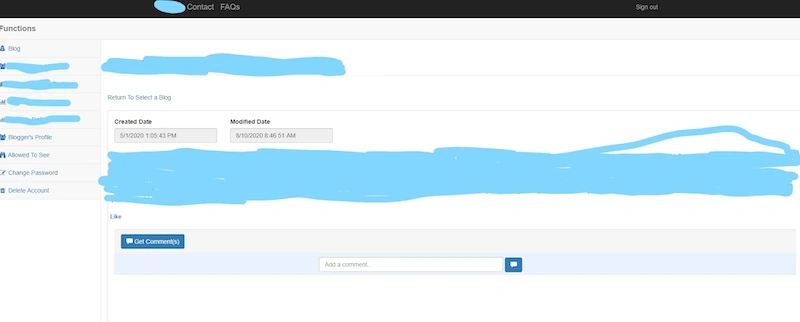
--- The view - the parent.
- @model GbngWebClient.Models.BlogPublishedByBlogIdVM
class
="page-header">class="blogtitle">@Session["BlogTitle"]- @{
- Layout = "~/Views/Shared/_LayoutUser.cshtml";
- }
- @if (ViewBag.errormessage != null)
- {
-
class
="alert alert-danger" id="errorMessage">@ViewBag.errormessage - }
- "@Url.Action("LoadDropdownBlogCategorysInBlogsPublished", "BlogPublished")">Return To Select a Blog
- @if (Model != null)
- {
- class="panel panel-default toppanel">class="panel-body">class="row">class="col-md-2">
- @Html.LabelFor(model => model.BlogPublishedByBlogId.CreatedDateTime)
- @Html.TextBoxFor(model => model.BlogPublishedByBlogId.CreatedDateTime, new { @class = "form-control", @disabled = "disabled" })

class="col-md-2">- @Html.LabelFor(model => model.BlogPublishedByBlogId.ModifiedDateTime)
- @Html.TextBoxFor(model => model.BlogPublishedByBlogId.ModifiedDateTime, new { @class = "form-control", @disabled = "disabled" })

class="row">- @Html.DisplayFor(model => model.BlogPublishedByBlogId.BlogContent, new { @class = "form-control blogContent", @disabled = "disabled" })
class="row">- @Html.Partial("_BlogLikeOrDislike")
class="panel-footer">- class="btn btn-primary Comment" data-id="@Model.BlogPublishedByBlogId.BlogId" value="Comment">
- class="glyphicon glyphicon-comment" aria-hidden="true"> Get Comment(s)
- @* The area dynamically built. It will hold the partial view - BlogPublished/_Comments.cshtml which also holds the partial view - BlogPublished/_CommentReplys.cshtml. *@
- @* The partial view is shown after the 'Get Comment(s)' button above is clicked. *@
- @* Add comment area. *@
"@string.Format("{0}_{1}","commentsBlock", @Model.BlogPublishedByBlogId.BlogId)" style="border: 1px solid #f1eaea; background-color: #eaf2ff;">- @*Centering the button with in-line CSS. *@
class="AddCommentArea" style="margin-left: 30%; margin-bottom: 5px; margin-top: 8px;">- @Html.AntiForgeryToken()
- "text" id="@string.Format("{0}_{1}", "comment", @Model.BlogPublishedByBlogId.BlogId)" class="form-control" placeholder="Add a comment..." style="display: inline;" />
- @* Button. *@
- class="btn btn-primary addComment" data-id="@Model.BlogPublishedByBlogId.BlogId">class="glyphicon glyphicon-comment" aria-hidden="true">
- }
- @Scripts.Render("~/bundles/jqueryval")
- @Scripts.Render("~/bundles/jquery")
- @Scripts.Render("~/bundles/bootstrap")
- @Styles.Render("~/Content/css")
- @section Scripts
- {
- }
--- The small partial view - _BlogLikeOrDislike.cshtml.
- "#" class="LikeOrDislike" style="margin-left: 5px; font-weight: bold; font-size: 13px;">Like
- @Scripts.Render("~/bundles/jqueryval")
- @Scripts.Render("~/bundles/jquery")
- @Scripts.Render("~/bundles/bootstrap")
- @Styles.Render("~/Content/css")
- @section Scripts
- {
- }

First LastRank #2,033 · 713 reputationPosted Aug 16, 2020, 8:51 AM EDT
Farhan AhmedRank #73 · 25K reputationPosted Aug 14, 2020, 5:34 PM EDT
Navaneeth KrishnanRank #1,172 · 1.5K reputationPosted Aug 14, 2020, 8:08 PM EDT
First LastRank #2,033 · 713 reputationPosted Aug 15, 2020, 8:25 AM EDT
Jignesh KumarRank #91 · 22.9K reputationPosted Aug 15, 2020, 6:20 PM EDT
First LastRank #2,033 · 713 reputationPosted Aug 16, 2020, 6:07 AM EDT




