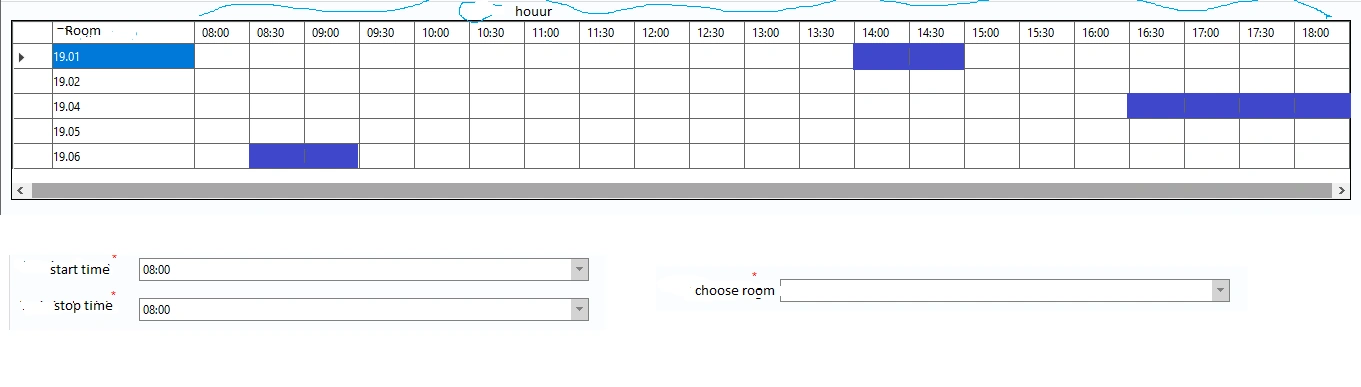
I want to look at the datagridview to know what time of the meeting is as shown in the picture. after selecting the start time and end time and choose the room
will automatically fill in the datagridview and have the background as shown. but the following code does not get that position, hope everyone can help.
C#
private void selectAreaColor()
{
    string starttime1 = cboStarttime.Text;
    string stoptime1 = cboStoptime.Text;
    // Get the start time and end time inputs and the selected meeting room
    DateTime startTime =DateTime.ParseExact( starttime1,"HH:mm",null);
    DateTime endTime = DateTime.ParseExact(stoptime1,"HH:mm",null);
    string selectedRoom = cboRoom.SelectedItem.ToString();

    // Loop through the rows in the DataGridView and find the matching row
    foreach (DataGridViewRow row in grdMeeting.Rows)
    {
        if (row.Cells[0].Value.ToString() == selectedRoom)
        {
            // Loop through the columns and compare the start and end times with the time slots
            for (int i = 1; i < grdMeeting.Columns.Count; i++)
            {
                DateTime columnTime = DateTime.ParseExact(grdMeeting.Columns[i].HeaderText, "HH:mm", null);
                if (startTime == columnTime || endTime == columnTime)
                {
                    //MessageBox.Show("Are you OK ");

                    grdMeeting.CurrentCell.Style.BackColor = Color.Blue;//Can't get the location to create the background
                    return;
                }
            }
        }
    }
}







Manikandan R128 reputationPosted Feb 17, 2023, 6:09 AM EST
Hello,
Try This
string starttime1 = dateTimePicker1.Text; string stoptime1 = dateTimePicker2.Text; // Get the start time and end time inputs and the selected meeting room DateTime startTime = DateTime.ParseExact(starttime1, "HH:mm", null); DateTime endTime = DateTime.ParseExact(stoptime1, "HH:mm", null); string selectedRoom = "101";// You Can Use this Dynamic Based on Your Selection // Loop through the rows in the DataGridView and find the matching row foreach (DataGridViewRow row in dataGridView1.Rows) { if (row.Cells[0].Value.ToString() == selectedRoom) { // Loop through the columns and compare the start and end times with the time slots for (int i = 1; i < dataGridView1.Columns.Count; i++) { DateTime columnTime = DateTime.ParseExact(dataGridView1.Columns[i].HeaderText, "HH:mm", null); string _HeaderText = dataGridView1.Columns[i].HeaderText.ToString(); if (startTime == columnTime)//|| endTime == columnTime { dataGridView1.CurrentRow.Cells[_HeaderText].Style.BackColor = Color.Blue;//Can't get the location to create the background if (startTime == endTime) return; else startTime = startTime.AddMinutes(30); //MessageBox.Show("Are you OK "); } } } }Tuhin PaulRank #7 · 71.9K reputationPosted Feb 18, 2023, 12:48 AM EST
Hi Honag,
See below the code if it can be of any help, after checing your code I tried some code at my end and I have come up with the following:
private void selectAreaColor()
{
    string starttime1 = cboStarttime.Text;
    string stoptime1 = cboStoptime.Text;
    // Get the start time and end time inputs and the selected meeting room
    DateTime startTime = DateTime.ParseExact(starttime1, "HH:mm", null);
    DateTime endTime = DateTime.ParseExact(stoptime1, "HH:mm", null);
    string selectedRoom = cboRoom.SelectedItem.ToString();

    // Loop through the rows in the DataGridView and find the matching row
    foreach (DataGridViewRow row in grdMeeting.Rows)
    {
        if (row.Cells[0].Value.ToString() == selectedRoom)
        {
            int rowIndex = row.Index;
            // Loop through the columns and compare the start and end times with the time slots
            for (int i = 1; i < grdMeeting.Columns.Count; i++)
            {
                DateTime columnTime = DateTime.ParseExact(grdMeeting.Columns[i].HeaderText, "HH:mm", null);
                if (startTime == columnTime || endTime == columnTime)
                {
                    int columnIndex = grdMeeting.Columns.IndexOf(grdMeeting.Columns[i]);
                    grdMeeting.Rows[rowIndex].Cells[columnIndex].Style.BackColor = Color.Blue;
                }
            }
        }
    }
}
You can get the row index by checking the
Indexproperty of theDataGridViewRowobject in the outer loop, and you can get the column index by using thegrdMeeting.Columns.IndexOfmethod to find the index of the column that matches the current time slot. Here's an updated version of yourselectAreaColormethod with these changes: