
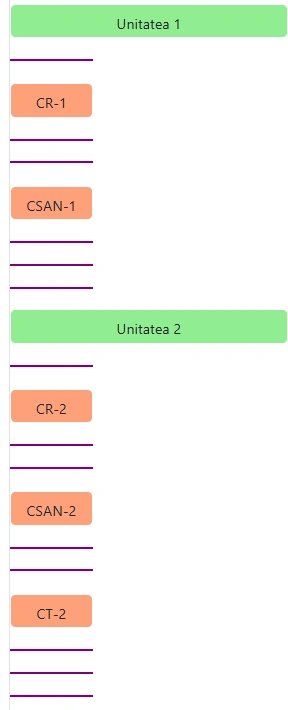
I have a list view binded to an sqlquery to a ListView. What I want is on click to load data and display for Unitatea 1 but click on Unitatea 2 to hide data for Unitatea 1 and display data only for Unitatea 2.
HTML
VB.NET
                ' />
                '
                    OnClick="LV1_Click"
                    UseSubmitBehavior="false"
                    Style="font-size: 11px; background-color: lightgreen" class="btn form-control form-control-sm"
                    data-toggle="collapse" data-target="#DivS" aria-expanded="false" aria-controls="DivS"
                    ClientIDMode="Static" />


                            ' />
                            '
                                OnClick="LV2_Click"
                                UseSubmitBehavior="false"
                                Style="font-size: 11px; background-color: lightsalmon" class="btn form-control form-control-sm"
                                data-toggle="collapse" data-target="#DivS" aria-expanded="false" aria-controls="DivT"
                                ClientIDMode="Static" />


                                        ' />
                                        '
                                            OnClick="LV3_Click"
                                            UseSubmitBehavior="false"
                                            Style="font-size: 11px; background-color: lightblue" class="form-control form-control-sm"
                                            data-toggle="collapse" data-target="#DivS" aria-expanded="false" aria-controls="DivT"
                                            ClientIDMode="Static" />
code behind
Java
protected void LV1_Click(object sender, EventArgs e)
{
    Button cmd = (Button)sender;
    ListViewItem ObiectivRow = (ListViewItem)cmd.NamingContainer;

    TextBox id = (TextBox)ObiectivRow.FindControl("txtIDOB");
    ListView LV2 = (ListView)ObiectivRow.FindControl("LV2");

    int idob = Convert.ToInt32(id.Text);

    List prm = new List
    {
        new SqlParameter("@IdOB", idob)
    };

    LV2.DataSource = GetDataTable("SELECT DISTINCT IdCL,Cladire FROM tblCladire WHERE IdOB= @IdOB;", prm);
    LV2.DataBind();

}

protected void LV2_Click(object sender, EventArgs e)
{
    Button cmd = (Button)sender;
    ListViewItem CladireRow = (ListViewItem)cmd.NamingContainer;

    TextBox id = (TextBox)CladireRow.FindControl("txtIDCL");
    int idcl = Convert.ToInt32(id.Text);
    ListView LstCamera = (ListView)CladireRow.FindControl("LV3");


    List prm = new List
    {
        new SqlParameter("@IdCL", idcl)
    };

    LstCamera.DataSource = GetDataTable("SELECT DISTINCT IdCA,Camera FROM tblCamera WHERE IdCL =@IdCL;", prm);
    LstCamera.DataBind();

}
an image of the displayed data
Marius VasileRank #785 · 2.9K reputationPosted Nov 17, 2024, 5:10 AM EST
Thank you Jignesh, for the first example may be a solution if the data is similar but I don't have Unitatea 1 , Unitatea 2 all over I all have Pavilion A, Building C and so on
Marius VasileRank #785 · 2.9K reputationPosted Nov 17, 2024, 4:51 AM EST
If I add
Jignesh KumarRank #91 · 22.9K reputationPosted Nov 17, 2024, 5:02 AM EST
$(document).ready(function () { // Hide all units by default $(".unit-list").hide(); // Click event on the button to toggle unit visibility $("button[data-toggle='collapse']").click(function () { // Get the unit data attribute for the clicked button var unit = $(this).data('unit'); // Hide all unit lists $(".unit-list").hide(); // Show the clicked unit's list $("div[data-unit='" + unit + "']").toggle(); }); });Answer a question in the forums and earn +20 SHARP for every answer.
See unanswered questionsTop experts