Error:
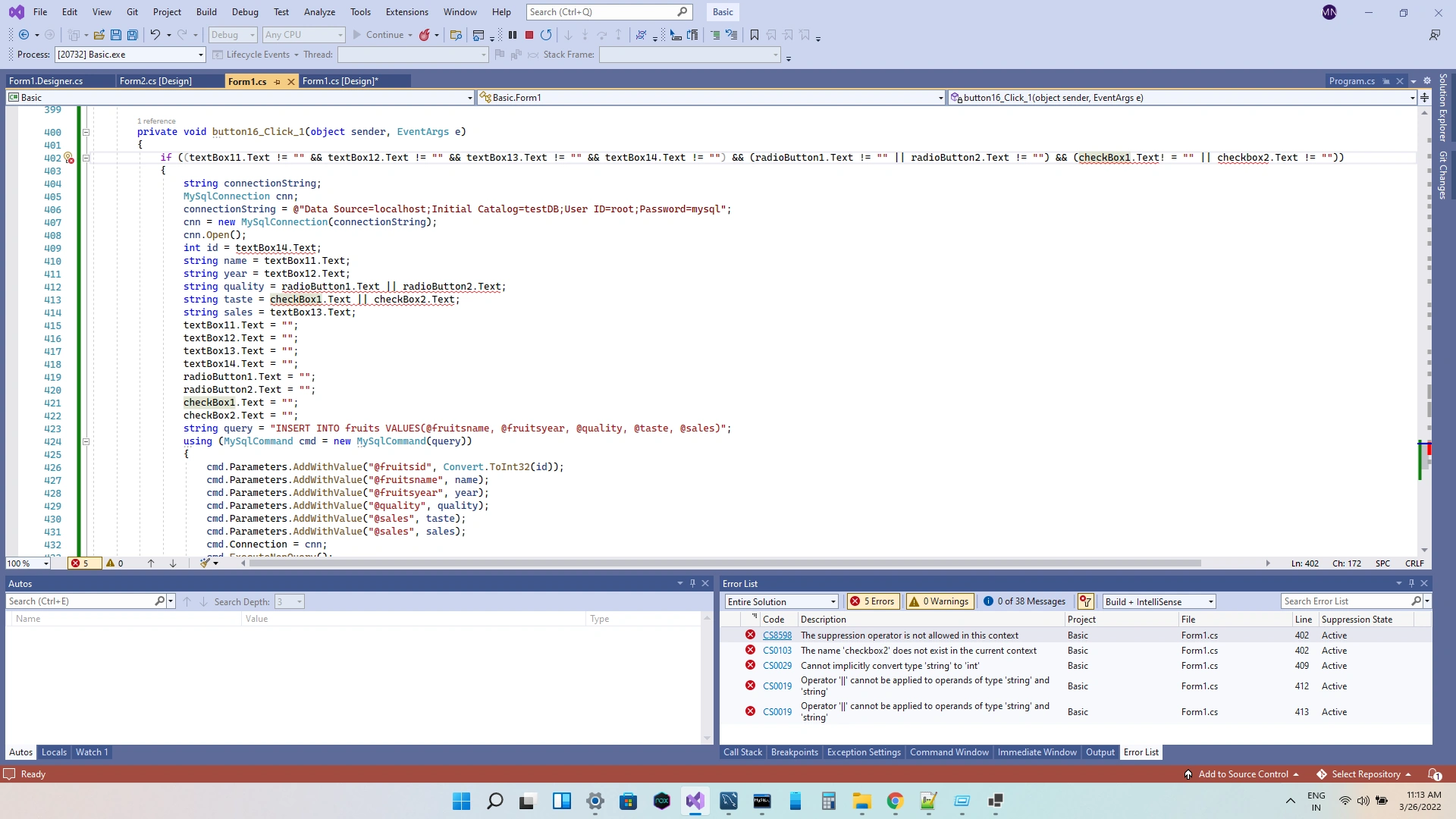
Operator && cannot be applied to operands of type bool and string
The name checkbox2 does not exist in the current context
Cannot implicit convert type string to int
Operator || cannot be applied to operands of type string and string
Operator || cannot be applied to operands of type string and string
if (textBox11.Text != "" && textBox12.Text != "" && textBox13.Text != "" && textBox14.Text != "" && radioButton1.Text != "" || radioButton2.Text != "" && checkBox1.Text! = "" || checkbox2.Text != "")
{
string connectionString;
MySqlConnection cnn;
connectionString = @"Data Source=localhost;Initial Catalog=testDB;User ID=root;Password=mysql";
cnn = new MySqlConnection(connectionString);
cnn.Open();
int id = textBox14.Text;
string name = textBox11.Text;
string year = textBox12.Text;
string quality = radioButton1.Text || radioButton2.Text;
string taste = checkBox1.Text || checkBox2.Text;
string sales = textBox13.Text;
textBox11.Text = "";
textBox12.Text = "";
textBox13.Text = "";
textBox14.Text = "";
radioButton1.Text = "";
radioButton2.Text = "";
checkBox1.Text = "";
checkBox2.Text = "";
string query = "INSERT INTO fruits VALUES(@fruitsname, @fruitsyear, @quality, @taste, @sales)";
using (MySqlCommand cmd = new MySqlCommand(query))
{
cmd.Parameters.AddWithValue("@fruitsid", Convert.ToInt32(id));
cmd.Parameters.AddWithValue("@fruitsname", name);
cmd.Parameters.AddWithValue("@fruitsyear", year);
cmd.Parameters.AddWithValue("@quality", quality);
cmd.Parameters.AddWithValue("@sales", taste);
cmd.Parameters.AddWithValue("@sales", sales);
cmd.Connection = cnn;
cmd.ExecuteNonQuery();
MessageBox.Show("Record Inserted Successfully");
DisplayData();
cnn.Close();
}
}
else
{
MessageBox.Show("Please Fill Data");
}
}










Sachin SinghRank #66 · 26.2K reputationPosted Mar 26, 2022, 2:15 AM EDT
Dinesh GabhaneRank #265 · 9.5K reputationPosted Mar 26, 2022, 1:30 AM EDT
Muhammad Imran AnsariRank #326 · 7.6K reputationPosted Mar 26, 2022, 2:00 AM EDT
Gajendra JangidRank #157 · 14.9K reputationPosted Mar 28, 2022, 1:00 AM EDT