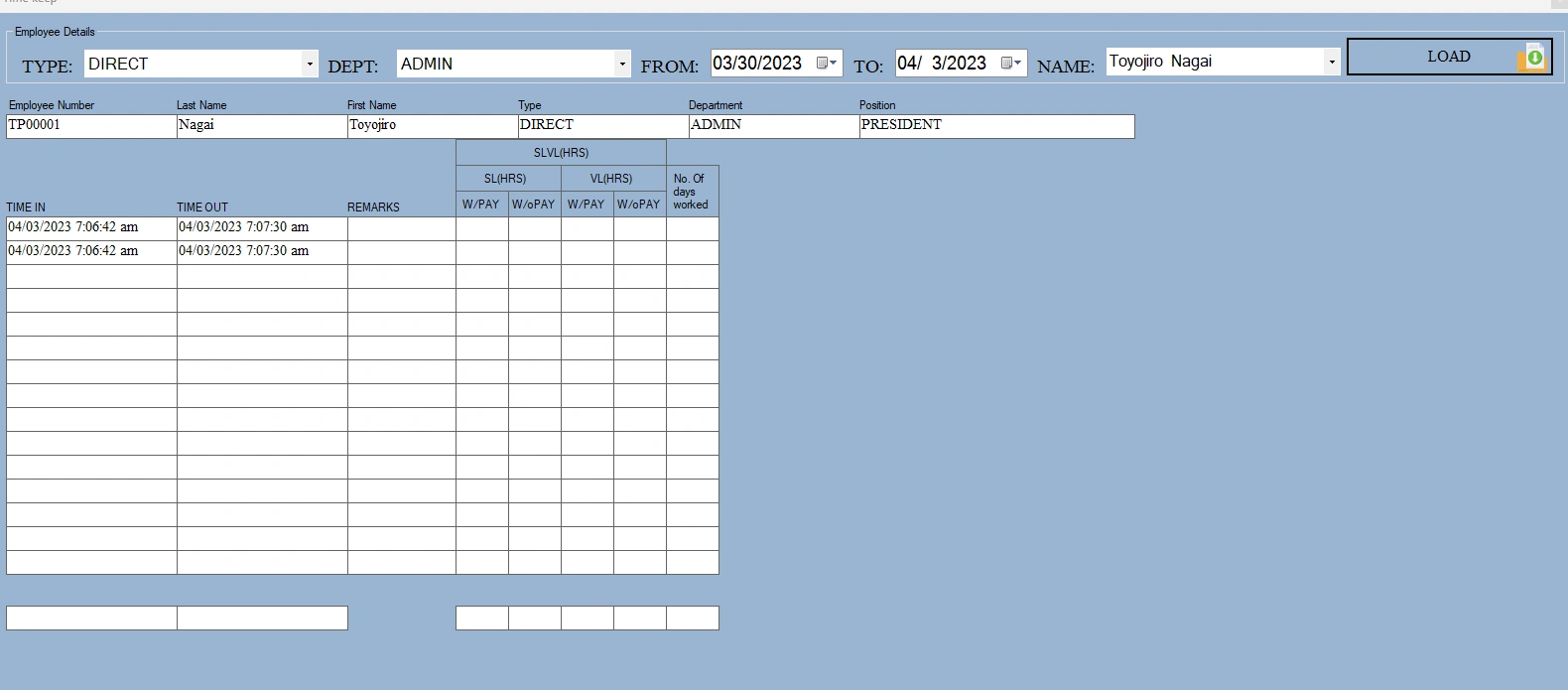
Hello guys please help me, I'm creating a time keeping I want the daterange from/to into textbox here is my code:
using (SqlConnection sqlConnection = new SqlConnection(Connect.pcnTEIPI))
{
SqlCommand command = new SqlCommand("select * from [AttendanceView] where Fullname ='" + cboName.Text + "' and TimeIn >= '"+ dtpDateFrom.Text +"' and TimeOut <= '"+ dtpDateto.Text +"'", sqlConnection);
sqlConnection.Open();
SqlDataReader read = command.ExecuteReader();
while (read.Read())
{
txtEmpNumber.Text = (read["Employeenumber"].ToString());
txtLastname.Text = (read["Lastname"].ToString());
txtFirstname.Text = (read["Firstname"].ToString());
txtType.Text = (read["Type"].ToString());
txtDepartment.Text = (read["Department"].ToString());
txtPosition.Text = (read["Position"].ToString());
TimeIN1.Text = (read["TimeIn"].ToString());
TimeOUT1.Text = (read["TimeOut"].ToString());
TimeIN2.Text = (read["TimeIn"].ToString());
TimeOUT2.Text = (read["TimeOut"].ToString());
}
}







Amit MohantyRank #112 · 20K reputationPosted Apr 3, 2023, 5:52 AM EDT
Try this
SqlConnection sqlConnection = new SqlConnection(conString);
sqlConnection.Open();
SqlCommand sqlCommand = new SqlCommand("usp_AttendanceDetails", sqlConnection);
sqlCommand.CommandType = CommandType.StoredProcedure;
sqlCommand.Parameters.AddWithValue("@fullName", cboName.Text);
sqlCommand.Parameters.AddWithValue("@timeIn", dtpDateFrom.Text);
sqlCommand.Parameters.AddWithValue("@timeOut", dtpDateto.Text);
SqlDataAdapter sqlDataAdapter = new SqlDataAdapter(sqlCommand);
DataSet dataSet = new DataSet();
sqlDataAdapter.Fill(dataSet);
if (dataSet.Tables.Count > 0)
{
    if (dataSet.Tables[0].Rows.Count > 0)
    {
        txtEmpNumber.Text = dataSet.Tables[0].Rows[0]["EmployeeNumber"].ToString();
        txtLastname.Text = dataSet.Tables[0].Rows[0]["LastName"].ToString();
        txtFirstname.Text = dataSet.Tables[0].Rows[0]["FirstName"].ToString();
        txtType.Text = dataSet.Tables[0].Rows[0]["Type"].ToString();
        txtDepartment.Text = dataSet.Tables[0].Rows[0]["Department"].ToString();
        txtPosition.Text = dataSet.Tables[0].Rows[0]["Position"].ToString();

        if (dataSet.Tables[1].Rows.Count > 0)
        {
            for (int i = 0; i <= dataSet.Tables[1].Rows.Count - 1; i++)
            {
                TextBox textBoxIn = this.Controls.Find("TimeIN" + (i + 1).ToString(), true).FirstOrDefault() as TextBox;
                TextBox textBoxOut = this.Controls.Find("TimeOUT" + (i + 1).ToString(), true).FirstOrDefault() as TextBox;
                textBoxIn.Text = dataSet.Tables[1].Rows[i]["TimeIn"].ToString();
                textBoxOut.Text = dataSet.Tables[1].Rows[i]["TimeOut"].ToString();
            }
        }
    }
}
Stored Procedure:
CREATE PROCEDURE usp_AttendanceDetails ( @fullName VARCHAR(50), @timeIn DATE, @timeOut DATE ) AS BEGIN SELECT DISTINCT Employeenumber, Lastname, Firstname, Type, Department, Position FROM [dbo].[AttendanceView] WHERE Fullname = @fullName AND CAST([TimeIn] AS DATE) >= @timeIn AND CAST([TimeOut] AS DATE) = @timeIn AND CAST([TimeOut] AS DATE) <= @timeOut ENDJC Ballo42 reputationPosted Apr 3, 2023, 7:41 PM EDT
Thank you Sir Amit it works, I appreciate your kindness.
Mr. Vishal Thank you too for helping me. I also appreciate your kindness.
Amit MohantyRank #112 · 20K reputationPosted Apr 3, 2023, 3:01 AM EDT
Can you please provide more details or clarification on your requirement so that we can better understand what you need and provide you with a more accurate solution?
JC Ballo42 reputationPosted Apr 3, 2023, 3:07 AM EDT
I have this data of timein and timeout, I want this 3 data or so on to put it into those textboxes of time int time out by clicking it in load data. I thought those simple codes will work by ranging it but its not.
Vishal JoshiRank #377 · 6.7K reputationPosted Apr 3, 2023, 3:31 AM EDT
Hello Ballo
As i undarstand it's issue of time comparison. in search box from date is 03/30/2023 but it response it's returnig only after 04/03/2023.
In this case you can use CAST sql function to compare only date.
Please try below query to get expected result.
SqlCommand command = new SqlCommand("select * from [AttendanceView] where Fullname ='" + cboName.Text + "' and CAST(TimeIn AS DATE) >= '"+ dtpDateFrom.Text +"' and CAST(TimeOut AS DATE) <= '"+ dtpDateto.Text +"'", sqlConnection);Thanks
JC Ballo42 reputationPosted Apr 3, 2023, 4:49 AM EDT
Hello Mr. Vishal, I tried every possible way on the command you gave me but it's not working. I'm So sorry.
Vishal JoshiRank #377 · 6.7K reputationPosted Apr 3, 2023, 4:51 AM EDT
Can you please confirm data response from query is correct or not?
Also, please share html and bind data code so i can review.
Thanks
JC Ballo42 reputationPosted Apr 3, 2023, 5:12 AM EDT
private void btnLoadData_Click(object sender, EventArgs e)
{
using (SqlConnection sqlConnection = new SqlConnection(Connect.pcnTEIPI))
{
SqlCommand command = new SqlCommand("select * from [AttendanceView] where Fullname ='" + cboName.Text + "' and CAST(TimeIn AS DATE) >= '" + dtpDateFrom.Text + "' and CAST(TimeOut AS DATE) <= '" + dtpDateto.Text + "' ", sqlConnection);
sqlConnection.Open();
SqlDataReader read = command.ExecuteReader();
while (read.Read())
{
txtEmpNumber.Text = (read["Employeenumber"].ToString());
txtLastname.Text = (read["Lastname"].ToString());
txtFirstname.Text = (read["Firstname"].ToString());
txtType.Text = (read["Type"].ToString());
txtDepartment.Text = (read["Department"].ToString());
txtPosition.Text = (read["Position"].ToString());
TimeIN1.Text = (read["TimeIn"].ToString());
TimeOUT1.Text = (read["TimeOut"].ToString());
TimeIN2.Text = (read["TimeIn"].ToString());
TimeOUT2.Text = (read["TimeOut"].ToString());
TimeIN3.Text = (read["TimeIn"].ToString());
TimeOUT3.Text = (read["TimeOut"].ToString());
}
}
}
Hello Sir Vishal Joshi,
This is my source code also the image is also there. I tried your but still the same. I also used the DATETIME in CAST but not also working.
I want the data in sql server to fill in those textboxes by using daterange in 2 datetime picker I tried everything but I am out of knowledge I sorry for troubling you.
Vishal JoshiRank #377 · 6.7K reputationPosted Apr 3, 2023, 5:27 AM EDT
SqlCommand command = new SqlCommand("select * from [AttendanceView] where Fullname ='" + cboName.Text + "' and CAST(TimeIn AS DATE) >= '" + dtpDateFrom.Text + "' and CAST(TimeOut AS DATE) <= '" + dtpDateto.Text + "' ", sqlConnection);
sqlConnection.Open();
SqlDataReader read = command.ExecuteReader();
int index = 1;
while (read.Read())
{
    txtEmpNumber.Text = (read["Employeenumber"].ToString());
    txtLastname.Text = (read["Lastname"].ToString());
    txtFirstname.Text = (read["Firstname"].ToString());
    txtType.Text = (read["Type"].ToString());
    txtDepartment.Text = (read["Department"].ToString());
    txtPosition.Text = (read["Position"].ToString());
    TextBox txtIn = (TextBox)FindControl("TimeIN" + index);
    TextBox txtOut = (TextBox)FindControl("TimeOUT" + index);
    txtIn.Text = (read["TimeIn"].ToString());
    txtOut.Text = (read["TimeOut"].ToString());
    index++;
}
Please try above code. as there index in readline we need to assign values by index.