Skip to content
Loading
0
  • Amit Mohanty
    0
    Hey try this.
     
    Controller:
    1. public ActionResult Index()  
    2. {  
    3.     return View();  
    4. }  
    5.   
    6. [HttpPost]  
    7. public ContentResult ReadFile(string fPath)  
    8. {  
    9.     string text = System.IO.File.ReadAllText(fPath);  
    10.     return Content(text);  
    11. } 
     View:
    1. @{  
    2.     ViewBag.Title = "Home Page";  
    3. }  
    4.   
    5. "text/javascript" src="http://ajax.googleapis.com/ajax/libs/jquery/1.8.3/jquery.min.js">  
    6. "text/javascript">  
    7.     function showData(dataa) {  
    8.         $.ajax({  
    9.             url: "/Home/ReadFile",  
    10.             type: "POST",  
    11.             data: JSON.stringify({ 'fPath': dataa }),  
    12.             contentType: "application/json; charset=utf-8",  
    13.             dataType: "text",  
    14.             success: function (response) {  
    15.                 alert("Success: " + response);  
    16.             },  
    17.             failure: function (response) {  
    18.                 alert("Failure: " + response.responseText);  
    19.             },  
    20.             error: function (response) {  
    21.                 alert("Error: " + response.responseText);  
    22.             }  
    23.         });  
    24.     }  
    25.   
    26.   
    27. class="jumbotron">  
    28.     

      ASP.NET


  •   
  • class="row">  
  •     class="col-md-12">  
  •         class="table-responsive" width="100%">  
  •               
  •                   
  •                     File Name  
  •                     File Location  
  •                   
  •               
  •               
  •                   
  •                     CODE  
  •                     "#" onclick="showData('E:\\AMIT\\Study\\Code.txt')">E:\\AMIT\\Study\\Code.txt  
  •                 
  •               
  •           
  •       
  •  

  •  Note: In the above code you have to bind your data to the table dyanamically.
    0
  • 0

    Thank you Amit,

    After adding the code I am getting error as " An exception of type 'System.IO.DirectoryNotFoundException' occurred in mscorlib.dll but was not handled in user code"
     
    Additional information: Could not find a part of the path 'C:\Isilon\IBEXSCANS\inc\1\nct\2011\08\20110816134516.txt'.
     
    My file path is in Network : " 
    Code
    'Network\\Isilon\\IBEXSCANS\\inc\\1\\nct\\2011\\08\\20110816134516.txt'

    Here is what I added to the controller and View.

     Public ActionResult details() 
    Code
     { return View();
    Code
     }
    Code
    [HttpPost]
    Code
     public ContentResult ReadFile(string fPath)
    Code
    {
    Code
     string text = System.IO.File.ReadAllText(fPath);
    Code
     return Content(text);
    Code
    }
    Code
    Code
    Code
    VIEW :
    Code
    @using ibexcustomapp.Models
    Code
    @model IEnumerablepatientmodel>
    Code
     @{     ViewBag.Title = "Home Page"; }
    Code
    script type="text/javascript" src="http://ajax.googleapis/libs/jquery/1.8.3/jquery.min.js">script>
    Code
    script type="text/javascript">
    Code
    function showData(dataa)
    Code
    {
    Code
      $.ajax({
    Code
     url: "/Home/ReadFile",
    Code
     type: "POST",
    Code
     data: JSON.stringify({ 'fPath': dataa }),
    Code
     contentType: "application/json; charset=utf-8",
    Code
     dataType: "text",
    Code
     success: function (response)
    Code
     {
    Code
     alert("Success:" + response);
    Code
    },
    Code
    failure: function (response)
    Code
     {
    Code
     alert("Error:" + response.responseText);
    Code
     },
    Code
     error: function (response)
    Code
     {
    Code
    alert("Error:" + response.responseText);
    Code
     }
    Code
     });     }
    Code
    script> div class="jumbotron"
    Code
    h2> ASP.NET h2> div>
    Code
    div class="row">
    Code
    div class="col-md-12">
    Code
    table class="table-responsive" width= 100%>
    Code
     thead>
    Code
     tr>
    Code
     th>IbexFileth>
    Code
     tr>
    Code
     thead>
    Code
     tbody>
    Code
     tr>
    Code
    td>a href="#" onclick="showData ('Network\\Isilon\\IBEXSCANS\\inc\\1\\nct\\2011\\08\\20110816134516.txt')"> Get Patient Detailsa>td>
    Code
     tr>
    Code
     tbody>
    Code
    table>
    Code
    div>
    Code
    div>
    Code
     
    0
  • Amit Mohanty
    0
    Hey Palak try to use path like this.
     
    \\\\Network\\Isilon\\IBEXSCANS\\inc\\1\\nct\\2011\\08\\20110816134516.txt
    0
  • 0

    Hello Amit, thanks a lot for helping on this.

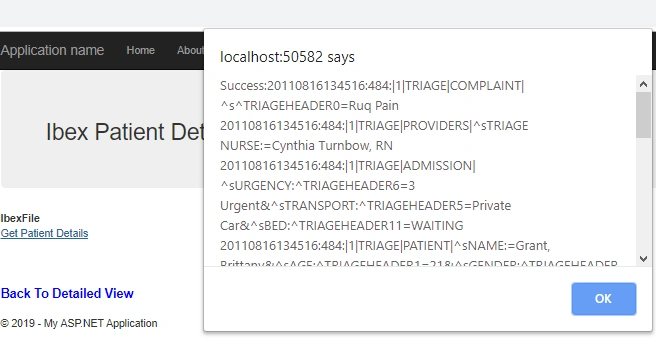
    It did work but the .txt data is displayed in a small pop up wondow as below.

    I want it to be displayed just below the "Get Patient Details"(below in blue) link in the screenshot below. Is it possible?


    0
  • Sonu Gupta
    0
    Hi,
     
    Visit the below links - 
     
    https://www.aspdotnet-suresh.com/2010/12/how-to-read-and-write-text-file-using.html
     
    https://www.dotnetcurry.com/ShowArticle.aspx?ID=144 
    0
  • 0

    Hello Sonu ,

    Thanks for the links. I need the application to read the .txt files dynamically. When you look at the below output.


    In the above screenshot I need to read and display the .txt files randomly when the client selects different .txt files link. All the answers that I am seeing now are displaying just a particular text file that is specified in the code.  
    0
  • -1

    Thank you for the replies. I think the answers are concerned with only one .txt file.

    Vincent's reply is close but I do not want to browse the .txt file to be shown on my client page.
     
     I am in a process where the user clicks the links of the path in a table column "tablefile"

    which contains different .txt files in each row. So when the user clicks on one link he should get the data contained in that text file.When he clicks the next link he should contain data in that .txt file and so on...

    All the .txt files are in same folder with different names. 
     
     
    So how can I accomplish this? 
    -1