Hello Team,
Please in my window form application, am trying to load both Supplier and product on the sales page and my issues is Supplier and product are not loading.
private void frmPurchaseAdd_Load(object sender, EventArgs e)
{
string qry = "Select ProID 'id', pName 'name' from tblProduct";
string qry2 = "Select SupID 'id', SupName 'name' from tblSupplier";
MainClass.CBFill(qry, cbProduct, "name", "id");
MainClass.CBFill(qry2, cmbSupplier, "name", "id");
if(supID>0)
{
cmbSupplier.SelectedValue = supID;
}
}
private void GetDetails()
{
string qry = "Select * from tblProduct where ProID =" +Convert.ToInt32(cbProduct.SelectedValue)+ "";
SqlCommand cmd = new SqlCommand(qry, MainClass.con);
SqlDataAdapter da = new SqlDataAdapter(cmd);
DataTable dt = new DataTable();
da.Fill(dt);
if(dt.Rows.Count>0)
{
txtCost.Text = dt.Rows[0]["pCost"].ToString();
Calculate();
}
}







Muhammad Imran AnsariRank #326 · 7.6K reputationPosted Oct 18, 2023, 6:25 PM EDT
It seems you are missing a bracket in your code and the missing the selectedProductId variable. Try the following code for your issue.
private void GetDetails() { try { if (cbProduct.SelectedValue != null) { int selectedProductId; if (int.TryParse(cbProduct.SelectedValue.ToString(), out selectedProductId)) { string qry = "Select * from tblProduct where ProID = @productId"; SqlCommand cmd = new SqlCommand(qry, MainClass.con); cmd.Parameters.AddWithValue("@productId", selectedProductId); SqlDataAdapter da = new SqlDataAdapter(cmd); DataTable dt = new DataTable(); da.Fill(dt); if (dt.Rows.Count > 0) { txtCost.Text = dt.Rows[0]["pCost"].ToString(); Calculate(); } } } } catch (Exception ex) { MessageBox.Show("Error retrieving product details: " + ex.Message, "Error", MessageBoxButtons.OK, MessageBoxIcon.Error); } }Muhammad Imran AnsariRank #326 · 7.6K reputationPosted Oct 18, 2023, 1:38 PM EDT
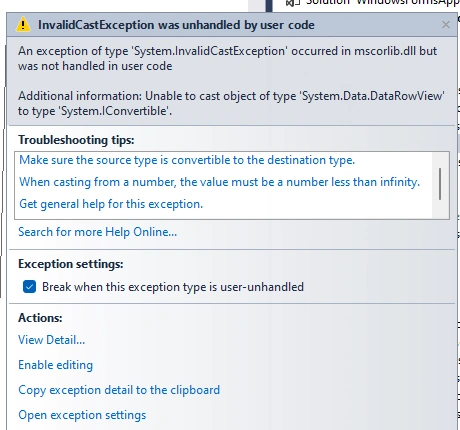
The InvalidCastException is likely occurring because the
SelectedValueproperty might not be an integer or convertible to an integer. To avoid this, you should first check if theSelectedValueis not null and then parse it to an integer.Here's the updated version of your
GetDetailsmethod to handle this:private void GetDetails() { try { if (cbProduct.SelectedValue != null) { if (int.TryParse(cbProduct.SelectedValue.ToString(), out int selectedProductId)) { string qry = "Select * from tblProduct where ProID = @productId"; SqlCommand cmd = new SqlCommand(qry, MainClass.con); cmd.Parameters.AddWithValue("@productId", selectedProductId); SqlDataAdapter da = new SqlDataAdapter(cmd); DataTable dt = new DataTable(); da.Fill(dt); if (dt.Rows.Count > 0) { txtCost.Text = dt.Rows[0]["pCost"].ToString(); Calculate(); } } else { // Handle the case when the SelectedValue is not a valid integer MessageBox.Show("Invalid product selection.", "Error", MessageBoxButtons.OK, MessageBoxIcon.Error); } } } catch (Exception ex) { MessageBox.Show("Error retrieving product details: " + ex.Message, "Error", MessageBoxButtons.OK, MessageBoxIcon.Error); } }This modification ensures that the
SelectedValueis a valid integer before using it in the SQL query. If the parsing fails, it will show an error message to the user. Make sure to handle the error gracefully for a better user experience.Emmmanuel FIADUFERank #947 · 2.2K reputationPosted Oct 18, 2023, 5:54 PM EDT
Hello Muhammed,
After applying the chamges more errors occure, kindly check to see how well you can remodified it for me. thank you.
Emmmanuel FIADUFERank #947 · 2.2K reputationPosted Oct 19, 2023, 3:55 AM EDT
Please the selected value is not null, it is working but the Sr # is comming as zeros in the DataGridView as shown in the picture