When i am trying to display grid view it raises this error pls help me out
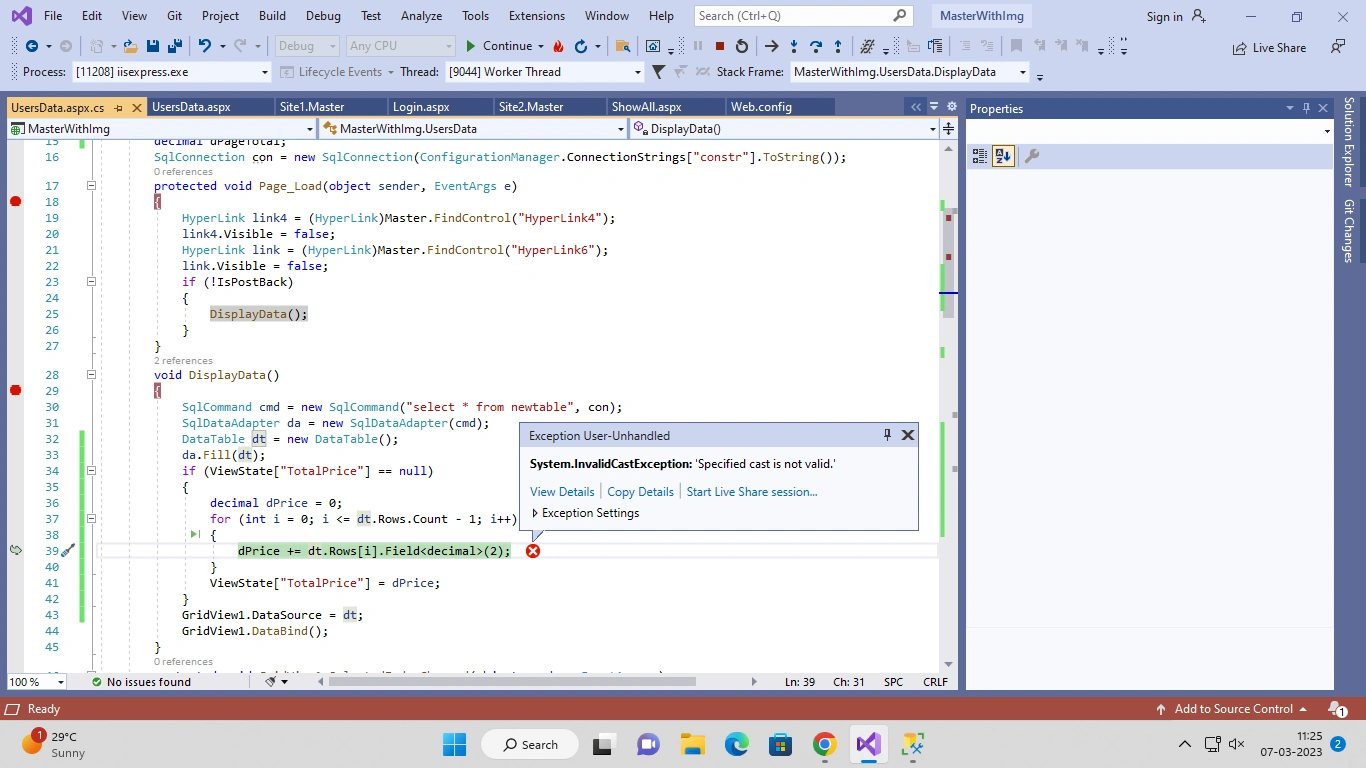
My Column DataType In DB
SQL
amount numeric(18,2)When i am trying to display grid view it raises this error pls help me out
My Column DataType In DB
amount numeric(18,2)Know the answer? Post it. Somebody with the same question will find it here.
Answer a question in the forums and earn +20 SHARP for every answer.
See unanswered questions Arun PottiAnswers in the forums20answers02
 Tahir AnsariAnswers in the forums5answers03
 Kamlesh KumarAnswers in the forums5answers04
 Sam HobbsAnswers in the forums4answers05
 Željko PerićAnswers in the forums3answersFull leaderboard →
 DevSocialUpcoming · 3rd editionAI Agents ConferenceDec 1–3, 2026Live onlineFree to attend5days leftRegister

Naimish MakwanaRank #324 · 7.7K reputationPosted Mar 7, 2023, 1:26 AM EST
Hello Jaya,
does you newtable table has only one column?
if it has more than one colum you need to select specific filed in query otherwise it it will throw error if datatype is different.
try to below query at lin no 38.
select amount from newtable
Thanks
Naimish Makwana
Amit MohantyRank #112 · 20K reputationPosted Mar 7, 2023, 2:05 AM EST
Make sure your newtable third column has decimal value. Bcoz you are passing Field(2).
Jignesh KumarRank #91 · 22.9K reputationPosted Mar 7, 2023, 4:09 AM EST
Hello Jaya prakash,
Your select statement must have thirdcolumn as decimal value.
When ever you use select statement in query we should use column name as best practice
        foreach (DataRow row in dt.Rows)
        {
            var field1 = row.Field(0);
            var field2 = row.Field(1);
            var field3 = row.Field(2);
            var field4 = row.Field(3);
            Console.WriteLine("{0} {1} {2} [{3}]", field1, field2, field3, field4);
        }
As above you need to check datatype of your column
Vishal JoshiRank #377 · 6.7K reputationPosted Mar 7, 2023, 4:27 AM EST
Hello Jaya,
There can be nullable field issue. if value in null in specific cell then it can throw error like this.
Please replace below code with error line code to chek null value.
dPrice += (!dt.Rows[i].IsNull(2)) ? dt.Rows[i].Field(2) : 0;Thanks
Vishal
Jaya PrakashRank #1,293 · 1.3K reputationPosted Mar 7, 2023, 4:36 AM EST
its working thank you all