Hello Team,
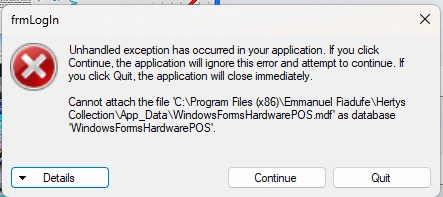
Please in my window application, when I run my application set up this is the error I get, kindly assist.
I have my .mdf database in my App_Data folder, I testeted the connection string and is working but when I run the application sep up then the error popup







Jignesh KumarRank #91 · 22.9K reputationPosted Apr 18, 2024, 11:43 PM EDT
Hello EMMMANUEL,
This error seems your SQL server instance, username, and password. If any of these three, not correct please check these properties in your connection string and make it correct,
string connectionString = @"Data Source=(LocalDB)\MSSQLLocalDB;AttachDbFilename=|DataDirectory|\YourDatabase.mdf;Integrated Security=True";OR
string connectionString = @"Data Source=.;AttachDbFilename=|DataDirectory|\YourDatabase.mdf;Integrated Security=True";Emmmanuel FIADUFERank #947 · 2.2K reputationPosted Apr 18, 2024, 5:08 AM EDT
Hello team,
I found the solution now,
I went to the file system and I created App_Data folder and loaded the .mdf database into it and it works for me.
Emmmanuel FIADUFERank #947 · 2.2K reputationPosted Apr 18, 2024, 5:21 AM EDT
Hello Team,
After I successfully run the application and when I tried to save data this is the error I got, kindly assist,
Emmmanuel FIADUFERank #947 · 2.2K reputationPosted Apr 19, 2024, 6:38 AM EDT
Hello Kumar,
Please I did as you said but it didn't work
Sam HobbsRank #107 · 20.5K reputationPosted Apr 19, 2024, 1:03 PM EDT
It depends on whether you are using Windows Authentication or SQL Server Authentication. A username and password is required for SQL Server Authentication but not Windows Authentication. See:
Also, if you have not connected to the database using Visual Studio's Server Explorer and SQL Server Object Explorer then do that. They can be very helpful.
Emmmanuel FIADUFERank #947 · 2.2K reputationPosted Apr 19, 2024, 1:46 PM EDT
Thank you team