Hi,
I have implemented cascading dropdown list that works perfect. I am using the cascading items to update STATUSES. However, i want to display a READ only textbox of the last saved STATUS field using the last selected cascading item in the dropdwn list using a WHERE Clause. The STATUS should be displayed immidately the last combo item is selected
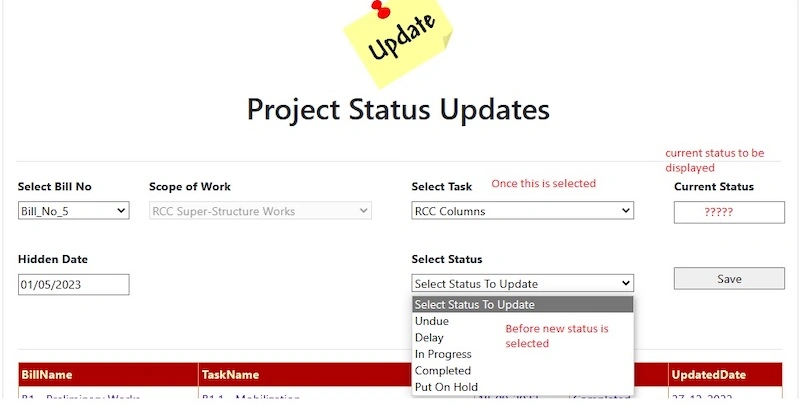
Thank you.







Rajeesh MenothRank #118 · 18.4K reputationPosted Jan 7, 2023, 2:08 AM EST
Hi,
Readonly you can setup up the page load.
protected void Page_Load(object sender, EventArgs e)
{
// status button id - txtStatus
txtStatus.Attributes.Add("readonly","readonly");
}
Handle the event of an item being selected in your DropDownList, something like this:
protected void ItemSelected(object sender, EventArgs e)
{
    // Id of the status drop down
    if (ddl_Status.SelectedItem.Value)
    {
        // status text box id
        txtStatus.Text = dl_Status.SelectedItem.Value;
    }
}
Reference :
https://www.aspdotnet-suresh.com/2010/09/how-to-get-readonly-textbox-value-in.html
https://stackoverflow.com/questions/54966924/how-to-display-fixed-data-on-textbox-based-on-cascading-dropdown-list-in-c
Ahmed Khalid185 reputationPosted Jan 9, 2023, 1:35 AM EST
Hi Rajeesh,
Thanks for your feedback.
There is onething i want to clarify, my requirement is not to display the selected value of the combobox to the text box. My requirement is to fetch and display on the textbox the saved STATUS value from the database, i.e before the user updates that same task again.
For example, say I have a Task by name "Footing Concreting" in the Task Combobox and this task's STATUS is currently saved in Database as "In Progress". Now, When a user wants to Update Status to "Completed", My requirement is to display in Textbox as "In Progress" when the user selects the Task Combobox and selects the task "Footing Concreting".
I hope its clear.
Thanks
Rajeesh MenothRank #118 · 18.4K reputationPosted Jan 9, 2023, 6:13 AM EST
Hi Ahamed,
While selecting the "Select Task" drop-down list you can trigger ( case cading drop down calls ) a database call with the respective parameters ( id is a must ). So that response you can bind inside of the status text box.
Example:
https://www.c-sharpcorner.com/UploadFile/rohatash/binding-dropdownlist-with-database-and-display-data-in-gridv/
Vishal JoshiRank #377 · 6.7K reputationPosted Jan 10, 2023, 8:21 AM EST
Hello Ahmed,
Please try the below way to achieve the task.
protected void TaskItemSelected(object sender, EventArgs e)
{
    // Get Task Status by the Id of the Task drop down
    var taskStatusId = GetTaskStatusByTaskId(ddl_Task.SelectedItem.Value)

    if (taskStatusId != null)
    {
        // Get Status Details by taskStatusId
        var statusDetail = GetStatus(taskStatusId);
        txtStatus.Text = statusDetail.Name;
    }
}
Thanks