Hi
Chart not showing all months name. Image attached
Chart2.DataSource = objResult;
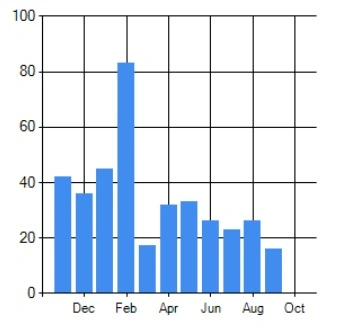
Chart2.Series[0].XValueMember = "Month";
Chart2.Series[0].YValueMembers = "AverageDays";
Chart2.DataBind();
Thanks
Hi
Chart not showing all months name. Image attached
Chart2.DataSource = objResult;
Chart2.Series[0].XValueMember = "Month";
Chart2.Series[0].YValueMembers = "AverageDays";
Chart2.DataBind();
Thanks
Know the answer? Post it. Somebody with the same question will find it here.
Answer a question in the forums and earn +20 SHARP for every answer.
See unanswered questions Arun PottiAnswers in the forums20answers02
 Tahir AnsariAnswers in the forums5answers03
 Kamlesh KumarAnswers in the forums5answers04
 Sam HobbsAnswers in the forums4answers05
 Željko PerićAnswers in the forums3answersFull leaderboard →
 DevSocialUpcoming · 3rd editionAI Agents ConferenceDec 1–3, 2026Live onlineFree to attend5days leftRegister

Vishal JoshiRank #377 · 6.7K reputationPosted Nov 21, 2022, 8:00 AM EST
Hello,
Please Share the data response you are getting.
Also, try to increase width of chart.
Thanks
Aravind GovindarajRank #430 · 5.8K reputationPosted Nov 21, 2022, 10:44 AM EST
I feel if you increase the size of the chart it will pile up, otherwise, you can overwrite the default behaviour of the month rendering option.
Abhishek YadavRank #217 · 11.3K reputationPosted Nov 21, 2022, 11:22 AM EST
you cannot set the values at(0,0) this is the valid reason
Brahma Prakash ShuklaRank #633 · 3.8K reputationPosted Nov 21, 2022, 10:17 AM EST
Try these solution.
1. You need to check your data for this, may be data is null for the missing months.
2. Increase your charts width.