hi,
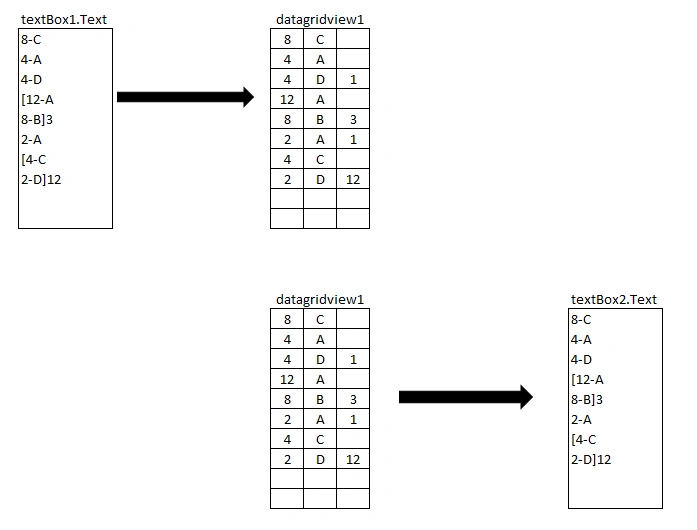
i want textbox1 input copy to datagridview1 and same aswell as same datagridview1 input copy to another textbox2 while button click event dynamically.
like below example.
kindly anybody share the code
thanks
Luv
hi,
i want textbox1 input copy to datagridview1 and same aswell as same datagridview1 input copy to another textbox2 while button click event dynamically.
like below example.
kindly anybody share the code
thanks
Luv
Know the answer? Post it. Somebody with the same question will find it here.
Answer a question in the forums and earn +20 SHARP for every answer.
See unanswered questions Arun PottiAnswers in the forums20answers02
 Tahir AnsariAnswers in the forums5answers03
 Kamlesh KumarAnswers in the forums5answers04
 Sam HobbsAnswers in the forums4answers05
 Željko PerićAnswers in the forums3answersFull leaderboard →
 DevSocialUpcoming · 3rd editionAI Agents ConferenceDec 1–3, 2026Live onlineFree to attend5days leftRegister

Uday DodiyaRank #239 · 10.3K reputationPosted Oct 5, 2024, 1:02 AM EDT
Hi Luv,
Here I have shared updated code that match your output requirment
Following is revised code.
namespace WinFormsApp4
{
    public partial class Form1 : Form
    {
        public Form1()
        {
            InitializeComponent();

            AddDummyDataToTextBox1();

            DefineColumnsForDataGridView();
        }

        // Add dummy data to textBox1
        private void AddDummyDataToTextBox1()
        {

            textBox1.Text = "8-C" + Environment.NewLine +
                            "4-A" + Environment.NewLine +
                            "4-D" + Environment.NewLine +
                            "[12-A" + Environment.NewLine +
                            "8-B]3" + Environment.NewLine +
                            "2-A" + Environment.NewLine +
                            "[4-C" + Environment.NewLine +
                            "2-D]12";
        }

        // Define Column For Datagridview Otherwise Gives Error
        private void DefineColumnsForDataGridView()
        {
            if (dataGridView1.Columns.Count == 0)
            {
                dataGridView1.Columns.Add("Column1", "Column1");
                dataGridView1.Columns.Add("Column2", "Column2");
                dataGridView1.Columns.Add("Column3", "Column3");
            }
        }

        private void button1_Click(object sender, EventArgs e)
        {
            // Step 1: Copy textBox1 to dataGridView1
            CopyTextBoxToDataGridView();

            // Step 2: Copy dataGridView1 back to textBox2
            CopyDataGridViewToTextBox2();
        }

        private void CopyTextBoxToDataGridView()
        {
            // Split the lines from the textBox1 text
            string[] lines = textBox1.Text.Split(new[] { Environment.NewLine }, StringSplitOptions.None);

            if (dataGridView1.Columns.Count == 0)
            {
                dataGridView1.Columns.Add("Column1", "Column 1");
                dataGridView1.Columns.Add("Column2", "Column 2");
                dataGridView1.Columns.Add("Column3", "Column 3");
            }

            dataGridView1.Rows.Clear();


            for (int i = 0; i  0 ? splitLine[0] : string.Empty;
                string col2 = splitLine.Length > 1 ? splitLine[1] : string.Empty;
                string col3 = splitLine.Length > 2 ? splitLine[2] : string.Empty;


                // Check if the next line starts with '['
                if (i + 1 < lines.Length && lines[i + 1].StartsWith("["))
                {
                    col3 = "1"; // Set "1" in column 3
                }

                dataGridView1.Rows.Add(col1.Replace("[","").Replace("]",""), col2.Replace("[", "").Replace("]", ""), col3);
            }
        }


        private void CopyDataGridViewToTextBox2()
        {
            textBox2.Clear();

            for (int i = 0; i < dataGridView1.Rows.Count - 1; i++)
            {
                DataGridViewRow currentRow = dataGridView1.Rows[i];
                string col1 = currentRow.Cells[0].Value?.ToString();
                string col2 = currentRow.Cells[1].Value?.ToString();
                string col3 = currentRow.Cells[2].Value?.ToString();


                string currentLine = col1 + "-" + col2;

                if (col3 == "1" && i + 1 < dataGridView1.Rows.Count - 1)
                {
                    // Next line should start with an open bracket "["
                    DataGridViewRow nextRow = dataGridView1.Rows[i + 1];
                    string nextCol1 = nextRow.Cells[0].Value?.ToString();
                    string nextCol2 = nextRow.Cells[1].Value?.ToString();
                    string nextLine = "[" + nextCol1 + "-" + nextCol2;

                    // Line after next should close the bracket "]" and append column 3 data if available
                    if (i + 2 < dataGridView1.Rows.Count - 1)
                    {
                        DataGridViewRow nextToNextRow = dataGridView1.Rows[i + 2];
                        string nextToNextCol1 = nextToNextRow.Cells[0].Value?.ToString();
                        string nextToNextCol2 = nextToNextRow.Cells[1].Value?.ToString();
                        string nextToNextCol3 = nextToNextRow.Cells[2].Value?.ToString();
                        string nextToNextLine = nextToNextCol1 + "-" + nextToNextCol2 + "]" + nextToNextCol3;

                        // Append all lines in sequence
                        textBox2.AppendText(currentLine + Environment.NewLine);
                        textBox2.AppendText(nextLine + Environment.NewLine);
                        textBox2.AppendText(nextToNextLine + Environment.NewLine);

                        // Skip next two rows since they are already processed
                        i += 2;
                        continue;
                    }
                }

                // Append the current line normally if no special condition met
                textBox2.AppendText(currentLine + Environment.NewLine);
            }
        }
    }
}
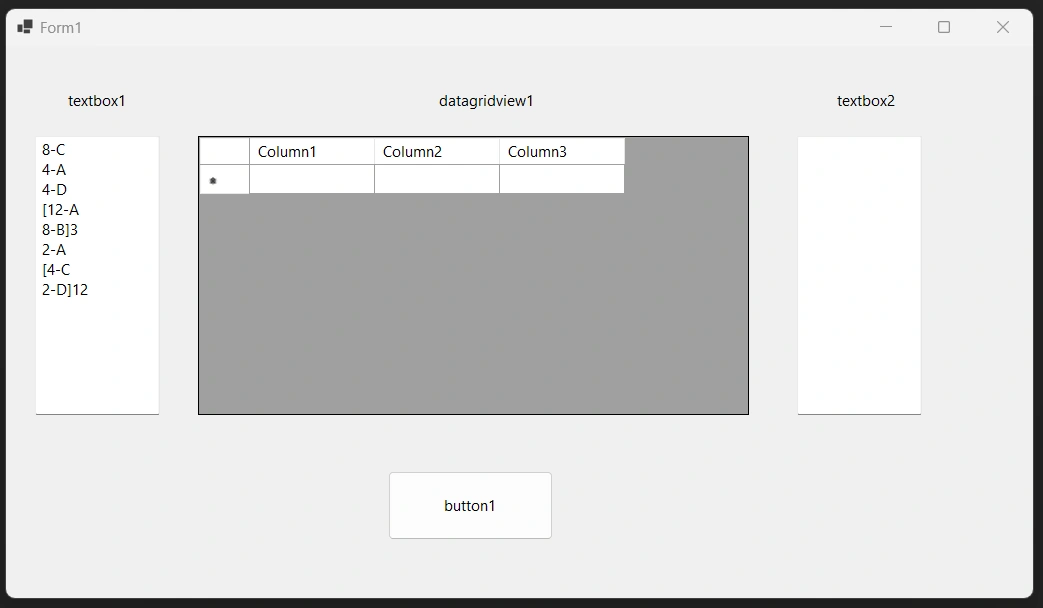
Output 1 : Before Button Click
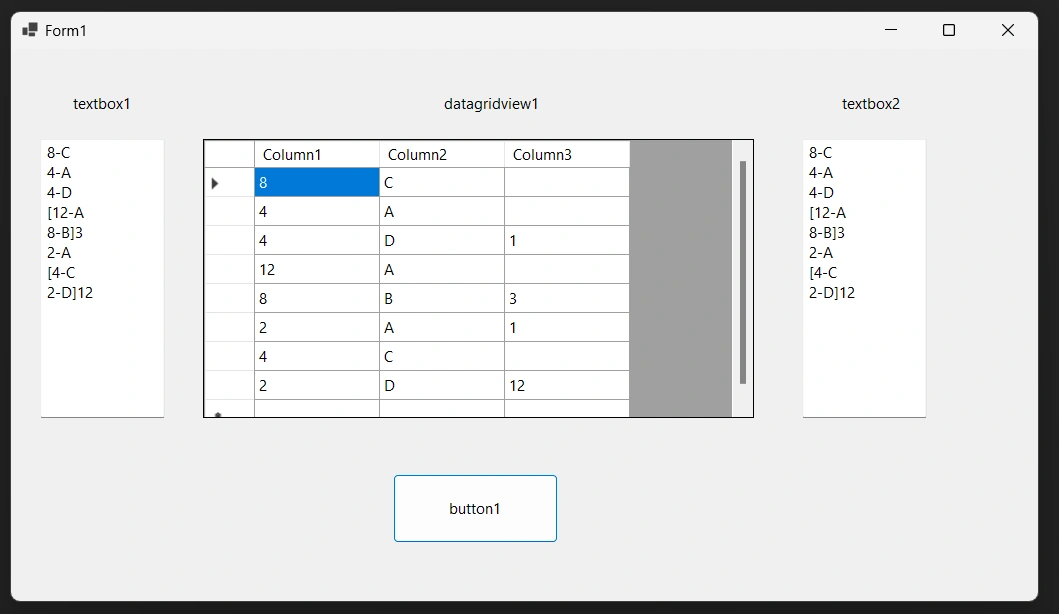
Output 2 : After Button Click
Luv LRank #8,316 · 224 reputationPosted Oct 3, 2024, 9:38 AM EDT
Dear @Uday Dodiya
Thanks for your reply sir.
in textbox1 if we start open bracket then previous line should be by default input should be 1 in gridview every line it will checked where open bracket is started then previous line ends input shoud be by default with 1 in gridview..
also copy from gridview1 data to textbox same as textbox1 input like open and close bracket.
Hope you understand.please share the revised code.
Thanks
Luv
Jayraj ChhayaRank #304 · 8.2K reputationPosted Oct 3, 2024, 1:46 AM EDT
Follow the steps below:
textBox1will be split into rows and columns based on the format.dataGridView1, on another button click, the contents will be transferred totextBox2in the same format as the originaltextBox1.// Assuming you have a Button (button1), a DataGridView (dataGridView1), // and two TextBoxes (textBox1, textBox2) in your form. private void button1_Click(object sender, EventArgs e) { // Step 1: Copy input from textBox1 to dataGridView1 string[] rows = textBox1.Text.Split(new[] { Environment.NewLine }, StringSplitOptions.None); // Clear any existing data in DataGridView dataGridView1.Rows.Clear(); dataGridView1.Columns.Clear(); // Add columns to DataGridView dataGridView1.Columns.Add("Column1", "Column1"); dataGridView1.Columns.Add("Column2", "Column2"); dataGridView1.Columns.Add("Column3", "Column3"); // Populate DataGridView with data from textBox1 foreach (string row in rows) { if (!string.IsNullOrWhiteSpace(row)) { // Split each row into values var rowData = row.Split(new[] { '-' }, StringSplitOptions.None); // Fill the remaining cells with values or empty strings dataGridView1.Rows.Add(rowData[0], rowData[1], rowData.Length > 2 ? rowData[2] : string.Empty); } } // Step 2: Copy content from dataGridView1 to textBox2 StringBuilder textBox2Content = new StringBuilder(); foreach (DataGridViewRow dgvRow in dataGridView1.Rows) { if (!dgvRow.IsNewRow) { // Get values from each row of DataGridView string column1 = dgvRow.Cells[0].Value?.ToString() ?? ""; string column2 = dgvRow.Cells[1].Value?.ToString() ?? ""; string column3 = dgvRow.Cells[2].Value?.ToString() ?? ""; // Append formatted data back to textBox2 textBox2Content.AppendLine($"{column1}-{column2}{column3}"); } } // Set textBox2 content textBox2.Text = textBox2Content.ToString().Trim(); }Uday DodiyaRank #239 · 10.3K reputationPosted Oct 3, 2024, 1:47 AM EDT
Hi,
The following code is working as I make the same application using your data.
You have to define two textboxes and make them multiline and one datagridview.
Following is code.
namespace WinFormsApp4
{
    public partial class Form1 : Form
    {
        public Form1()
        {
            InitializeComponent();

            AddDummyDataToTextBox1();

            DefineColumnsForDataGridView();
        }

        // Add dummy data to textBox1
        private void AddDummyDataToTextBox1()
        {

            textBox1.Text = "8-C" + Environment.NewLine +
                            "4-A" + Environment.NewLine +
                            "4-D" + Environment.NewLine +
                            "[12-A]" + Environment.NewLine +
                            "8-B|3" + Environment.NewLine +
                            "2-A" + Environment.NewLine +
                            "[4-C]" + Environment.NewLine +
                            "2-D|12";
        }

        // Define Column For Datagridview Otherwise Gives Error
        private void DefineColumnsForDataGridView()
        {
            if (dataGridView1.Columns.Count == 0)
            {
                dataGridView1.Columns.Add("Column1", "Column1");
                dataGridView1.Columns.Add("Column2", "Column2");
                dataGridView1.Columns.Add("Column3", "Column3");
            }
        }

        private void button1_Click(object sender, EventArgs e)
        {
            // Step 1: Copy textBox1 to dataGridView1
            CopyTextBoxToDataGridView();

            // Step 2: Copy dataGridView1 back to textBox2
            CopyDataGridViewToTextBox2();
        }

        private void CopyTextBoxToDataGridView()
        {
            // Clear previous rows in dataGridView1
            dataGridView1.Rows.Clear();

            // Split textBox1 content by new line to get rows
            string[] rows = textBox1.Text.Split(new[] { Environment.NewLine }, StringSplitOptions.RemoveEmptyEntries);

            foreach (var row in rows)
            {
                // Split each row into parts based on hyphens (or other delimiters)
                string[] columns = row.Split(new[] { '-', '[', ']', '|' }, StringSplitOptions.RemoveEmptyEntries);

                if (columns.Length > 0)
                {
                    while (columns.Length  rowValues = new List();

                    // Loop through each cell in the row
                    foreach (DataGridViewCell cell in row.Cells)
                    {
                        if (cell.Value != null)
                        {
                            rowValues.Add(cell.Value.ToString());
                        }
                    }

                    string formattedRow = string.Join("-", rowValues);
                    textBox2.AppendText(formattedRow + Environment.NewLine); // Add formatted row to textBox2
                }
            }
        }
    }
}
Output 1 : Before Button Click
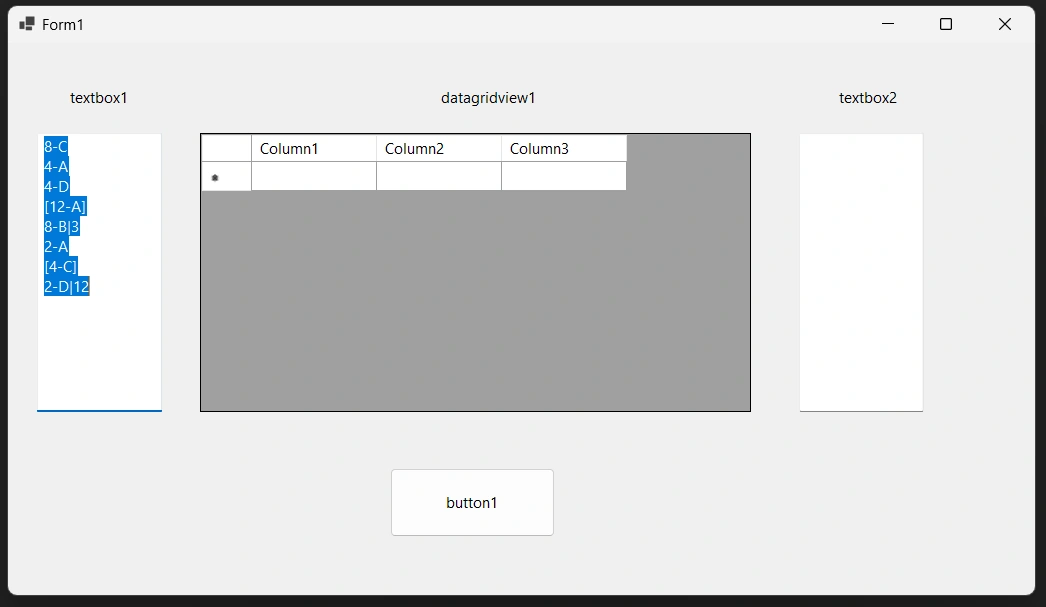
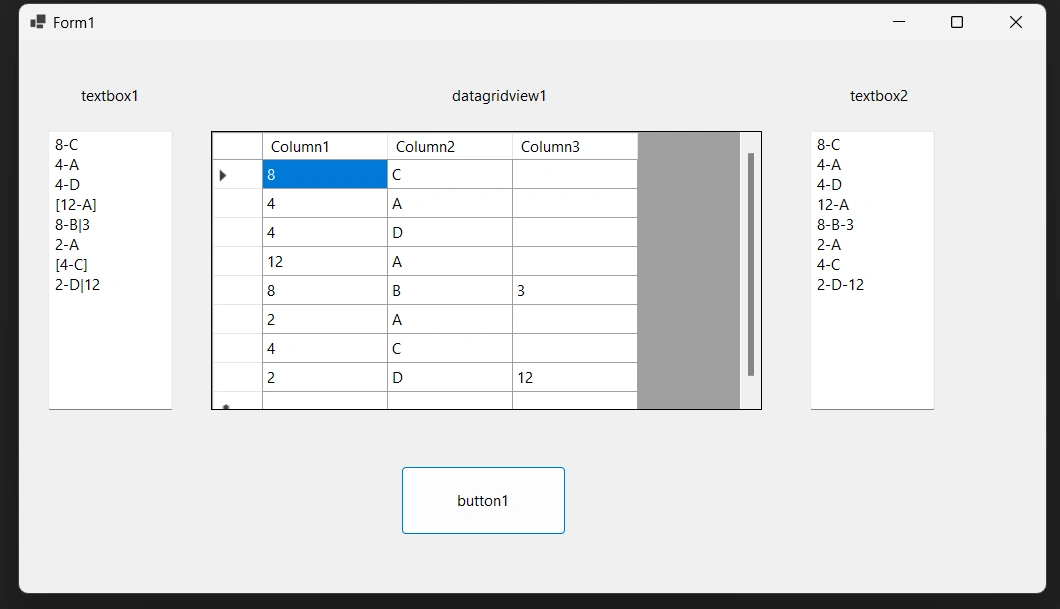
Output 2 : After Button Click
Luv LRank #8,316 · 224 reputationPosted Oct 3, 2024, 9:24 AM EDT
Dear @Jayraj Chhaya / @Uday Dodiya
please find the result output given below attachment.
hope you understand my logic.if use open and closing bracket with timing then gridview output should be
wothout bracket and timing should be another column.and before start bracket previuous row should be timing should be 1 by default .like below
c0 c1 c2
10 A
10 B 1 (HERE BYDEFULT 1 BECAUSE BELOW START WITH OPEN BRACKET IN TEXTBOX1 INPUT.)
8 C
2 D 8
ALSO SAME GRIDVIEW DATA COPY TO TEXTBOX2 SAME OPEN AND CLOSE BRACKET WHERE TIMING IS USED SAME AS TEXTBOX1.
Hope you understand my logic.
Thankyou
Luv
Luv LRank #8,316 · 224 reputationPosted Oct 4, 2024, 11:38 PM EDT
Dear @Uday Dodiya,
Please rectify as per the requirment and share the code.
Thanks
Luv
Luv LRank #8,316 · 224 reputationPosted Oct 13, 2024, 1:25 AM EDT
Dear @Uday Dodiya
Thanks for your reply sir.it work well and what i need.
Here i have small impliment need i.e if textbox input ends without timing then gridview result should be by default 1.
pls refer image.
please help the recify code.
Thanks in advance.