Crud operations
Know the answer? Post it. Somebody with the same question will find it here.
Answer a question in the forums and earn +20 SHARP for every answer.
See unanswered questions Arun PottiAnswers in the forums20answers02
 Tahir AnsariAnswers in the forums5answers03
 Kamlesh KumarAnswers in the forums5answers04
 Sam HobbsAnswers in the forums4answers05
 Željko PerićAnswers in the forums3answersFull leaderboard →
 DevSocialUpcoming · 3rd editionAI Agents ConferenceDec 1–3, 2026Live onlineFree to attend5days leftRegister

Vishal JoshiRank #377 · 6.7K reputationPosted Mar 14, 2023, 9:09 AM EDT
You can get value like the below code
onFormSubmit(value:any) { // sample to get value of form var empName = value.EmpName; }Vishal JoshiRank #377 · 6.7K reputationPosted Mar 14, 2023, 8:41 AM EDT
Hello Sruthi
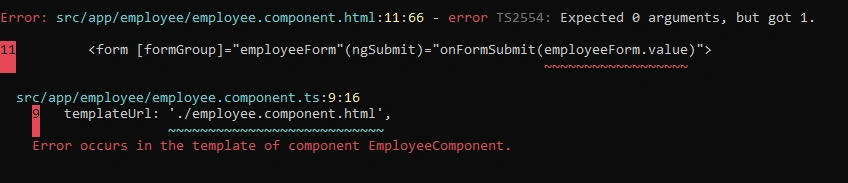
Your onSubmit() method does not expect any arguments. But from your html you call it with one argument: onSubmit(serviceForm.value)
I would remove the parameter from html just simply use onSubmit()
Thanks
Sruthi Desai36 reputationPosted Mar 14, 2023, 8:48 AM EDT
Thank You Soo much it worked.
Sruthi Desai36 reputationPosted Mar 14, 2023, 8:51 AM EDT
But after removing parameter the details or not getting submitted.
Vishal JoshiRank #377 · 6.7K reputationPosted Mar 14, 2023, 8:58 AM EDT
Please share the version of angular.
Sruthi Desai36 reputationPosted Mar 14, 2023, 9:02 AM EDT
version 18.12.1
Sruthi Desai36 reputationPosted Mar 14, 2023, 9:03 AM EDT
import { Component, OnInit } from '@angular/core'; import { FormBuilder, Validators } from '@angular/forms'; import { Observable } from 'rxjs'; import { EmployeeService } from '../employee.service'; import { Employee } from '../employee'; @Component({ selector: 'app-employee', templateUrl: './employee.component.html', styleUrls: ['./employee.component.css'] }) export class EmployeeComponent implements OnInit { dataSaved = false; employeeForm: any; allEmployees: Observable; employeeIdUpdate = 0; massage = ''; constructor(private formbulider: FormBuilder, private employeeService:EmployeeService) { } ngOnInit() { this.employeeForm = this.formbulider.group({ EmpName: ['', [Validators.required]], DateOfBirth: ['', [Validators.required]], EmailId: ['', [Validators.required]], Gender: ['', [Validators.required]], Address: ['', [Validators.required]], PinCode: ['', [Validators.required]], }); this.loadAllEmployees(); } loadAllEmployees() { this.allEmployees = this.employeeService.getAllEmployee(); } onFormSubmit() { this.dataSaved = false; const employee = this.employeeForm.value; this.CreateEmployee(employee); this.employeeForm.reset(); } loadEmployeeToEdit(employeeId: string) { this.employeeService.getEmployeeById(employeeId).subscribe(employee=> { this.massage = ''; this.dataSaved = false; this.employeeIdUpdate = employee.EmpId; this.employeeForm.controls['EmpName'].setValue(employee.EmpName); this.employeeForm.controls['DateOfBirth'].setValue(employee.DateOfBirth); this.employeeForm.controls['EmailId'].setValue(employee.EmailId); this.employeeForm.controls['Gender'].setValue(employee.Gender); this.employeeForm.controls['Address'].setValue(employee.Address); this.employeeForm.controls['PinCode'].setValue(employee.PinCode); }); } CreateEmployee(employee: Employee) { if (this.employeeIdUpdate == null) { this.employeeService.createEmployee(employee).subscribe( () => { this.dataSaved = true; this.massage = 'Record saved Successfully'; this.loadAllEmployees(); this.employeeIdUpdate = 0; this.employeeForm.reset(); } ); } else { employee.EmpId = this.employeeIdUpdate; this.employeeService.updateEmployee(employee).subscribe(() => { this.dataSaved = true; this.massage = 'Record Updated Successfully'; this.loadAllEmployees(); this.employeeIdUpdate = 0; this.employeeForm.reset(); }); } } deleteEmployee(employeeId: string) { if (confirm("Are you sure you want to delete this ?")) { this.employeeService.deleteEmployeeById(employeeId).subscribe(() => { this.dataSaved = true; this.massage = 'Record Deleted Succefully'; this.loadAllEmployees(); this.employeeIdUpdate = 0; this.employeeForm.reset(); }); } } resetForm() { this.employeeForm.reset(); this.massage = ''; this.dataSaved = false; } }Sruthi Desai36 reputationPosted Mar 14, 2023, 9:04 AM EDT
Vishal JoshiRank #377 · 6.7K reputationPosted Mar 14, 2023, 9:05 AM EDT
Please try the below defination for onFormSubmit in .ts file.
onFormSubmit(value:any)
{
  // your code
}
In HTML you can use the below code
Thanks
Sruthi Desai36 reputationPosted Mar 14, 2023, 9:05 AM EDT
I have shared both ts and html code plzz help sir.
Sruthi Desai36 reputationPosted Mar 14, 2023, 9:10 AM EDT
Showing like this sir
Sruthi Desai36 reputationPosted Mar 14, 2023, 9:13 AM EDT
'EmpName' is declared but its value is never read.ts(6133)
Tuhin PaulRank #7 · 71.9K reputationPosted Mar 18, 2023, 2:33 PM EDT
You can improve the accpeted answer by doing the following:
Use type annotations to make your code more readable and maintainable. You can specify the types of the function arguments and the return value.
onFormSubmit(value: {EmpName: string}): void {
  // sample to get value of form
  const empName = value.EmpName;
}
Another improvement is use destructuring to extract values from objects and arrays and assign them to variables. You can use destructuring to extract the EmpName property from the value object.
onFormSubmit({EmpName}: {EmpName: string}): void {
  // sample to get value of form
  const empName = EmpName;
}