Hi
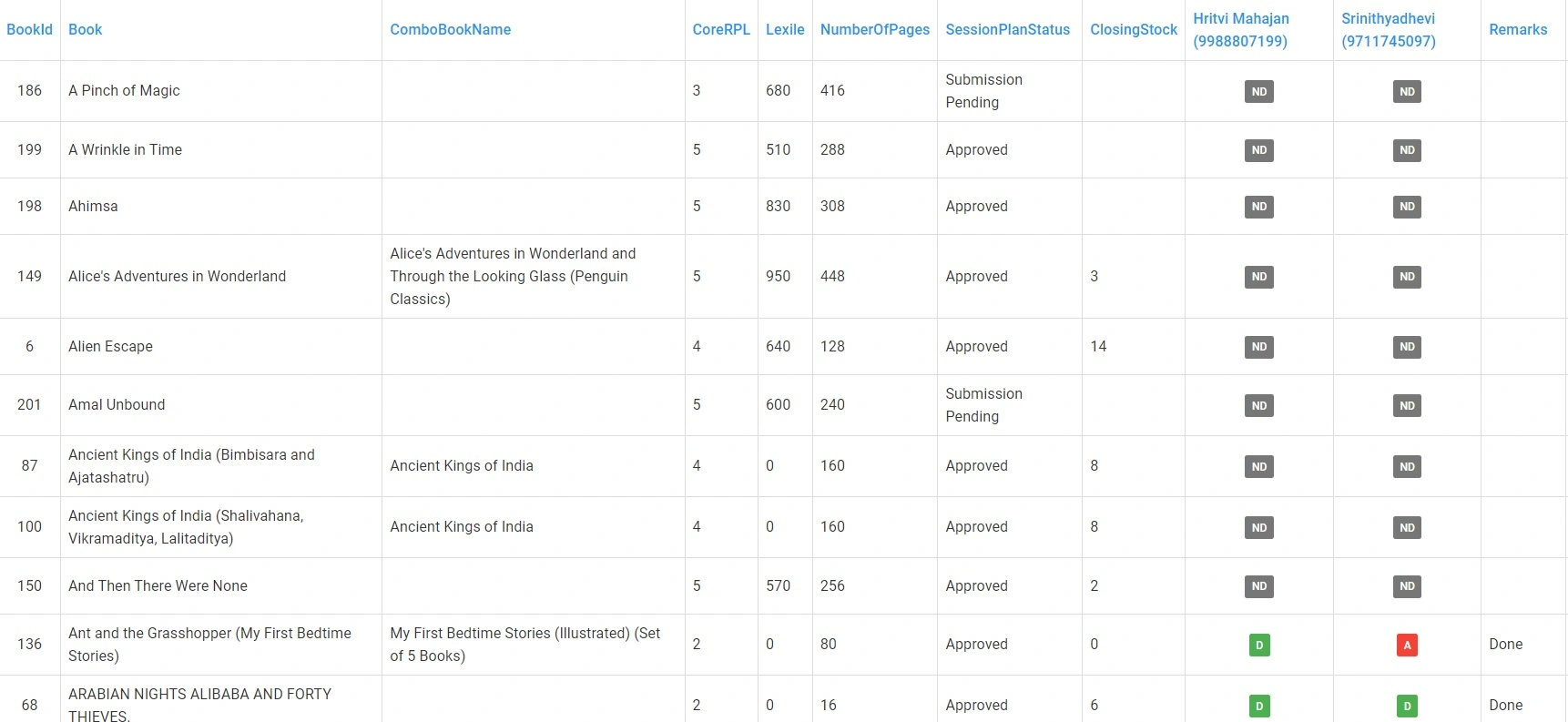
Hi
Know the answer? Post it. Somebody with the same question will find it here.
Answer a question in the forums and earn +20 SHARP for every answer.
See unanswered questions Arun PottiAnswers in the forums20answers02
 Tahir AnsariAnswers in the forums5answers03
 Kamlesh KumarAnswers in the forums5answers04
 Sam HobbsAnswers in the forums4answers05
 Željko PerićAnswers in the forums3answersFull leaderboard →
 DevSocialUpcoming · 3rd editionAI Agents ConferenceDec 1–3, 2026Live onlineFree to attend5days leftRegister

Rajkiran SwainRank #165 · 14.4K reputationPosted May 2, 2023, 1:27 AM EDT
Need more information with code ?
Ramco RamcoRank #462 · 5.4K reputationPosted May 2, 2023, 1:31 AM EDT
Hi
protected void grdPlanning_Sorting(object sender, GridViewSortEventArgs e) { DataTable dtresult = (DataTable)ViewState["dirState"]; if (dtresult.Rows.Count > 0) { if (Convert.ToString(ViewState["sortdr"]) == "Asc") { dtresult.DefaultView.Sort = e.SortExpression + " Desc"; ViewState["sortdr"] = "Desc"; } else { dtresult.DefaultView.Sort = e.SortExpression + " Asc"; ViewState["sortdr"] = "Asc"; } grdPlanning.DataSource = dtresult; grdPlanning.DataBind(); } }private void GetData() { SQLUtility sQLUtility = new SQLUtility(); DataTable dt = sQLUtility.GeBookPlanningRecommendation(vRpl, BookCollection, StudentCollection).Tables[0]; if (dt != null) { DataColumn Remarks = new DataColumn("Remarks", typeof(string)); dt.Columns.Add(Remarks); DataColumn Dates = new DataColumn("Date", typeof(DateTime)); dt.Columns.Add(Dates); grdPlanning.DataSource = dt; grdPlanning.DataBind(); } ltrlReportHead.Text = "Sessions Book Planning (" + dt.Rows.Count + " Records)"; ViewState["dirState"] = dt; ViewState["sortdr"] = "Asc"; }protected void gr_RowDataBound(object sender, GridViewRowEventArgs e) { Boolean rowHide = false; if (e.Row.RowType != DataControlRowType.DataRow) return; e.Row.Cells[0].HorizontalAlign = HorizontalAlign.Center; for (int i = 8; i < e.Row.Cells.Count - 2 ; i++) { var row = (DataRowView)e.Row.DataItem; var currentPerson = row[0].ToString(); var currentDate = row.DataView.Table.Columns[i]; var commandArgument = currentPerson + ":" + currentDate; LinkButton button = new LinkButton(); button.Text = row[i].ToString(); //button.CommandName = "Select"; //button.CommandArgument = commandArgument; if (row[i].ToString().ToUpper() == "A") { button.CssClass = "badge badge-danger"; } else if (row[i].ToString().ToUpper() == "B") { button.CssClass = "badge badge-warning"; } else if (row[i].ToString().ToUpper() == "ND") { button.CssClass = "badge badge-secondary"; button.OnClientClick = "return false;"; } else if (row[i].ToString().ToUpper() == "D") { button.CssClass = "badge badge-success"; } else if (row[i].ToString().ToUpper() == "S") { button.CssClass = "badge badge-info"; } else if (row[i].ToString().ToUpper() == "HB") { button.CssClass = "badge badge-primary"; } e.Row.Cells[i].Controls.Add(button); e.Row.Cells[i].HorizontalAlign = HorizontalAlign.Center; if (row[i].ToString().ToUpper().Trim() == "D") { e.Row.Cells[e.Row.Cells.Count - 2].Text = "Done"; } if (row[i].ToString().ToUpper() == "S") { e.Row.Cells[e.Row.Cells.Count - 2].Text = "Scheduled"; } } TextBox txtDate = new TextBox(); txtDate.CssClass = "form-control"; txtDate.DataBind(); e.Row.Cells[e.Row.Cells.Count - 1].Controls.Add(txtDate); }Thanks
Rajkiran SwainRank #165 · 14.4K reputationPosted May 2, 2023, 1:33 AM EDT
Based on the code provided, it seems that the sorting functionality is working correctly. However, you mentioned that the data is not sorted when you click on the Remarks column.
One possible reason for this issue could be that the Remarks column is added after the data is bound to the GridView, so it might not be included in the sorting logic. To fix this, you can modify the GetData() method to add the Remarks column before binding the data to the GridView. Here is an updated version of the method:
private void GetData()
{
    SQLUtility sQLUtility = new SQLUtility();
    DataTable dt = sQLUtility.GeBookPlanningRecommendation(vRpl, BookCollection, StudentCollection).Tables[0];
    if (dt != null)
    {
        DataColumn Remarks = new DataColumn("Remarks", typeof(string));
        dt.Columns.Add(Remarks);
        DataColumn Dates = new DataColumn("Date", typeof(DateTime));
        dt.Columns.Add(Dates);

        // Add Remarks data to each row
        foreach (DataRow row in dt.Rows)
        {
            row["Remarks"] = "some value";
        }

        // Sort the data by Remarks column initially
        dt.DefaultView.Sort = "Remarks Asc";

        grdPlanning.DataSource = dt;
        grdPlanning.DataBind();
    }
    ltrlReportHead.Text = "Sessions Book Planning (" + dt.Rows.Count + " Records)";
    ViewState["dirState"] = dt;
    ViewState["sortdr"] = "Asc";
}
In this updated method, we first add the Remarks column to the DataTable and populate it with some values for each row. We also sort the data by the Remarks column initially so that it appears sorted when the page is first loaded.
Now, when you click on the Remarks column header to sort the data, the sorting should work correctly.
Ramco RamcoRank #462 · 5.4K reputationPosted May 2, 2023, 1:44 AM EDT
Hi RajKiran
I have written below code but still not working. Secondly in gr_RowDataBound Remarks value gets updated.
Only after that Gridview must be getting binded.
if (dt != null) { DataColumn Remarks = new DataColumn("Remarks", typeof(string)); dt.Columns.Add(Remarks); DataColumn Dates = new DataColumn("Date", typeof(DateTime)); dt.Columns.Add(Dates); foreach (DataRow row in dt.Rows) { row["Remarks"] = ""; } // Sort the data by Remarks column initially dt.DefaultView.Sort = "Remarks Asc"; grdPlanning.DataSource = dt; grdPlanning.DataBind(); }Rajkiran SwainRank #165 · 14.4K reputationPosted May 2, 2023, 1:56 AM EDT
To fix the issue, you need to update the
ViewState["dirState"]with the sorted data table in thegrdPlanning_Sortingevent handler. Here's how you can do it:protected void grdPlanning_Sorting(object sender, GridViewSortEventArgs e) { DataTable dtresult = (DataTable)ViewState["dirState"]; if (dtresult.Rows.Count > 0) { if (Convert.ToString(ViewState["sortdr"]) == "Asc") { dtresult.DefaultView.Sort = e.SortExpression + " Desc"; ViewState["sortdr"] = "Desc"; } else { dtresult.DefaultView.Sort = e.SortExpression + " Asc"; ViewState["sortdr"] = "Asc"; } dtresult = dtresult.DefaultView.ToTable(); // update the data table with sorted data grdPlanning.DataSource = dtresult; grdPlanning.DataBind(); ViewState["dirState"] = dtresult; // update the ViewState with sorted data table } }Additionally, I noticed that you are adding two new columns to the data table
dtin theGetDatamethod. However, you are not setting the values for these columns in theforeachloop. You need to set the values for these columns in theforeachloop before binding the data to the grid view. Here's how you can do it:if (dt != null) { DataColumn Remarks = new DataColumn("Remarks", typeof(string)); dt.Columns.Add(Remarks); DataColumn Dates = new DataColumn("Date", typeof(DateTime)); dt.Columns.Add(Dates); foreach (DataRow row in dt.Rows) { row["Remarks"] = ""; // set the value of Remarks column row["Date"] = DateTime.MinValue; // set the value of Date column } dt.DefaultView.Sort = "Remarks Asc"; grdPlanning.DataSource = dt; grdPlanning.DataBind(); ViewState["dirState"] = dt; ViewState["sortdr"] = "Asc"; }If still it didn't work then revert your changes in page laod and try