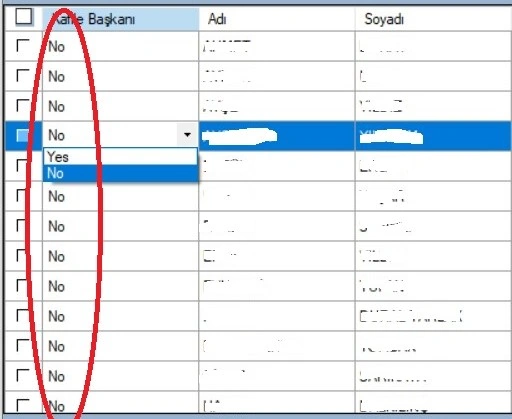
I have defined a combobox named “kbaskani” in datagridview. I need to select only one person with yes option in the marked column. At the same time, I don't want to send an empty data. How can I warn both empty data warning and multiple selection except for one selection?







Tahir AnsariRank #366 · 6.8K reputationPosted Jul 27, 2023, 6:08 AM EDT
Hi Mehmet try this one
private void dataGridView1_CellValidating(object sender, DataGridViewCellValidatingEventArgs e) { DataGridViewComboBoxColumn comboBoxColumn = dataGridView1.Columns["kbaskani"] as DataGridViewComboBoxColumn; if (comboBoxColumn != null && e.ColumnIndex == comboBoxColumn.Index) { string newValue = e.FormattedValue.ToString(); string oldValue = dataGridView1.Rows[e.RowIndex].Cells[e.ColumnIndex].Value.ToString(); // Validate the selected value if (newValue == "Yes") { // Check if another "Yes" option already exists in the column int yesCount = 0; foreach (DataGridViewRow row in dataGridView1.Rows) { if (row.Index != e.RowIndex && row.Cells[e.ColumnIndex].Value.ToString() == "Yes") { yesCount++; break; } } if (yesCount > 0) { MessageBox.Show("You have chosen more than one Yes option. You can choose only one Yes option.", "Validation Error", MessageBoxButtons.OK, MessageBoxIcon.Error); e.Cancel = true; // Cancel cell validation return; } } else if (newValue == "No") { // Check if no "Yes" option is chosen int yesCount = 0; foreach (DataGridViewRow row in dataGridView1.Rows) { if (row.Index != e.RowIndex && row.Cells[e.ColumnIndex].Value.ToString() == "Yes") { yesCount++; break; } } if (yesCount == 0) { MessageBox.Show("You haven’t chosen any Yes option. You have to choose one of the Yes options.", "Validation Error", MessageBoxButtons.OK, MessageBoxIcon.Error); e.Cancel = true; // Cancel cell validation return; } } } }Mehmet FatihRank #1,474 · 1.1K reputationPosted Jul 25, 2023, 8:39 AM EDT
I have got this error Tahir.
Mehmet FatihRank #1,474 · 1.1K reputationPosted Jul 27, 2023, 6:05 AM EDT
datagridview combobox form validation
I added two options "Yes" and "No" to DataGridViewComboBoxColumn named kbaskani in windows form. It has no connection to the database. The initial value is set to “No”. The thing I want to do:
Mehmet FatihRank #1,474 · 1.1K reputationPosted Jul 27, 2023, 6:19 AM EDT
I have tried it. Bit it saving without any warning.
Tahir AnsariRank #366 · 6.8K reputationPosted Jul 27, 2023, 6:37 AM EDT
Hello you need to debug and caught the error and fix. Not every answer is always accurate.
You said data is saving, try to fix by debugging
Mehmet FatihRank #1,474 · 1.1K reputationPosted Jul 27, 2023, 9:30 AM EDT
Tahir, the problem is this. if I don't clik the kbaskani column, It is not giving an error and saving without warning that Yes option hasn't been choosen. How can we assign it to click button event?