Hello Team,
In my mvc controller and Js function my date formart became like this /Date(1728086400000)/ mean while in other part of project this same date format work fine as I expected.
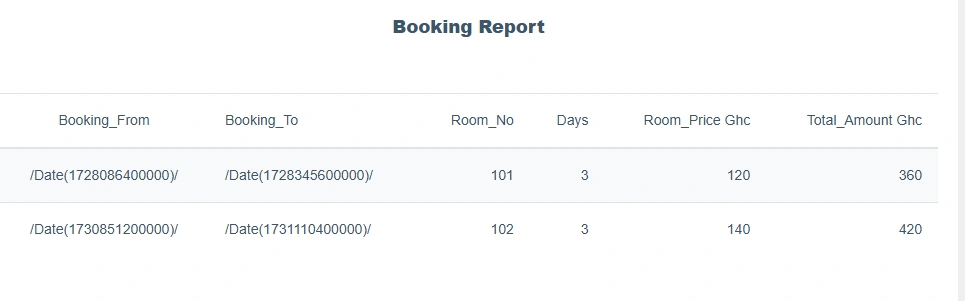
C#
public ActionResult GetAllBookingHistory(string RoomNumber, string sDate=null, string eDate=null)
{
    DateTime? startDate = null;
    if (!string.IsNullOrEmpty(sDate))
        startDate = Convert.ToDateTime(sDate);
    DateTime? endDate = null;
    if (!string.IsNullOrEmpty(eDate))
        endDate = Convert.ToDateTime(eDate);
    var bookingList = objHotelDbEntities.RoomBookings.Join(objHotelDbEntities.Rooms,
                      booking => booking.AssignRoomId,
                      room => room.RoomId,
                      (booking, room) => new { booking = booking, room = room });
    var modifiedData = bookingList.GroupBy(x => new { x.booking.BookingFrom, x.booking.BookingTo, x.booking.BookingId}).Select(x => new RoomBookingViewModel
    {
        CustomerName = x.FirstOrDefault().booking.CustomerName,
        Address = x.FirstOrDefault().booking.Address,
        PhoneNo = x.FirstOrDefault().booking.PhoneNo,
        BookingFrom = x.Key.BookingFrom,
        BookingTo = x.Key.BookingTo,
        BookingId = x.FirstOrDefault().booking.BookingId,
        RoomNumber = x.FirstOrDefault().room.RoomNumber,
        NoOfMembers = x.FirstOrDefault().booking.NoOfMembers,
        numberOfDays = System.Data.Entity.DbFunctions.DiffDays(x.Key.BookingFrom, x.Key.BookingTo).Value,
        RoomPrice = x.FirstOrDefault().room.RoomPrice,
        TotalAmount = x.FirstOrDefault().booking.TotalAmount,

    }).ToList();
    modifiedData.ForEach(a => { a.BookingFrom = Convert.ToDateTime(a.BookingFrom); });
    if(startDate !=null)
    {
        modifiedData = modifiedData.Where(a => a.BookingFrom >= startDate).ToList();
    }
    if(endDate !=null)
    {
        modifiedData = modifiedData.Where(a => a.BookingFrom  a.BookingFrom).ToList();
    var TotalSales = responseData.Sum(a => a.TotalAmount);
    return Json(modifiedData, JsonRequestBehavior.AllowGet);
}






Jignesh KumarRank #91 · 22.9K reputationPosted Nov 25, 2024, 9:41 PM EST
Hello Emmmanuel ,
You haven't incorporated my latest updated code into your function. I have updated the
parseJsonDate()method for you; please apply the following change, as it should resolve your issue.// Helper function to parse and format JSON dates function parseJsonDate(jsonDate) { // Extract the timestamp from the JSON date string var timestamp = parseInt(jsonDate.match(/\/Date\((\d+)\)\//)[1], 10); var date = new Date(timestamp); // Format the date to 'dd-MM-yyyy' var day = String(date.getDate()).padStart(2, '0'); var month = String(date.getMonth() + 1).padStart(2, '0'); // Months are zero-based var year = date.getFullYear(); return `${day}-${month}-${year}`; } function GetAllBookingPDFReport() { $http.get('/Booking/GetAllBookingHistoryPDF') .then(function (response) { var data = response.data; // Parse dates if needed data.forEach(function (item) { if (item.BookingFrom) { item.BookingFrom = dateParser(item.BookingFrom); } if (item.BookingTo) { item.BookingTo = dateParser(item.BookingTo); } }); $scope.PrintBookingRecordList = data; sumOfSalesDetails($scope); }) }Emmmanuel FIADUFERank #947 · 2.2K reputationPosted Nov 18, 2024, 6:13 AM EST
JS Function
function GetAllBookingPDFReport() { $http.get('/Booking/GetAllBookingHistory') .then(function (response) { var data = response.data; $scope.PrintBookingRecordList = data; sumOfSalesDetails($scope); }); }Jayraj ChhayaRank #304 · 8.2K reputationPosted Nov 18, 2024, 8:01 AM EST
Hi @Emmmanuel FIADUFE,
The date format issue you are encountering, where dates are represented as
/Date(1728086400000)/, is typically related to how dates are serialized in JSON. This format is a JSON representation of a .NET DateTime object, which can be confusing when consumed in JavaScript.To resolve this, ensure that the dates are properly formatted before being sent to the client. You can modify your
GetAllBookingHistoryaction to convert the DateTime objects to a more JavaScript-friendly format, such as ISO 8601.var modifiedData = bookingList.GroupBy(x => new { x.booking.BookingFrom, x.booking.BookingTo, x.booking.BookingId }) .Select(x => new RoomBookingViewModel { // Other properties... BookingFrom = x.Key.BookingFrom.ToString("o"), // ISO 8601 format BookingTo = x.Key.BookingTo.ToString("o"), // Other properties... }).ToList();In your JavaScript function, you can then parse these dates easily:
function GetAllBookingPDFReport() { $http.get('/Booking/GetAllBookingHistory') .then(function (response) { var data = response.data; data.forEach(function(item) { item.BookingFrom = new Date(item.BookingFrom); // Convert to Date object item.BookingTo = new Date(item.BookingTo); }); $scope.PrintBookingRecordList = data; sumOfSalesDetails($scope); }); }Amit MohantyRank #112 · 20K reputationPosted Nov 19, 2024, 12:39 AM EST
Format the dates into a standard format before returning them as JSON. For example
public ActionResult GetAllBookingHistory(string RoomNumber, string sDate = null, string eDate = null)
{
    DateTime? startDate = null;
    if (!string.IsNullOrEmpty(sDate))
        startDate = Convert.ToDateTime(sDate);
    DateTime? endDate = null;
    if (!string.IsNullOrEmpty(eDate))
        endDate = Convert.ToDateTime(eDate);

    var bookingList = objHotelDbEntities.RoomBookings.Join(objHotelDbEntities.Rooms,
                      booking => booking.AssignRoomId,
                      room => room.RoomId,
                      (booking, room) => new { booking = booking, room = room });

    var modifiedData = bookingList.GroupBy(x => new { x.booking.BookingFrom, x.booking.BookingTo, x.booking.BookingId }).Select(x => new RoomBookingViewModel
    {
        CustomerName = x.FirstOrDefault().booking.CustomerName,
        Address = x.FirstOrDefault().booking.Address,
        PhoneNo = x.FirstOrDefault().booking.PhoneNo,
        BookingFrom = x.Key.BookingFrom,
        BookingTo = x.Key.BookingTo,
        BookingId = x.FirstOrDefault().booking.BookingId,
        RoomNumber = x.FirstOrDefault().room.RoomNumber,
        NoOfMembers = x.FirstOrDefault().booking.NoOfMembers,
        numberOfDays = System.Data.Entity.DbFunctions.DiffDays(x.Key.BookingFrom, x.Key.BookingTo).Value,
        RoomPrice = x.FirstOrDefault().room.RoomPrice,
        TotalAmount = x.FirstOrDefault().booking.TotalAmount,

    }).ToList();

    if (startDate != null)
    {
        modifiedData = modifiedData.Where(a => a.BookingFrom >= startDate).ToList();
    }
    if (endDate != null)
    {
        modifiedData = modifiedData.Where(a => a.BookingFrom  new
    {
        a.CustomerName,
        a.Address,
        a.PhoneNo,
        BookingFrom = a.BookingFrom?.ToString("yyyy-MM-ddTHH:mm:ss"), // Format to ISO 8601
        BookingTo = a.BookingTo?.ToString("yyyy-MM-ddTHH:mm:ss"),     // Format to ISO 8601
        a.BookingId,
        a.RoomNumber,
        a.NoOfMembers,
        a.numberOfDays,
        a.RoomPrice,
        a.TotalAmount
    }).ToList();

    return Json(responseData, JsonRequestBehavior.AllowGet);
}
On client side, ff you prefer keeping the
/Date(timestamp)/format on the server, parse it in JavaScript using a function. For example:function parseJsonDate(jsonDate) { const timestamp = parseInt(jsonDate.replace(/\/Date\((.*?)\)\//, '$1')); return new Date(timestamp); } function GetAllBookingPDFReport() { $http.get('/Booking/GetAllBookingHistory') .then(function (response) { var data = response.data; // Parse dates in the response data data.forEach(booking => { booking.BookingFrom = parseJsonDate(booking.BookingFrom); booking.BookingTo = parseJsonDate(booking.BookingTo); }); $scope.PrintBookingRecordList = data; sumOfSalesDetails($scope); }); }Jignesh KumarRank #91 · 22.9K reputationPosted Nov 19, 2024, 12:48 AM EST
Hello Emmmanual,
If you are encountering issues with the date format, you can apply the following code in your application's front-end JavaScript., It should resolve your issue,
function GetAllBookingPDFReport() { $http.get('/Booking/GetAllBookingHistory') .then(function (response) { var data = response.data; // Parse dates if needed data.forEach(function (item) { if (item.BookingFrom) { item.BookingFrom = new Date(item.BookingFrom); } if (item.BookingTo) { item.BookingTo = new Date(item.BookingTo); } }); $scope.PrintBookingRecordList = data; // Calculate sales details sumOfSalesDetails($scope); }) .catch(function (error) { console.error("Error fetching booking history:", error); }); }Emmmanuel FIADUFERank #947 · 2.2K reputationPosted Nov 19, 2024, 5:28 AM EST
Thank you team,
Please I will check it out and revert as soon as possible.
Emmmanuel FIADUFERank #947 · 2.2K reputationPosted Nov 20, 2024, 7:40 PM EST
Hello Jignesh Kumar
Please when I use your code, this is the result that I got
Emmmanuel FIADUFERank #947 · 2.2K reputationPosted Nov 20, 2024, 7:44 PM EST
Hello Amit Mohanty
Please this is the date format that came which isn't what I'm looking for.
I want something like dd-MM-yyyy
Emmmanuel FIADUFERank #947 · 2.2K reputationPosted Nov 20, 2024, 7:50 PM EST
Hello Jayraj Chhaya,
Please this is the error, message that came.
Jignesh KumarRank #91 · 22.9K reputationPosted Nov 20, 2024, 8:57 PM EST
Hello Emmmanuel ,
Please use this updated version. It may be / not removed in that so it's giving null.
function GetAllBookingPDFReport() { $http.get('/Booking/GetAllBookingHistory') .then(function (response) { var data = response.data; // Parse dates in the format "/Date(1728086400000)/" data.forEach(function (item) { if (item.BookingFrom) { item.BookingFrom = parseJsonDate(item.BookingFrom); } if (item.BookingTo) { item.BookingTo = parseJsonDate(item.BookingTo); } }); $scope.PrintBookingRecordList = data; // Calculate sales details sumOfSalesDetails($scope); }) .catch(function (error) { console.error("Error fetching booking history:", error); }); } // Helper function to parse JSON dates function parseJsonDate(jsonDate) { // Extract the timestamp from the JSON date string var timestamp = parseInt(jsonDate.match(/\/Date\((\d+)\)\//)[1], 10); return new Date(timestamp); }Emmmanuel FIADUFERank #947 · 2.2K reputationPosted Nov 21, 2024, 3:35 PM EST
Hello Jignesh Kumar
The date format is isn't wroking
Jignesh KumarRank #91 · 22.9K reputationPosted Nov 21, 2024, 10:39 PM EST
Hello Emmmanuel ,
To convert the
/Date(1728086400000)/format into the'dd-MM-yyyy'format in your JavaScript function, you can modify theparseJsonDatefunction to include formatting logic. Here’s the updated function:// Helper function to parse and format JSON dates function parseJsonDate(jsonDate) { // Extract the timestamp from the JSON date string var timestamp = parseInt(jsonDate.match(/\/Date\((\d+)\)\//)[1], 10); var date = new Date(timestamp); // Format the date to 'dd-MM-yyyy' var day = String(date.getDate()).padStart(2, '0'); var month = String(date.getMonth() + 1).padStart(2, '0'); // Months are zero-based var year = date.getFullYear(); return `${day}-${month}-${year}`; }Ramesh PalanivelRank #372 · 6.8K reputationPosted Nov 22, 2024, 2:47 AM EST
Instead doing it your own, we have several date library which makes code easier. Please refer some of open source datatime libraray Moment.js, Datejs
Refer this article for more info
https://phrase.com/blog/posts/best-javascript-date-time-libraries/#:~:text=across%20the%20globe.-,Datejs,formatting%2C%20and%20processing%20DateTime%20objects.
Emmmanuel FIADUFERank #947 · 2.2K reputationPosted Nov 22, 2024, 10:25 AM EST
Hello Jignesh Kumar
It is not working please
Emmmanuel FIADUFERank #947 · 2.2K reputationPosted Nov 22, 2024, 1:04 PM EST
Thank you Team for your support so far, but just that nothing is working.
Any further help will be greatly appreciated
Jignesh KumarRank #91 · 22.9K reputationPosted Nov 23, 2024, 1:17 AM EST
Could you please share your updated code here? This will help us better understand what might be wrong with it.
Emmmanuel FIADUFERank #947 · 2.2K reputationPosted Nov 25, 2024, 9:33 AM EST
Hello Jignesh Kumar,
This is the current update.
function dateParser(input) {
input = input.replace('/Date(', '');
return new Date(parseInt(input, 10));
}
function GetAllBookingPDFReport() {
$http.get('/Booking/GetAllBookingHistoryPDF')
.then(function (response) {
var data = response.data;
// Parse dates if needed
data.forEach(function (item) {
if (item.BookingFrom) {
item.BookingFrom = dateParser(item.BookingFrom);
}
if (item.BookingTo) {
item.BookingTo = dateParser(item.BookingTo);
}
});
$scope.PrintBookingRecordList = data;
sumOfSalesDetails($scope);
})
}
Emmmanuel FIADUFERank #947 · 2.2K reputationPosted Nov 26, 2024, 2:14 AM EST
Thank you team,
verything is working perfectly now as per Kumar's code