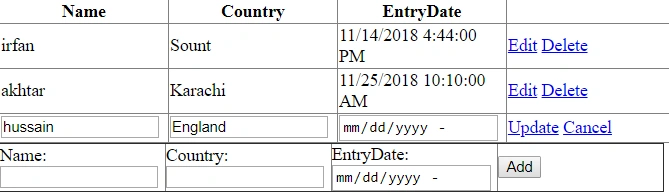
Date get remove when i click row on gridview for editingAkhter HUssain8yAsked Nov 24, 2018, 9:36 PM ESTSolvedShareLinkedInXCopy linkSavewhen i edit row in gridview then date in cell get remove from gridview , Need soultion for this i want to keep date as same when i do edit event click?
Date get remove when i click row on gridview for editingAkhter HUssain8yAsked Nov 24, 2018, 9:36 PM ESTSolvedShareLinkedInXCopy linkSavewhen i edit row in gridview then date in cell get remove from gridview , Need soultion for this i want to keep date as same when i do edit event click?
Jignesh KumarRank #91 · 22.9K reputation8y agoPosted Nov 26, 2018, 5:58 AM EST✓ Accepted answer0Hi Akhter, Please one mre gridview event GridView1_PreRender Source : "GridView1" runat="server" AutoGenerateColumns="false" OnRowEditing="GridView1_RowEditing" OnRowUpdating="GridView1_RowUpdating" OnPreRender="GridView1_PreRender"> CodeBehind: protected void GridView1_PreRender(object sender, EventArgs e) { if (this.GridView1.EditIndex != -1) { TextBox txtDate = this.GridView1.Rows[this.GridView1.EditIndex].FindControl("txtDate") as TextBox; DateTime val = DateTime.ParseExact(txtDate.Text, "M/d/yyyy h:mm:ss tt", CultureInfo.InvariantCulture); txtDate.TextMode = TextBoxMode.DateTimeLocal; txtDate.Text = val.ToString("yyyy-MM-dd HH:mm:ss").Replace(' ', 'T'); } } 0
Suraj KumarRank #353 · 7.1K reputation8y agoPosted Nov 25, 2018, 2:30 AM EST0Request you to upload your sample code so it will be easy to help and track the issue and will get resolved soon.0
Akhter HUssainRank #1,522 · 1K reputation8y agoPosted Nov 25, 2018, 3:30 AM EST0HERE IS Html Code <%-- <%# Convert.ToDateTime(Eval("BirthDate")).ToString("dd/MM/yyyy") %>--%> <%----%> ItemStyle-Width="150" /> Here C# Code protected void GridView3_RowEditing(object sender, GridViewEditEventArgs e) { GridView3.EditIndex = e.NewEditIndex; this.BindGrid(); } protected void GridView3_RowUpdating(object sender, GridViewUpdateEventArgs e) { System.Globalization.CultureInfo enUS = new System.Globalization.CultureInfo("en-US"); GridViewRow row = GridView3.Rows[e.RowIndex]; int customerId = Convert.ToInt32(GridView3.DataKeys[e.RowIndex].Values[0]); string name = (row.FindControl("txtName") as TextBox).Text; string Country = (row.FindControl("txtCountry") as TextBox).Text; string date2 = (row.FindControl("txtEntryDate") as TextBox).Text; DateTime EntryDate; if (!string.IsNullOrEmpty(date2)) { EntryDate = DateTime.ParseExact(date2, "yyyy-MM-ddTHH:mm", CultureInfo.InvariantCulture); } else { EntryDate = System.DateTime.Today; } string query = "UPDATE Country SET Name=@Name, Country=@Country, EntryDate=@EntryDate WHERE CustomerId=@CustomerId"; con = new SqlConnection("Data Source=DESKTOP-5PJ76B9;Integrated Security=SSPI;Initial Catalog=Institute"); { using (SqlCommand cmd = new SqlCommand(query)) { cmd.Parameters.AddWithValue("@CustomerId", customerId); cmd.Parameters.AddWithValue("@Name", name); cmd.Parameters.AddWithValue("@Country", Country); cmd.Parameters.AddWithValue("@EntryDate", EntryDate); cmd.Connection = con; con.Open(); cmd.ExecuteNonQuery(); con.Close(); } } GridView3.EditIndex = -1; this.BindGrid(); }0Suraj KumarRank #353 · 7.1K reputation8y agoPosted Nov 25, 2018, 6:58 AM EST0If you will change TextMode="Date" then it will work as shown below "txtEntryDate" runat="server" Text='<%# Bind("EntryDate", "{0:yyyy-MM-dd}") %>' TextMode="Date"> EDIT If you will run your application in IE then DateTimeLocal will also work as it is not supported by chrome. Hope this will help you.0Akhter HUssainRank #1,522 · 1K reputation8y agoPosted Nov 25, 2018, 7:42 AM EST0but i am using converstion in c#DateTime EntryDate;if (!string.IsNullOrEmpty(date2)){EntryDate = DateTime.ParseExact(date2, "yyyy-MM-ddTHH:mm", CultureInfo.InvariantCulture);}else{EntryDate = System.DateTime.Today;} then raising exception 0Jignesh KumarRank #91 · 22.9K reputation8y agoPosted Nov 25, 2018, 6:10 PM EST0Hi Akhter, Please change bleow line it will work for you. "txtDate" runat="server" Text='<%# Bind("EntryDate") %>' htmlEncode=false DataFormatString="{0:dd-MMM-yyyy}"> And Code behind file you need to changeif (!string.IsNullOrEmpty(date2)) { EntryDate = DateTime.ParseExact(date2, "M/d/yyyy h:mm:ss tt", CultureInfo.InvariantCulture); } 0Akhter HUssainRank #1,522 · 1K reputation8y agoPosted Nov 26, 2018, 8:36 AM EST0Jignesh Kumar Thanks Alot ,You are genious ,very thanks 0Akhter HUssainRank #1,522 · 1K reputation8y agoPosted Nov 26, 2018, 8:54 AM EST0that issue resolve but when updating again this issue is coming String was not recognized as a valid DateTime. after using pre render0Join to answer this questionEvery answer you publish earns 20 SHARP.Create free accountSign inKnow the answer?Answer a question in the forums and earn +20 SHARP for every answer.See unanswered questionsForumsTop experts01Arun PottiAnswers in the forums20answers02Tahir AnsariAnswers in the forums5answers03Kamlesh KumarAnswers in the forums5answers04Sam HobbsAnswers in the forums4answers05Željko PerićAnswers in the forums3answers?YouYour name goes here.Every answer: 20 SHARP.JoinFull leaderboard →2026DevSocialUpcoming · 3rd editionAI Agents ConferenceDec 1–3, 2026Live onlineFree to attend5days leftRegister
Suraj KumarRank #353 · 7.1K reputation8y agoPosted Nov 25, 2018, 6:58 AM EST0If you will change TextMode="Date" then it will work as shown below "txtEntryDate" runat="server" Text='<%# Bind("EntryDate", "{0:yyyy-MM-dd}") %>' TextMode="Date"> EDIT If you will run your application in IE then DateTimeLocal will also work as it is not supported by chrome. Hope this will help you.0
Akhter HUssainRank #1,522 · 1K reputation8y agoPosted Nov 25, 2018, 7:42 AM EST0but i am using converstion in c#DateTime EntryDate;if (!string.IsNullOrEmpty(date2)){EntryDate = DateTime.ParseExact(date2, "yyyy-MM-ddTHH:mm", CultureInfo.InvariantCulture);}else{EntryDate = System.DateTime.Today;} then raising exception 0
Jignesh KumarRank #91 · 22.9K reputation8y agoPosted Nov 25, 2018, 6:10 PM EST0Hi Akhter, Please change bleow line it will work for you. "txtDate" runat="server" Text='<%# Bind("EntryDate") %>' htmlEncode=false DataFormatString="{0:dd-MMM-yyyy}"> And Code behind file you need to changeif (!string.IsNullOrEmpty(date2)) { EntryDate = DateTime.ParseExact(date2, "M/d/yyyy h:mm:ss tt", CultureInfo.InvariantCulture); } 0
Akhter HUssainRank #1,522 · 1K reputation8y agoPosted Nov 26, 2018, 8:36 AM EST0Jignesh Kumar Thanks Alot ,You are genious ,very thanks 0
Akhter HUssainRank #1,522 · 1K reputation8y agoPosted Nov 26, 2018, 8:54 AM EST0that issue resolve but when updating again this issue is coming String was not recognized as a valid DateTime. after using pre render0

Jignesh KumarRank #91 · 22.9K reputationPosted Nov 26, 2018, 5:58 AM EST
Suraj KumarRank #353 · 7.1K reputationPosted Nov 25, 2018, 2:30 AM EST
Akhter HUssainRank #1,522 · 1K reputationPosted Nov 25, 2018, 3:30 AM EST
Suraj KumarRank #353 · 7.1K reputationPosted Nov 25, 2018, 6:58 AM EST
Akhter HUssainRank #1,522 · 1K reputationPosted Nov 25, 2018, 7:42 AM EST
Jignesh KumarRank #91 · 22.9K reputationPosted Nov 25, 2018, 6:10 PM EST
Akhter HUssainRank #1,522 · 1K reputationPosted Nov 26, 2018, 8:36 AM EST
Akhter HUssainRank #1,522 · 1K reputationPosted Nov 26, 2018, 8:54 AM EST
Answer a question in the forums and earn +20 SHARP for every answer.
See unanswered questionsTop experts