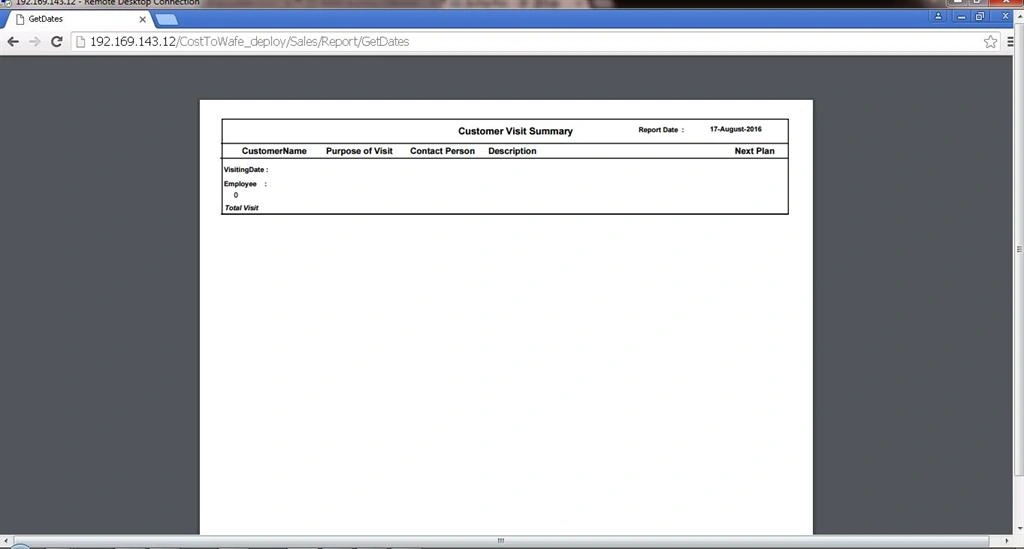
Hi i have one view called DailyVisitReport . it contain 2 fields called FromDate and ToDate. I am generating report depend upon the dates. I am using Crystal Report 2010. In normal Local Machine run it working fine after deploying my application in web server it showing empty report. I will explain my issue clearly.
I upload my application in online using Web server. So I purchased Virtual Private Server from Godaddy. I upload my application in online using Remote desktop connection by purchased web server IP address (from Godaddy).
Before i got one error while generating report after i deploying my application in web server that error is mention below.
so i asked many forums and search google. Many of them suggest me to add CrystalDecistion.ReportAppServer.CommLayer dll in assembly folder of the web server system and also refer that in Web.config File.I also did the same. Again i deploy my appliation in web server and try to generate the report. This time it didnt show any error and also generate the empty report.
The issue is date is not binding correctly. The Date Format which i send to controller is 01-mar-16 from Fromdate and Todate. But the date format which is retrieving from db is different eg 08/12/2016 and also it coming with time.I am saving Date without time in db.But while retrieving it will come with one default time.
So i convert the date format in sql as string format using
And also i change the VisitingDate Format from String to date while retrieving. Now the format of date while retrieving from db and format of fromdate and to date both are same.I normal local machine run its working perfectly. But it showing empty report after deploying in web server.And one thing that is if i didnt select any date and click ok button means it shows all the data (which is in the table) in report in web server
My Controller Code
public ActionResult VisitSummaryReport()
{
return View();
}
[HttpPost]
public ActionResult GetDates(VisitorsViewModel VisitorsVM)
{
var fromdt = Convert.ToString(string.Format("{0:dd/MMM/yy}", VisitorsVM.FromDate));
var todt = Convert.ToString(string.Format("{0:dd/MMM/yy}", VisitorsVM.ToDate));
SqlConnection connection = new SqlConnection(@"Data Source=S192-169-143-12\WAFEEXPRESS;Initial Catalog=CRM;User ID=sa;Password=Wafe@win;");
//SqlConnection connection = new SqlConnection(@"Data Source=192.168.0.73\SQLEXPRESS,14330;Initial Catalog=CRM;User ID=sa;Password=wafewin;");
Still i am getting Empty report in web server. I tried my level best to explain my issue.Any one understand my isssue and help me to resolve this problem.
Advance Thanks.
8 Answers
Know the answer? Post it. Somebody with the same question will find it here.
You may have to check what values are you getting for below 2 variables.
var fromdt = Convert.ToString(string.Format("{0:dd/MMM/yy}", VisitorsVM.FromDate));
var todt = Convert.ToString(string.Format("{0:dd/MMM/yy}", VisitorsVM.ToDate));
Sometimes Datetime zone in server may be different from your local machines, so you have to make sure that the date which you are passing to sql is in the correct format as in your local system. Just create a simple test page and check what will be the value for this variables after uploading into server.
+1
Joginder BangerRank #360 · 7K reputationPosted Aug 22, 2016, 8:36 AM EDT
0
hiSneha Dhandapani,
as per my knowledge this type of problem occur date format. But i checked you have already done date format. I suggest you check check date format in sql server may be not match in sql server.








Sneha KRank #2,496 · 563 reputationPosted Aug 22, 2016, 8:30 PM EDT
Midhun TpRank #388 · 6.5K reputationPosted Aug 22, 2016, 11:31 PM EDT
Joginder BangerRank #360 · 7K reputationPosted Aug 22, 2016, 8:36 AM EDT
Sneha KRank #2,496 · 563 reputationPosted Aug 23, 2016, 12:18 AM EDT
Midhun TpRank #388 · 6.5K reputationPosted Aug 23, 2016, 12:32 AM EDT
Sneha KRank #2,496 · 563 reputationPosted Aug 23, 2016, 2:07 AM EDT
Midhun T P i pass in the format of dd/mmm/yy
Midhun TpRank #388 · 6.5K reputationPosted Aug 23, 2016, 3:26 AM EDT
Sneha KRank #2,496 · 563 reputationPosted Aug 23, 2016, 4:38 AM EDT
Midhun T P you are correct.