I have create an MVC project that will display the details of a quotation to a table using JQuery. Below is my mark-up and the jquery itself:
- <div class="card-body text-secondary">
- <div class="table-responsive-sm">
- <table id="tblEmployee" class="table table-bordered table-hover">
- <thead>
- <tr>
- <th>Reference #th>
- <th>Damage Nameth>
- <th>Damage Conditionth>
- <th>Level Codeth>
- <th>Labot Costth>
- <th>Parts Costth>
- <th>Total Costth>
- <th>Actionth>
- tr>
- thead>
- <tbody>tbody>
- table>
- div>
- div>
- $(document).ready(function () {
- var tr;
- $.getJSON("/QuotationMgt/GetQuotationDetails", function (json) {
- $.each(json, function (i, emp) {
- var empid = emp.Id;
- tr = $('
'); - tr.append("
- tr.append("
- tr.append("
- tr.append("
- tr.append("
- tr.append("
- tr.append("
- tr.append("
" + " ");- $('#tblEmployee').append(tr);
- });
- });
- $('#tblEmployee').on('click', 'td a.delete', function () {
- var deleteUrl = $(this).attr("href");
- if (confirm("Are you sure wants to delete?")) {
- $.ajax({
- url: deleteUrl, dataType: "json", type: "POST", contentType: "application/json",
- error: function (err) { alert('Unable to delete record.'); },
- success: function (response) {
- window.location.href = "/QuotationMgt/CreateQuotationDetail/" + @ViewBag.quotationNo;
- }
- });
- }
- });
- });
Below is the sample result and what I wanted is the GRAND TOTAL to be displayed at the bottom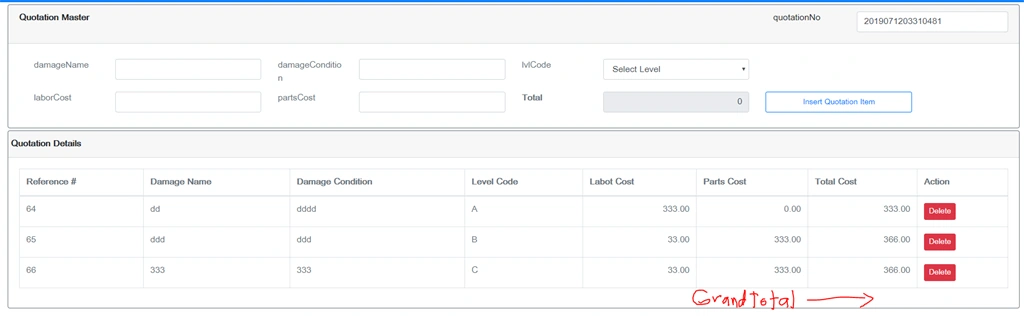 if this is a gridview in a webform, I can simply use the RowDatabound event to get the grand total. I am just new in MVC and obviously struggling in JQuery.
Any help will be much appreciated.8 Answers
Know the answer? Post it. Somebody with the same question will find it here.
- tr.append("
- tr.append("
- tr.append("
- tr.append("
- tr.append("
- tr.append("
- tr.append("
" + " - grandTotal = grandTotal + emp.totalCost;
- $('#tblEmployee').append(tr);
- });
- $("#lblTotal").text(grandTotal);
- });
- $('#tblEmployee').on('click', 'td a.delete', function () {
- var deleteUrl = $(this).attr("href");
- if (confirm("Are you sure wants to delete?")) {
- $.ajax({
- url: deleteUrl, dataType: "json", type: "POST", contentType: "application/json",
- error: function (err) { alert('Unable to delete record.'); },
- success: function (response) {
- window.location.href = "/QuotationMgt/CreateQuotationDetail/" + @ViewBag.quotationNo;
- }
- });
- }
- });
- });
 Hi Dear,
- Int32 tot = 0;
- protected void Dg_Source_RowDataBound(object sender, GridViewRowEventArgs e)
- {
- if (e.Row.RowType == DataControlRowType.DataRow)
- {
- tot = tot + Convert.ToInt32(e.Row.Cells[1].Text);
- lblSum.Text = tot.ToString();
- }
- }
 Hi Rajanikant, thanks for your reply. But, this is not asp.net webforms. This is MVC.check thisas per your requirementhttps://techbrij.com/sum-total-avg-table-footer-asp-net-mvc-razorthis one is by using css to table column and change code accordinglyhttps://stackoverflow.com/questions/27017507/how-to-get-a-sum-of-column-of-gridview-using-javascript
 Hi Hold on,Please try this link,https://www.dotnetcurry.com/jquery/1189/jquery-table-calculate-sum-all-rowsHello Priyanka, I tried your suggestion but it gaves me this wierd result
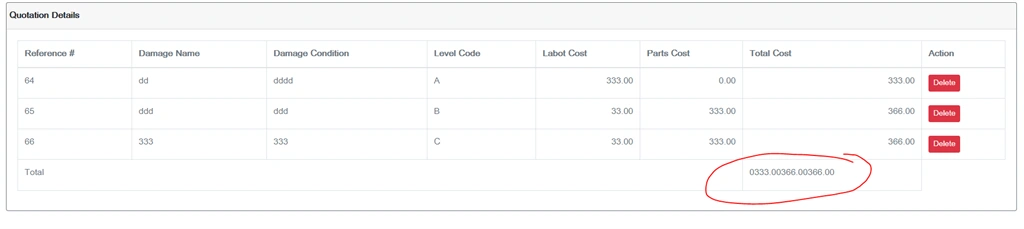
 Hi Hold,Please make sure that you are adding numbers , try converting your totalcost to decimal or int and check in console . If still remain unresolved. Please post your code here.Thanks everyone for all of your inputs.I've already solve my problem using my own way. Though, probably this process takes longer to display the result but as of now, it gives me the result that I need.I simply get the total from my database and display the result using jquery.Again, thanks for all your inputs.
Know the answer? Answer a question in the forums and earn +20 SHARP for every answer.
See unanswered questions01ForumsTop experts
 Arun PottiAnswers in the forums20answers02
 Tahir AnsariAnswers in the forums5answers03
 Kamlesh KumarAnswers in the forums5answers04
 Sam HobbsAnswers in the forums4answers05
 Željko PerićAnswers in the forums3answersFull leaderboard →
 DevSocialUpcoming · 3rd editionAI Agents ConferenceDec 1–3, 2026Live onlineFree to attend4days leftRegister

Priyanka JainRank #356 · 7K reputationPosted Jul 29, 2019, 6:06 AM EDT