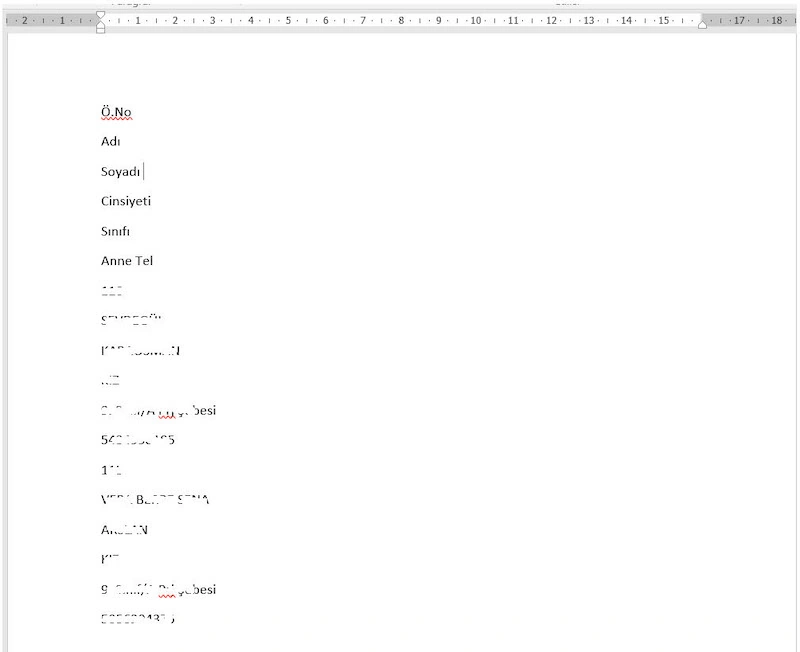
When converting Excel table to word, I get the following result. I cannot show the data in the table. I want help on this matter.
C#
private void ExceltoWord_Load(object sender, EventArgs e)
{
    string excelFilePath = "C:\\Users\\Fatih\\Desktop\\Ögrenci Bilgileri.xlsx";
    string wordFilePath = "C:\\Users\\Fatih\\Desktop\\Ögrenci Bilgileri.docx";

    try
    {
        ConvertExcelToWord(excelFilePath, wordFilePath);
        Console.WriteLine("Conversion completed successfully.");
    }
    catch (Exception ex)
    {
        Console.WriteLine($"An error occurred during the conversion: {ex.Message}");
    }
}

static void ConvertExcelToWord(string excelFilePath, string wordFilePath)
{
    Word.Application wordApp = new Word.Application();
    Document wordDoc = wordApp.Documents.Add();

    // Open the Excel file
    Excel.Application excelApp = new Excel.Application();
    Workbook excelWorkbook = excelApp.Workbooks.Open(excelFilePath);
    Worksheet excelWorksheet = excelWorkbook.ActiveSheet;

    // Get the used range of the Excel worksheet
    Excel.Range usedRange = excelWorksheet.UsedRange;

    // Loop through each row in the used range
    for (int row = 1; row <= usedRange.Rows.Count; row++)
    {
        // Create a new paragraph in the Word document
        Paragraph paragraph = wordDoc.Content.Paragraphs.Add();

        // Loop through each column in the used range
        for (int col = 1; col <= usedRange.Columns.Count; col++)
        {
            // Get the value of the cell in the current row and column
            Excel.Range cell = usedRange.Cells[row, col];
            string cellValue = cell.Value != null ? cell.Value.ToString() : "";

            // Add the cell value to the paragraph
            paragraph.Range.Text += cellValue + " ";
        }
    }

    // Save and close the Word document
    wordDoc.SaveAs(wordFilePath);
    wordDoc.Close();

    // Close the Excel file
    excelWorkbook.Close();
    excelApp.Quit();
}
This is the result I got with the following code
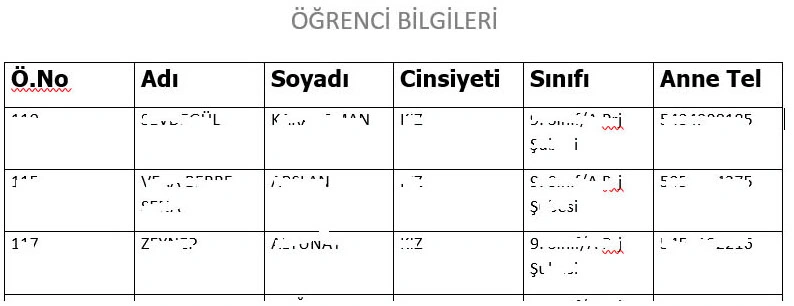
 This is exactly what I want to do.







Vijay Pratap SinghRank #381 · 6.6K reputationPosted Dec 6, 2023, 12:23 AM EST
Hopefully this will help
using System; using Excel = Microsoft.Office.Interop.Excel; using Word = Microsoft.Office.Interop.Word; namespace ExcelToWordConverter { class Program { static void Main(string[] args) { // Create Excel Application Excel.Application excelApp = new Excel.Application(); excelApp.Visible = true; // Make Excel visible (optional) // Open Excel Workbook Excel.Workbook excelWorkbook = excelApp.Workbooks.Open(@"C:\Path\To\Your\Excel\File.xlsx"); // Reference the Worksheet with the table Excel.Worksheet excelWorksheet = excelWorkbook.Sheets["Sheet1"]; // Change "Sheet1" to your sheet name // Create a Word Application Word.Application wordApp = new Word.Application(); wordApp.Visible = true; // Make Word visible (optional) // Create a new Word Document Word.Document wordDoc = wordApp.Documents.Add(); // Copy Excel table and paste it into Word excelWorksheet.UsedRange.Copy(); wordApp.Selection.PasteSpecial(Link: false, DisplayAsIcon: false, DataType: WdPasteDataType.wdPasteRTF); // Save Word Document wordDoc.SaveAs2(@"C:\Path\To\Your\Word\File.docx"); // Close and release resources wordDoc.Close(); wordApp.Quit(); System.Runtime.InteropServices.Marshal.ReleaseComObject(wordDoc); System.Runtime.InteropServices.Marshal.ReleaseComObject(wordApp); excelWorkbook.Close(); excelApp.Quit(); System.Runtime.InteropServices.Marshal.ReleaseComObject(excelWorkbook); System.Runtime.InteropServices.Marshal.ReleaseComObject(excelApp); Console.WriteLine("Conversion complete."); } } }Jignesh KumarRank #91 · 22.9K reputationPosted Dec 6, 2023, 12:50 AM EST
Please use this one which will help you out,
using System;
using Microsoft.Office.Interop.Excel;
using Microsoft.Office.Interop.Word;

namespace ExcelToWordConverter
{
    class Program
    {
        static void Main(string[] args)
        {
            // Replace these paths with the actual paths of your Excel and Word files

           string excelFilePath = "C:\\Users\\Fatih\\Desktop\\Ögrenci Bilgileri.xlsx";
           string wordFilePath = "C:\\Users\\Fatih\\Desktop\\Ögrenci Bilgileri.docx";

            // Create an Excel application and open the workbook
            Application excelApp = new Application();
            Workbook excelWorkbook = excelApp.Workbooks.Open(excelFilePath);

            // Create a Word application and document
            Application wordApp = new Application();
            Document wordDocument = wordApp.Documents.Add();

            // Add a table to the Word document
            Table wordTable = wordDocument.Tables.Add(wordDocument.Range(), excelWorkbook.Sheets[1].UsedRange.Rows.Count, excelWorkbook.Sheets[1].UsedRange.Columns.Count);

            // Copy data from Excel to Word table
            for (int i = 1; i <= excelWorkbook.Sheets[1].UsedRange.Rows.Count; i++)
            {
                for (int j = 1; j <= excelWorkbook.Sheets[1].UsedRange.Columns.Count; j++)
                {
                    wordTable.Cell(i, j).Range.Text = excelWorkbook.Sheets[1].Cells[i, j].Value.ToString();
                }
            }

            // Save the Word document
            wordDocument.SaveAs2(wordFilePath);

            // Close and release resources
            wordDocument.Close();
            excelWorkbook.Close();
            wordApp.Quit();
            excelApp.Quit();

            ReleaseObject(wordTable);
            ReleaseObject(wordDocument);
            ReleaseObject(excelWorkbook);
            ReleaseObject(excelApp);
            ReleaseObject(wordApp);

            Console.WriteLine("Conversion completed successfully!");
        }

        // Helper method to release COM objects
        private static void ReleaseObject(object obj)
        {
            try
            {
                System.Runtime.InteropServices.Marshal.ReleaseComObject(obj);
            }
            catch (Exception ex)
            {
                Console.WriteLine("Error releasing object: " + ex.Message);
            }
            finally
            {
                obj = null;
            }
        }
    }
}