Hello Team,
When I click save instead saving the data it duplicate same data mutilple time.
private void SaveBill()
{
try
{
if (DGVClientBill.Rows.Count > 0)
{
// update product qty
if (MessageBox.Show("Please confirm if you want to save this record?", stitle, MessageBoxButtons.YesNo, MessageBoxIcon.Question) == DialogResult.Yes)
{
for (int i = 0; i < DGVClientBill.Rows.Count; i++)
{
con.Open();
SqlCommand cmd = new SqlCommand("insert into tblSales(SDate,SProductName,SPrice,SQty, SAmount,SCustomer)values(@sDate,@sProductName,@sPrice,@sQty, @sAmount,@sCustomer)", con);
cmd.Parameters.AddWithValue("@sDate", dtBillindDate.Value.ToString("dd-MM-yyyy"));
cmd.Parameters.AddWithValue("@sProductName", txtProductName.Text);
cmd.Parameters.AddWithValue("@sPrice", txtSellingPrice.Text);
cmd.Parameters.AddWithValue("@sQty", txtQuantity.Text);
cmd.Parameters.AddWithValue("@sAmount", Convert.ToDecimal(DGVClientBill.Rows[i].Cells["dgvTotal"].Value.ToString()));
cmd.Parameters.AddWithValue("@sCustomer", txtCustomer.Text);
cmd.ExecuteNonQuery();
con.Close();
MessageBox.Show("Bill successfully saved !", "POS", MessageBoxButtons.OK, MessageBoxIcon.Information);
}
}
}
// Clear();
}
catch (Exception Ex)
{
con.Close();
MessageBox.Show(Ex.Message);
}
}








Amit MohantyRank #112 · 20K reputationPosted Nov 24, 2023, 1:18 AM EST
This is my new remodification of the code but it is still saving a single data out of the rest, because you have used DGVClientBill.CurrentRow. Do you want to insert all rows from the DGVClientBill to your database, if yes try this:
private void SaveBill() { try { if (DGVClientBill.Rows.Count > 0) { // update product qty if (MessageBox.Show("Please confirm if you want to save this record?", stitle, MessageBoxButtons.YesNo, MessageBoxIcon.Question) == DialogResult.Yes) { for (int i = 0; i < DGVClientBill.Rows.Count; i++) { con.Open(); SqlCommand cmd = new SqlCommand("insert into tblSales(SDate,SProductName,SPrice,SQty, SAmount,SCustomer)values(@sDate,@sProductName,@sPrice,@sQty, @sAmount,@sCustomer)", con); cmd.Parameters.AddWithValue("@sDate", dtBillindDate.Value.ToString("dd-MM-yyyy")); cmd.Parameters.AddWithValue("@sProductName", DGVClientBill.Rows[i].Cells["dgvProduct"].Value.ToString()); cmd.Parameters.AddWithValue("@sPrice", DGVClientBill.Rows[i].Cells["dgvSellingPrice2"].Value.ToString()); cmd.Parameters.AddWithValue("@sQty", DGVClientBill.Rows[i].Cells["dgvQuantity"].Value.ToString()); cmd.Parameters.AddWithValue("@sAmount", Convert.ToDecimal(DGVClientBill.Rows[i].Cells["dgvTotal"].Value.ToString())); cmd.Parameters.AddWithValue("@sCustomer", txtCustomer.Text); cmd.ExecuteNonQuery(); con.Close(); } MessageBox.Show("Bill successfully saved !", "POS", MessageBoxButtons.OK, MessageBoxIcon.Information); } } } catch (Exception Ex) { con.Close(); MessageBox.Show(Ex.Message); } }Amit MohantyRank #112 · 20K reputationPosted Nov 23, 2023, 8:55 AM EST
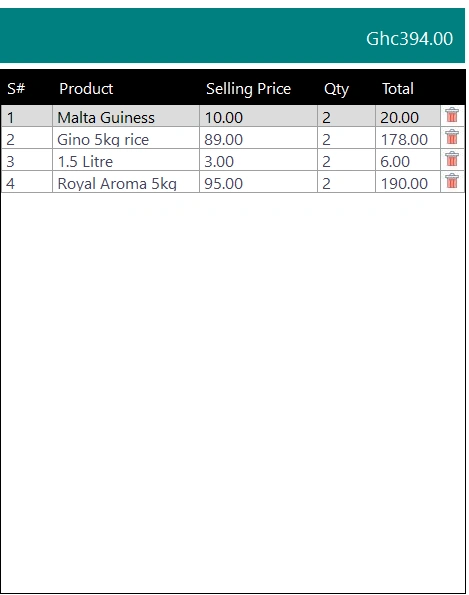
You are looping through DataGridView rows but fetching the values from textboxes rather than from the DataGridView itself. May be that's the reason of duplicating the value.
Emmmanuel FIADUFERank #947 · 2.2K reputationPosted Nov 23, 2023, 10:09 AM EST
I remove the loop and this time round it saves only one data out of the rest
private void SaveBill()
{
try
{
if (MessageBox.Show("Please confirm if you want to save this record?", stitle, MessageBoxButtons.YesNo, MessageBoxIcon.Question) == DialogResult.Yes)
{
{
con.Open();
SqlCommand cmd = new SqlCommand("insert into tblSales(SDate,SProductName,SPrice,SQty, SAmount,SCustomer)values(@sDate,@sProductName,@sPrice,@sQty, @sAmount,@sCustomer)", con);
cmd.Parameters.AddWithValue("@sDate", dtBillindDate.Value.ToString("dd-MM-yyyy"));
cmd.Parameters.AddWithValue("@sProductName", txtProductName.Text);
cmd.Parameters.AddWithValue("@sPrice", txtSellingPrice.Text);
cmd.Parameters.AddWithValue("@sQty", txtQuantity.Text);
cmd.Parameters.AddWithValue("@sAmount", Convert.ToDecimal(DGVClientBill.CurrentRow.Cells["dgvTotal"].Value).ToString("#0.00"));
cmd.Parameters.AddWithValue("@sCustomer", txtCustomer.Text);
cmd.ExecuteNonQuery();
con.Close();
MessageBox.Show("Bill successfully saved !", "POS", MessageBoxButtons.OK, MessageBoxIcon.Information);
}
}
}
// Clear();
catch (Exception Ex)
{
con.Close();
MessageBox.Show(Ex.Message);
}
}
Emmmanuel FIADUFERank #947 · 2.2K reputationPosted Nov 23, 2023, 10:33 AM EST
This is my new remodification of the code but it is still saving a single data out of the rest.
private void SaveBill()
{
try
{
// Save Sales data
if (MessageBox.Show("Please confirm if you want to save this record?", stitle, MessageBoxButtons.YesNo, MessageBoxIcon.Question) == DialogResult.Yes)
{
{
con.Open();
SqlCommand cmd = new SqlCommand("insert into tblSales(SDate,SProductName,SPrice,SQty, SAmount,SCustomer)values(@sDate,@sProductName,@sPrice,@sQty, @sAmount,@sCustomer)", con);
cmd.Parameters.AddWithValue("@sDate", dtBillindDate.Value.ToString("dd-MM-yyyy"));
cmd.Parameters.AddWithValue("@sProductName", Convert.ToString(DGVClientBill.CurrentRow.Cells["dgvProduct"].Value));
cmd.Parameters.AddWithValue("@sPrice", Convert.ToDecimal(DGVClientBill.CurrentRow.Cells["dgvSellingPrice2"].Value).ToString("#0.00"));
cmd.Parameters.AddWithValue("@sQty", Int32.Parse(DGVClientBill.CurrentRow.Cells["dgvQunatity"].Value.ToString()));
cmd.Parameters.AddWithValue("@sAmount", Convert.ToDecimal(DGVClientBill.CurrentRow.Cells["dgvTotal"].Value).ToString("#0.00"));
cmd.Parameters.AddWithValue("@sCustomer", txtCustomer.Text);
cmd.ExecuteNonQuery();
con.Close();
MessageBox.Show("Bill successfully saved !", "POS", MessageBoxButtons.OK, MessageBoxIcon.Information);
}
}
}
// Clear();
catch (Exception Ex)
{
con.Close();
MessageBox.Show(Ex.Message);
}
}
Sam HobbsRank #107 · 20.5K reputationPosted Nov 23, 2023, 4:17 PM EST
If it were me I would put a breakpoint (you can use F9 to do that) somewhere in the code and then debug. When the breakpoint is hit I would look at the data. Probably the data is the same every time. If so then you need to determine why it is always the same.
Emmmanuel FIADUFERank #947 · 2.2K reputationPosted Nov 24, 2023, 3:04 AM EST
Thank you Amit, it is working now
Yogi SRank #511 · 4.8K reputationPosted Nov 23, 2023, 1:03 PM EST
Close visual studio, restart pc and see if it solves the problem. Happend to me some years back, restarting solved my problem.